
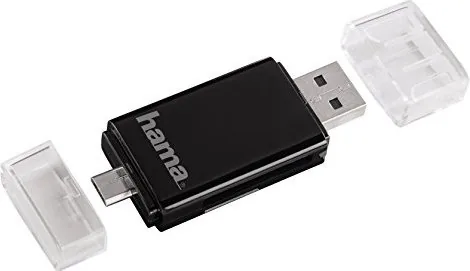
Hama 2in1 USB 2.0 OTG Card Reader Manual
PDF manual · 12 Pages
English



Quick check
Incorrect answer, please try again.
Chat with your Hama 2in1 USB 2.0 OTG Card Reader manual using AI
Get instant AI answers from your Hama 2in1 USB 2.0 OTG Card Reader manual
Ask anything about the Hama 2in1 USB 2.0 OTG Card Reader. Answers come from this manual, with the pages they are based on.
Ask a Question
Do you recommend 2in1 USB 2.0 OTG Card Reader?
Yes NoFrequently Asked Questions
It supports SD, SDHC, SDXC, microSD, microSDHC, and microSDXC cards. That makes it suitable for most common memory card types used in cameras, phones, and portable devices.
Is this answer helpful?
Yes. The USB Type A connector is meant for computers, while the microUSB Type B connector is intended for Android devices with OTG support. Only one connector should be used at a time.
Is this answer helpful?
On many computers it works automatically once connected. On Android devices, you may need a file manager app, and in some cases an additional plug-in app if the device does not recognize it right away.
Is this answer helpful?
The instructions recommend FAT32 and exFAT for reliable operation. Other formats may not work as consistently, especially on different devices and operating systems.
Is this answer helpful?
Always wait until the transfer is fully finished, then use the operating system’s eject or safely remove function before taking out the memory card. This helps prevent corruption or data loss.
Is this answer helpful?
Its connectors are not for simultaneous use, and the reader depends on host or OTG compatibility. So it is practical, but it will not work with every device without the right support.
Is this answer helpful?
Advantages and Disadvantages
Advantages

- Supports both SD and microSD card families for flexible everyday use.
- Works with Windows, Mac OS, and Android devices that support OTG.
- Compact and easy to use with automatic detection on compatible systems.
- Useful for fast file transfer without needing built-in card slots.
Disadvantages

- USB-A and microUSB connectors cannot be used at the same time.
- Requires OTG/host support, so some devices may not be compatible.
- Best performance depends on FAT32 or exFAT formatting.
- Android users may need a file manager or extra plug-in app.
Product Specification
Type
Card reader
Form factor
1x USB stick
Connection
1x USB-A 2.0 (connector, 480Mb/s), 1x USB 2.0 Micro-B (connector, 480Mb/s)
Media slots
1x microSD (microSD), 1x SD Card
Transfer
1x microSD, 1x SD Card (SD Card)
Power supply
Power supply only via connection
Dimensions
2.40x0.39x0.87in (WxHxD)
Weight
0.02 lb
Case color
black
Compatibility
universal
USB specification
Link
Product Description
Hama OTG Dual-Slot Card Reader, USB-A 2.0/USB 2.0 Micro-B plug Manual
Simple storage access for everyday devices
The Hama OTG Dual-Slot Card Reader is built for quick, practical file transfers between memory cards and compatible devices. With support for SD and microSD formats, it gives users a compact way to move photos, videos, documents, and other data without needing a full-sized card slot on every device. Its dual-slot design makes it especially convenient for people who work with both standard SD cards and smaller microSD cards.
One of its key strengths is flexibility. The reader supports a USB Type A connection for computers and a microUSB Type B connection for Android devices that support OTG. That makes it useful for laptops, desktop PCs, tablets, and smartphones, as long as the device is host-capable. It works with common operating systems such as Windows, Mac OS, and Android, which broadens its everyday appeal.
The reader is designed for straightforward use: connect it, insert the memory card, and start transferring files. On Android, a file manager app may be needed to browse content, while on computers the process is typically automatic. For best results, the text recommends FAT32 or exFAT formatting, which helps ensure reliable performance across supported devices.
This product also comes with practical usage guidance. It should be used in dry environments, protected from heat, moisture, drops, and shocks, and cleaned only with a soft, slightly damp cloth. A notable safety detail is that the USB-A and microUSB plugs must never be used at the same time. Before removing a card, users should always finish the transfer and use the operating system’s eject function to reduce the risk of data loss.
Overall, the Hama OTG Dual-Slot Card Reader is a compact accessory for users who want an easy bridge between memory cards and modern devices. It focuses on compatibility, portability, and simple operation rather than advanced features, making it a dependable choice for everyday storage access.
Notes
- Use only one connector at a time.
- Confirm OTG support on mobile devices.
- Always eject safely before removing media.
- FAT32 and exFAT are the recommended file systems.
Search for 67,732 Manuals online


Type-in Brand or Model
ehammer89
8 months ago
Does this card reader transfer data fast, and will it work for SD and microSD with my phone, tablet, and laptop?
Manual.ly
8 months ago
Yes. The reader is designed for quick, simple transfers from SD and microSD cards to common devices such as smartphones, tablets, and laptops. It is plug-and-play for typical use cases like viewing and importing files. Transfer speed mainly depends on your SD/microSD card's class or speed rating and the connection used (phone/tablet model, USB port, and cable). For very large files, expect longer transfer times based on those factors. If transfers seem unusually slow, check that you are using a sufficiently fast memory card and a supported USB connection, then try again.