

Free Haaga Manuals – Read, Download & Print
1 Manuals
Manuals
Categories

Free Haaga Manuals - Read, Download & Print
Find Helpful Haaga Product Documentation
Looking for a Free Haaga Manuals resource? This page is designed to help users locate, read, download, and print useful documentation for Haaga products in a simple, organized way. Whether you need an operating guide, assembly instructions, maintenance information, troubleshooting steps, safety details, or parts references, a clear manual can make everyday product care much easier.
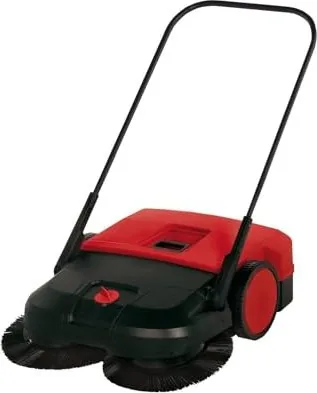
Haaga is known for practical cleaning equipment, including manual sweepers and related tools used in homes, workshops, commercial spaces, and outdoor areas. Product manuals provide important instructions for using equipment correctly and safely. They can also help owners understand product features, identify compatible accessories, and follow recommended cleaning or storage procedures.
Read Haaga Manuals Online
Reading a Haaga manual online is a convenient option when you need information quickly. Digital manuals can be viewed from a desktop computer, tablet, or mobile device without requiring a printed copy. This can be especially useful when checking a setup step, reviewing a maintenance interval, or confirming the correct operating procedure before using a sweeper.
Online manuals commonly include the same core information found in paper documentation. Depending on the model, a guide may contain an overview of controls, technical specifications, safety warnings, assembly diagrams, operating instructions, care recommendations, and troubleshooting advice. Some manuals also include illustrated parts lists or exploded diagrams that can be helpful when identifying replacement components.
Before relying on any manual, make sure the document matches the exact Haaga model you own. Product names can be similar, while different versions may use different brush systems, handles, collection bins, wheel designs, or adjustment settings. Check the model number on the product label, packaging, purchase receipt, or existing documentation whenever possible.
Download Manuals for Offline Access
Downloading a Haaga manual can be useful for owners who want a copy available without an internet connection. An offline file can be stored on a phone, computer, tablet, or cloud drive for future reference. This is helpful in garages, sheds, workshops, warehouses, or other areas where internet access may be limited.
When downloading documentation, save files with clear names that include the product model and language. For example, a filename such as "Haaga-sweeper-model-manual.pdf" is easier to find later than a generic file name. Creating a dedicated folder for equipment manuals can also help keep household, garden, workshop, and business documents organized.
Use official manufacturer sources, authorized retailers, reputable distributors, or legitimate documentation libraries whenever available. Official manuals are more likely to include accurate safety information, current product details, and the correct diagrams for the model. Avoid altered, incomplete, or suspicious files from unknown sources, especially if they request software installation or personal information before access.
Print a Haaga Manual When You Need a Paper Copy
A printed Haaga manual can be practical for hands-on maintenance and daily use. Paper copies are easy to keep near the product, in a tool cabinet, or with other equipment records. Printing selected pages may be particularly useful when following assembly instructions, checking a maintenance chart, or comparing a parts diagram while inspecting the machine.
For best results, print safety pages, troubleshooting sections, maintenance schedules, and parts diagrams in a readable format. If the manual includes color-coded illustrations, consider printing those pages in color when possible. Large diagrams may be easier to understand when printed at full size or on larger paper.
To reduce paper use, print only the sections you need most often. Many owners choose to print the quick-start guide, cleaning instructions, adjustment information, and warranty details while keeping the full digital version saved for reference. Place printed pages in a protective folder or binder to keep them clean and accessible.
What You Can Learn From a Haaga Manual
A product manual is more than a basic instruction sheet. It can help you use your equipment efficiently and extend its working life. Haaga manuals may explain how to prepare a sweeper before use, position the handle, adjust brush pressure, empty collection containers, and clean debris from moving parts.
Safety information is one of the most important sections to review. Manuals may explain where equipment should be used, what kinds of debris should be avoided, how to keep hands clear of moving components, and how to store the unit securely. Always follow the specific warnings provided for your model. Do not use a product for tasks outside its intended purpose, and inspect it before operation if it has been stored for a long period.
Maintenance guidance can also prevent common performance issues. A manual may recommend removing trapped dirt, checking brushes for wear, inspecting wheels, cleaning collection bins, and storing the product in a dry location. Regular care can help maintain sweeping performance and reduce the chance of avoidable damage.
Troubleshooting Common Sweeper Issues
If a Haaga sweeper is not collecting debris effectively, the manual may help identify possible causes. Common issues can include blocked brushes, worn bristles, incorrect height adjustment, an overfilled collection container, loose parts, or debris wrapped around moving components. Review the troubleshooting section before attempting repairs.
Start with simple checks. Empty the collection bin, remove visible debris, inspect brushes and wheels, and confirm that all parts are properly attached. If the product has an adjustable setting, verify that it is appropriate for the surface being cleaned. Smooth surfaces, paving, rough concrete, and outdoor paths may require different settings for best results.
If a problem continues after basic cleaning and adjustment, contact an authorized service provider or the manufacturer. Do not force parts, modify the equipment, or use unapproved replacement components. Using the correct parts and procedures helps protect product performance and user safety.
Locate the Correct Model Number
Finding the right manual begins with identifying the exact Haaga product model. The model number may appear on a rating label, frame sticker, handle area, packaging label, invoice, or original sales documentation. Record the number exactly, including letters, digits, spaces, and suffixes.
If the label is missing or difficult to read, compare visible product features with official product images and specifications. Details such as sweeping width, bin capacity, handle shape, wheel placement, brush arrangement, and color scheme may help distinguish one model from another. However, visual comparison should be used carefully because product versions can look similar.
For older equipment, manuals may be archived rather than listed with current products. Authorized dealers, customer support teams, and official brand resources may be able to help identify legacy models or direct users to suitable documentation.
Use Manuals Responsibly
Free access to Haaga manuals should support safe ownership, proper maintenance, and informed product use. Manuals remain subject to the rights and terms of their publishers. Download and print documents only from legitimate sources and use them for personal, operational, or authorized business purposes.
Always prioritize the instructions supplied for your specific model. General guidance can be helpful, but the official manual is the best source for product-specific settings, safety requirements, service intervals, and replacement part information. Keep a copy available so you can quickly review important details whenever needed.
Keep Your Haaga Equipment Ready for Use
A reliable manual makes it easier to get the most from Haaga cleaning equipment. Read the guide before first use, save a digital copy for convenient access, and print key pages for hands-on tasks. With the correct documentation, regular cleaning, and careful maintenance, owners can better understand their equipment and keep it prepared for routine cleaning jobs.
Search for 67,706 Manuals online


Type-in Brand or Model