

GP Batteries QP0A Manual
PDF manual · 2 Pages
English



Quick check
Incorrect answer, please try again.
Chat with your GP Batteries QP0A manual using AI
Get instant AI answers from your GP Batteries QP0A manual
Ask anything about the GP Batteries QP0A. Answers come from this manual, with the pages they are based on.
Ask a Question
Do you recommend QP0A?
Yes NoFrequently Asked Questions
Connect the pad to a compatible power adapter using the included Micro-USB cable. The LED flashes once when connected. Place your Qi-compatible device with its charging coil aligned to the pad center; the LED will flash during charging and turn solid green when fully charged.
Is this answer helpful?
A single green flash indicates proper connection to power. Flashing green means the pad is actively charging. Solid green indicates the device is fully charged. A red LED signals an abnormal condition that requires disconnecting and inspecting the pad.
Is this answer helpful?
Yes, in many cases, but wireless charging may be impaired if the case is thicker than 5 mm. If charging fails or is intermittent, remove the case and try again to ensure proper coil alignment.
Is this answer helpful?
No. The pad generates a magnetic field that may interfere with medical implants. Maintain a minimum distance of 20 cm between the charging pad and any medical implant to avoid potential interference.
Is this answer helpful?
The QP0A has built-in protections for foreign object detection, over-current, short-circuit, over-temperature, and over-voltage to help prevent damage to the pad and connected devices.
Is this answer helpful?
Unplug the charging pad from the power source and reconnect it. If abnormal LED behavior persists, stop using the pad and inspect it for damage. Do not operate a wet or damaged unit; contact support or follow local disposal guidelines if defective.
Is this answer helpful?
Use a power adapter that supports DC 5V/2A or 9V/1.67A output to enable up to 10W charging. The adapter is not included, so choose a reliable adapter with the appropriate specifications for optimal performance.
Is this answer helpful?
Advantages and Disadvantages
Advantages

- Compact, lightweight design (Ø101 x 6.8 mm; 58 g) ideal for desks and nightstands.
- Up to 10W wireless output with dual input options (DC 5V/2A, 9V/1.67A) for efficient charging.
- Multiple safety protections: foreign-object detection, over-current, short-circuit, over-temperature, over-voltage.
- Simple LED status indicator for connection, charging, full charge and abnormal conditions.
- Includes Micro-USB cable and supports common Qi-compatible devices.
Disadvantages

- Requires separate power adapter; adapter not included in the package.
- May not charge through cases thicker than 5 mm; case removal sometimes required.
- Limited operating temperature range (0 °C to 30 °C) restricts use in extreme environments.
- Uses Micro-USB rather than newer USB-C input.
- Magnetic field can affect medical implants; keep at least 20 cm distance.
Product Specification
Output
1x wireless (Qi, 10W), max. 10W
Input
1x USB Micro-B (socket)
Color
gray
Dimensions
3.98x3.98x0.28in
Volume
4.36in3
Product Description
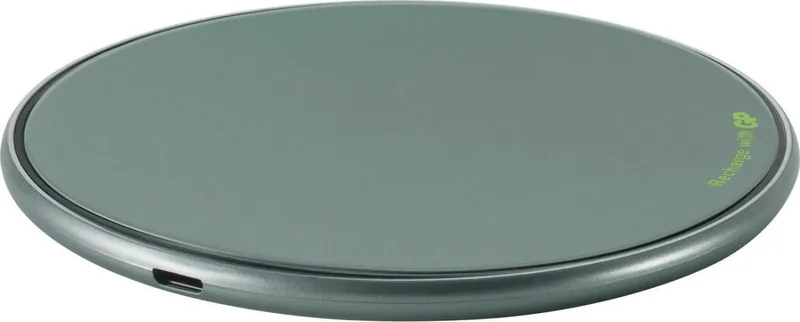
GP Batteries QP0A Wireless Charging Pad 10W gray Manual
Overview
The GP Batteries QP0A Wireless Charging Pad 10W gray delivers a compact, reliable Qi wireless charging solution for everyday use. Sleek and lightweight at 58 g with a 101 mm diameter and a low 6.8 mm profile, the pad supports up to 10W output and dual input profiles (5V/2A and 9V/1.67A) for efficient charging. Its neutral gray finish blends into desks and nightstands without drawing attention, while safety protections and a basic LED indicator keep charging simple and safe.
Design and Performance
Designed for convenience, the QP0A is meant to align a device’s charging coil with the pad’s center for optimal charging. The pad supports Qi-compatible smartphones and other devices, and will begin charging once alignment is detected. An LED provides straightforward status information: a single green flash on connection, flashing green during charging, solid green when fully charged, and red if an abnormal condition occurs. The pad is engineered with protections including foreign object detection, over-current, short-circuit, over-temperature, and over-voltage safeguards.
Usage Tips
- Align the center of your device with the pad’s center for best results. Cases thicker than 5 mm may impair charging—remove them if needed.
- Use a suitable adapter (not included) and the supplied Micro-USB cable. If the LED behaves erratically, unplug and reconnect the pad.
- Avoid placing magnetic stripe cards, passports, or metallic objects on the pad while it’s powered; they can be damaged or cause hazards.
- Maintain at least 20 cm distance from medical implants; the magnetic field can interfere with them.
Safety and Care
Follow safety guidance: keep the pad away from heat, moisture, and liquids; don’t use if wet or damaged; unplug before cleaning or storage; do not disassemble. Stop use immediately if the unit emits odor, becomes excessively hot, or shows deformation. Dispose of the device according to local electronic-waste regulations to avoid environmental harm.
Final Thoughts
The GP Batteries QP0A Wireless Charging Pad 10W gray is a practical, no-frills charger for everyday Qi charging needs. It balances compact design with essential safety features and straightforward status feedback, making it a sensible pick for bedside and desktop charging setups.
Notes
- Includes Micro-USB cable; AC adapter sold separately.
- Operating range: 0 °C to 30 °C (32 °F to 86 °F).
- Weight: 58 g; dimensions: Ø101 x 6.8 mm.
Search for 67,706 Manuals online


Type-in Brand or Model