Manual.ly Logo

goobay Wireless Charging Pad Manual

5.0 · 2 Ratings

PDF manual · 4 Pages

English

M: OA-GPT-54-NAN
page

/ 4

Loading...
14beef2a040c8ee6b978327b0c6a7a41c53a page 2
EN
- 2 -
User Manual
Wireless charging pads
Goobay
®
by Wentronic GmbH | Pillmannstraße 12
38112 Braunschweig | Germany
REV2018-04-17
V2.0
59877/59878
1 Safety Instructions
The user manual is part of the product and contains important informati-
on for correct use.
• Read the user manual completely and carefully before use.
The user manual must be available for uncertainties and passing the
product.
• Keep this user manual.
• Comparethespecicationsofalluseddevicestoensure
compatibility.
• Not meant for children.
• Do not open the housing.
• In case of questions, defects, mechanical damage, trouble
and other problems, non-recoverable by the documentation,
contact your dealer or producer.
• Do not modify or alter products, product parts and accesso-
ries constructively.
• Avoid stresses such as heat and cold, moisture and direct
sunlight, vibration and mechanical pressure.
• Only use in dry ambience.
Magnetism
The product contains magnetic materials.
• Regarding the compatibility with implanted medical devices,
consult a doctor before use.
• Keep a minimum distance of 20 cm to medical equipment.
• Do not store or operate near bank cards.
Risk of stumbling
• Place, install and transport product, product parts and acces
sories in a safe way.
2 Description and Function
2.1 Wireless charging pad
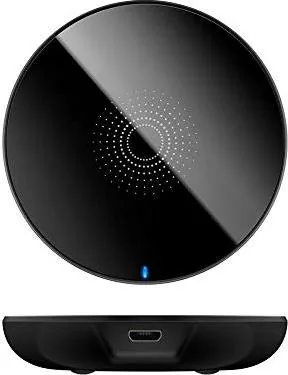
This product is a wireless charging pad for charging mobile devices such as mobile
phones or camaras via wireless induction. The wireless charging pad can be char-
ged via the USB charging cable to PC, USB charging adapter or USB car charger.
2.2 Scope of delivery
Wireless charging pad 59877 or 59878, USB charging cable, User manual
2.3 Operating elements
1
2
3
59878 59877
1 Induction coils / shelf 2 LED for standby and charging state
3 Micro-USB input
2.4 Specications
Wireless charging pad 59877 59878
Connections
Micro-USB input (IN),
wireless charging interface
Input 5 V
, 2 A min
Output 5 V
, 1 A (ind., max.)
Frequency band 105-205 kHz
wireless charging distance max. 2-8 mm
minimum distance to medical devices 20 cm
Dimensions Ø68 x 11 mm
Weight 40 g
Colour black white
USB charging cable
Connectors
Micro-USB plug,
USB-A plug
Cable length 1.0 m
3 Intended Use
We do not permit using the device in other ways like described in chapter
“Description and Function“. Not attending to these regulations and safety
instructions might cause fatal accidents, injuries, and damages to
persons and property.
4 Preparing
• Comparethespecicationsofalluseddevicestoensurecompatibility.
• Check the scope of delivery for completeness and integrity.
5 Connecting, placing and charging
1. Place the wireless charging pad onto a plane, horizontal surface.
2. Plug the USB charging cable into the input (IN) of the wireless charging
pad and into the USB charging socket of
- a USB charging adaptor,
- a PC or
- an USB car charger with min. 2 A output current.
The LED ashes 3 times blue after connecting and then switches off.
Thereafter, the device enters standby mode.
3. Place a Qi standard-able device onto the wireless charging pad.
The LED
- shines blue, when the device is recognized and charges.
- ashes, when the charging position of the device is improper.
• Move the device a little back and forth until the LED shines blue.
4. Check the charging state of your device by its status display.
5. Remove all cable connections after use.
6 Maintenance and Cleaning
The product is maintenance-free.
• Clean only with a dry, soft cloth.
• Do not use cleaning agents and chemicals.
• Store cool and dry.
• Store the product out the reach of children and in a dry and dust-protec-
ted ambience when not in use.
• Keep and use the original packaging for transport.
7 Disposal Notes
We reserve the right to printing errors and changes to product, packaging
or product documentation.
• See our terms of warranty. These are available in their current form under
the given contact details.
8 Disposal Notes
According to the European WEEE directive, electrical and electronic
equipment must not be disposed with consumers waste. Its components
must be recycled or disposed apart from each other. Otherwise contami
native and hazardous substances can pollute our environment.
As a consumer, you are committed by law to dispose electrical and electronic de-
vices to the producer, the dealer, or public collecting points at the end of the devices
lifetime for free. Particulars are regulated in national right. The symbol on the pro-
duct, in the user`s manual, or at the packaging alludes to these terms. With this kind
of waste separation, application, and waste disposal of used devices you achieve an
important share to environmental protection.
WEEE No: 82898622
9 EU Declaration of Conformity
With the CE sign Goobay®, a registered trademark of the Wentronic GmbH ensures,
that the product is conformed to the basic European standards and directives.

Chat with your goobay Wireless Charging Pad manual using AI

Get instant AI answers from your goobay Wireless Charging Pad manual

Ask anything about the goobay Wireless Charging Pad. Answers come from this manual, with the pages they are based on.

Ask a Question

0/1000

Do you recommend Wireless Charging Pad?

Yes No
0
User Pic

Ines Kruger

10 months ago

Is it easy to use right away? Do I just plug it in and start, and is the handling simple?

0
User Pic

Manual.ly

10 months ago

Yes. Customers report the device is lightweight and easy to handle, with a very straightforward setup. You can simply connect/plug it in and start using it without complicated steps. The design is also praised for being attractive and pleasant to use, so the overall experience feels simple and beginner-friendly.

M: OA-GPT-5-NAN
M: OA-GPT-5-NAN

Frequently Asked Questions

A

It works with Qi-compatible devices, including many smartphones and some mobile accessories. The device must support wireless induction charging to charge properly on the pad.

Is this answer helpful?

A

The charger delivers up to 5W output. It is designed for basic wireless charging rather than fast-charging performance, making it suitable for everyday top-ups.

Is this answer helpful?

A

It uses a Micro-USB input and should be connected to a USB power source with at least 2A output, such as a USB adapter, computer, or car charger.

Is this answer helpful?

A

A blue light confirms that the device is detected and charging. If the LED blinks, the phone is likely not centered correctly and should be moved slightly.

Is this answer helpful?

A

Yes, but charging distance is limited. Very thick or metal cases may reduce charging efficiency or prevent the device from being recognized properly.

Is this answer helpful?

A

Use the charger only in dry conditions, keep it away from bank cards, and maintain a minimum distance of 20 cm from implanted medical devices. A stable, flat surface is recommended.

Is this answer helpful?

M: OA-GPT-54-NAN

Advantages and Disadvantages

Advantages

  • Compact 68 mm design fits easily on desks, shelves, and bedside tables.
  • Qi compatibility makes it convenient for many modern smartphones and small devices.
  • LED status light helps confirm standby, charging, and placement accuracy.
  • Lightweight build and black finish make it easy to carry and visually subtle.
VS

Disadvantages

  • 5W output is modest and slower than many modern fast wireless chargers.
  • Requires precise device placement for proper charging performance.
  • Micro-USB input feels dated compared with newer USB-C accessories.
  • Not suitable for wet environments and should only be used in dry spaces.
M: OA-GPT-54-NAN

Product Specification

Output

1x wireless (Qi, 5W), max. 5W

Input

1x USB Micro-B (socket, 10W)

Dimensions

2.68x2.68x0.43 in

Weight

0.09 lb

Volume

3.11 in^3

M: OA-GPT-54-NAN

Product Description

Wentronic Goobay Wireless Charger 5W Black

The Wentronic Goobay wireless charger in black is a compact everyday accessory for people who want a cleaner, simpler way to power up their devices. Designed for Qi-compatible smartphones and other mobile gadgets, it replaces constant cable plugging with a neat inductive charging surface. Its small footprint and light build make it easy to place on a desk, bedside table, or in a travel setup.

Simple charging with a practical design

At first glance, this charger stands out for its minimal shape and discreet black finish. The round pad measures just 68 mm across and is only 11 mm high, so it blends easily into modern workspaces. Despite its size, it is built to deliver stable wireless charging at up to 5W, which is ideal for light daily use and overnight top-ups.

The charger connects through Micro-USB and needs a power source with at least 2A output, such as a USB adapter, a PC, or a car charger. Once connected, the LED gives a quick visual signal and then enters standby mode. When a Qi device is centered correctly, the blue light confirms that charging has started. If the device is not placed properly, the LED blinks to help guide repositioning.

Everyday convenience for mobile users

This model is a good fit for users who value simplicity over speed. It is especially useful for bedside charging, office desks, or compact travel bags where reducing cable clutter matters. The included manual explains the basic setup clearly, making the charger easy to use even for first-time wireless charging users.

The product is also thoughtfully designed with safety in mind. The manual recommends dry use only, keeping the charger away from bank cards and implanted medical devices, and placing it on a flat, stable surface. These details make it a sensible choice for routine, low-maintenance charging.

Notes

  • Best performance is achieved when the phone is aligned carefully on the pad.
  • Wireless charging distance is limited, so thick cases may affect results.
  • Keep the surface dry and clean for reliable operation.
  • The charger is maintenance-free and easy to store when not in use.
M: OA-GPT-54-NAN

© Copyright 2026 Manual.ly