
goobay USB Hub with Built-in Audio Manual
PDF manual · 4 Pages
English



Quick check
Incorrect answer, please try again.
Chat with your goobay USB Hub with Built-in Audio manual using AI
Get instant AI answers from your goobay USB Hub with Built-in Audio manual
Ask anything about the goobay USB Hub with Built-in Audio. Answers come from this manual, with the pages they are based on.
Ask a Question
Do you recommend USB Hub with Built-in Audio?
Yes NoFrequently Asked Questions
The hub supports USB 2.0 with a maximum data rate of 480 Mbps and is backward compatible with USB 1.1. To achieve full 2.0 speeds, connected peripherals must also support USB 2.0.
Is this answer helpful?
No drivers are required. The hub operates via plug-and-play; connected devices may require their own drivers as specified by their manufacturers.
Is this answer helpful?
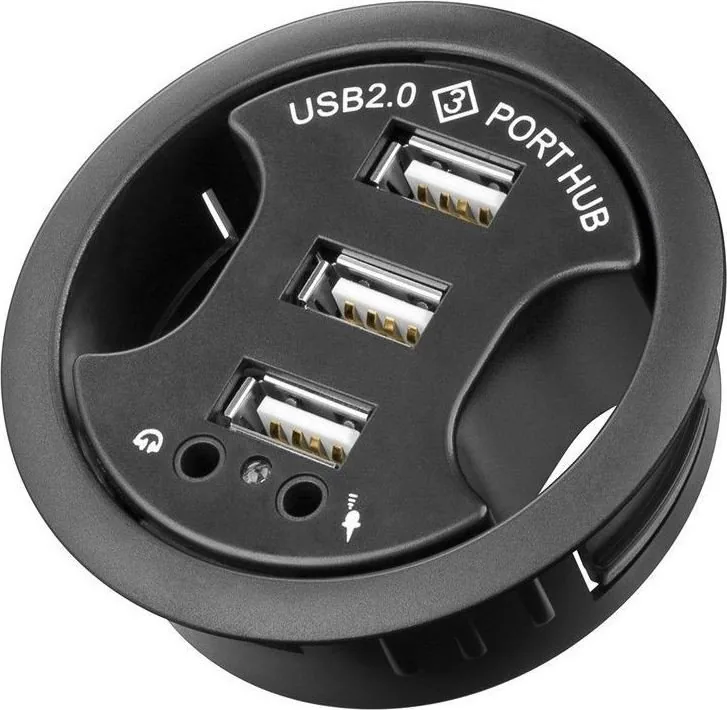
Yes. The hub is specifically designed for integration into desk cable entry openings; dimensions vary by model (approx. Ø71 or Ø95 mm with ~31 mm height).
Is this answer helpful?
Certain models include one microphone input and one headphone output, enabling headset connectivity alongside the USB ports.
Is this answer helpful?
No. Do not open or modify the housing. There is a risk of electric shock and voiding warranties; maintenance and repairs should be handled by qualified personnel.
Is this answer helpful?
Follow local WEEE regulations: do not dispose of the device with household waste. Return it to the manufacturer, retailer, or an authorized public collection point for proper recycling.
Is this answer helpful?
No. The product is intended for dry indoor use only and must not be used in wet, explosive, or extreme-temperature environments.
Is this answer helpful?
Advantages and Disadvantages
Advantages

- Compact, desk-integrated design for clean cable management and easy access.
- Plug-and-play operation without drivers for simple installation and immediate use.
- Available with audio in/out for headset and microphone integration.
- USB 2.0 backward-compatible with USB 1.1, supporting common office peripherals.
- Low profile and lightweight, fits typical desk grommet openings.
Disadvantages

- USB 2.0 bandwidth (480 Mbps) may be limiting for high-speed storage devices.
- No power switch; must unplug at the mains in emergencies or during storms.
- Not suitable for use in wet, extreme or explosive environments.
- Not designed for power-hungry or bus-powered multiple high-draw devices.
- No internal user-serviceable parts; repairs require qualified personnel.
Product Specification
Type
USB-Hub
Form factor
1x Built-in module (connection cable not detachable, 2.36 in desk cable grommet)
Connection interface
1x USB-A 2.0 (plug via cable, 480Mb/s, 4.92 ft cable length), 2x Jack (plug, 4.92 ft cable length)
Ports
3x USB-A 2.0 (socket), 2x Jack (socket, 3.5mm)
Data transfer
3x USB-A 2.0 (socket, 480Mb/s), 1x Jack (socket, 3.5mm, Audio-Out), 1x Jack (socket, 3.5mm, Mic-In)
Power supply
Power supply also via connection, mains connection (1x USB-A plug), external power supply possible but not included
Dimensions
2.76x1.22 in (DxH)
Weight
0.30 lb
Housing color
black
Compatibility
universal
USB designation
Link
Product Description
Wentronic Goobay Audio Built-in USB Hub — Overview
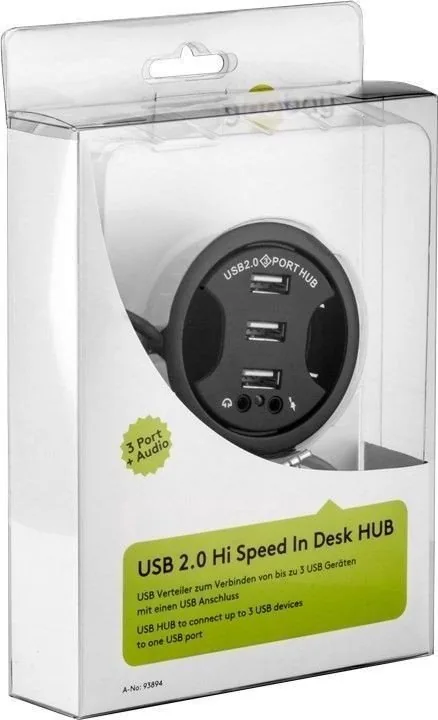
The Wentronic Goobay Audio Built-in USB Hub is a desk-integrated USB 2.0 hub designed for office furniture cable grommets. Available in variants with 3 or 4 USB-A ports and models that include integrated audio (microphone in and headphone out), it provides a tidy, plug-and-play extension for PC USB and audio interfaces. With USB 2.0 support (up to 480 Mbps) it is backward compatible with USB 1.1, though connected peripherals must support USB 2.0 to achieve full transfer speeds.
Design and Functionality
Engineered for simple integration into desks, the hub installs into a cable entry opening and connects to the PC via an attached cable. The circular modules come in compact diameters (approx. Ø71 or Ø95 mm) and low-profile heights (~31 mm), making them unobtrusive on work surfaces. Several model weights range from about 117 g to 134 g depending on configuration.
The hub requires no driver installation and works via plug-and-play. It extends existing USB and audio ports and is primarily intended as a convenient interface extension for office setups, meeting basic connectivity needs for keyboards, mice, flash drives, headsets and similar peripherals.
Safety, Usage and Care
Safety instructions emphasize avoiding contact with mains voltages, using accessible outlets (the device has no power switch), and unplugging the unit during storms or emergencies. The product should only be used in dry environments, not in explosive atmospheres, and must not be modified or opened. It is maintenance-free; do not use chemical cleaners. Repairs should be performed by qualified personnel.
Environmental and Disposal Notes
The hub falls under WEEE regulations: electronic devices must not be disposed of with household waste. Consumers should return end-of-life units to manufacturers, retailers, or public collection points for proper recycling to avoid environmental contamination.
Final Thoughts
The Wentronic Goobay built-in hub is a practical, low-profile solution for desk-based USB and audio expansion. It focuses on ease of installation, safe operation, and tidy desk integration rather than high-speed or power-hungry peripherals, making it well suited to everyday office peripherals and media headsets.
Notes
- USB 2.0 provides up to 480 Mbps; full speed requires USB 2.0–capable peripherals.
- Do not open the housing or attempt modifications; risk of electric shock.
- Return old devices to designated WEEE collection points.
Search for 67,732 Manuals online


Type-in Brand or Model
Sabino Marchetti
8 months ago
Is the installation with the two mounting rings reliable, and does the LED light stay on even when the PC is switched off?
Manual.ly
8 months ago
Thanks for the feedback. The two mounting rings are designed for easy installation, but please handle them carefully during setup, as the outer part can be a bit more sensitive if forced or installed at an angle. For the LED behavior: some models keep a residual LED glow depending on power/standby mode. If you want the LED completely off, check the device settings and verify that the power source is fully shut down (not just standby). If the LED is still on in your configuration and you did not enable any status lighting, contact support with your model and a photo of the setup so we can confirm the correct mode.