
goobay SAT Multiswitch Manual
PDF manual · 16 Pages
English



Quick check
Incorrect answer, please try again.
Chat with your goobay SAT Multiswitch manual using AI
Get instant AI answers from your goobay SAT Multiswitch manual
Ask anything about the goobay SAT Multiswitch. Answers come from this manual, with the pages they are based on.
Ask a Question
Do you recommend SAT Multiswitch?
Yes NoFrequently Asked Questions
It distributes satellite and terrestrial TV signals from one installation to multiple receivers, making it useful for multi-room TV systems.
Is this answer helpful?
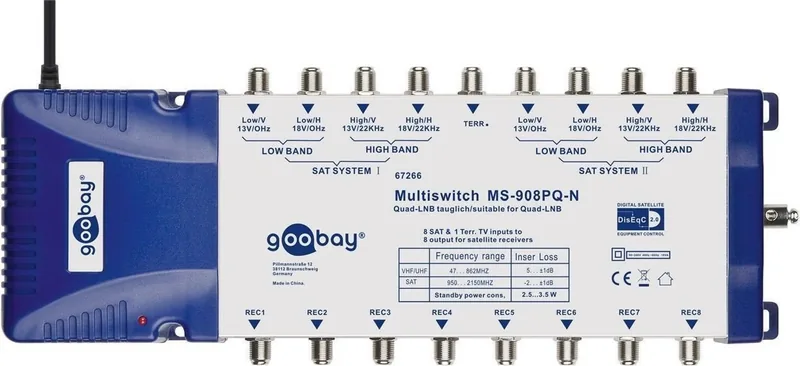
This version uses 9 inputs in total: 8 satellite inputs plus 1 terrestrial input, and it provides 8 receiver outputs.
Is this answer helpful?
Yes, the product is designed to work with HDTV signals and modern satellite installations.
Is this answer helpful?
Yes, the manual states that it is compatible with Quad-LNB configurations, which makes it suitable for flexible satellite distribution.
Is this answer helpful?
It should be installed indoors in a dry environment, on a stable surface or wall, with enough space around it for ventilation.
Is this answer helpful?
Yes, unused inputs and outputs should be terminated properly to help maintain signal quality and meet installation guidelines.
Is this answer helpful?
Advantages and Disadvantages
Advantages

- Supports 8 receiver outputs for flexible multi-room distribution.
- Handles satellite and terrestrial signals in one system.
- HDTV and Quad-LNB compatible for modern TV setups.
- Wall-mountable design helps with neat installation.
Disadvantages

- Installation requires careful wiring and technical know-how.
- Must be used indoors in dry conditions only.
- Proper grounding and termination are important for correct operation.
- Not ideal for casual users expecting simple plug-and-play setup.
Product Specification
Satellite Inputs
8
Terrestrial Inputs
1
Outputs
8
Cascadable
no
Satellite Positions
2 (Quattro, Quad)
Special Features
Quad-compatible
Dimensions
14.37x2.76x4.72in (WxHxD)
Product Description
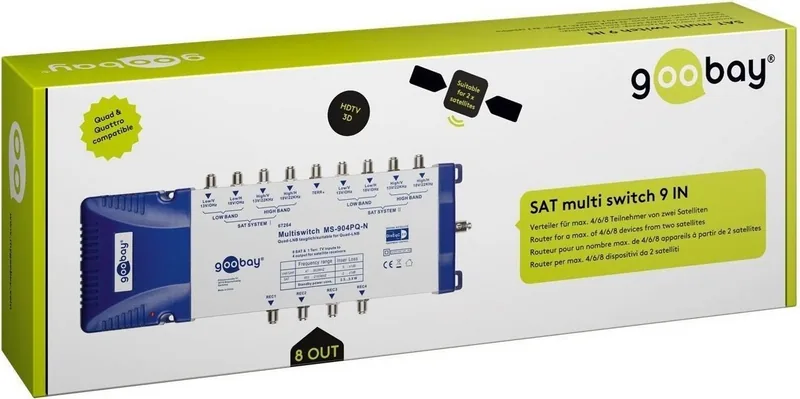
Wentronic Goobay SAT Multiswitch 9 Inputs/8 Outputs
The Wentronic Goobay SAT Multiswitch 9 inputs/8 outputs is designed for homes and installations that need reliable distribution of satellite and terrestrial TV signals to multiple rooms. It combines a practical switching concept with broad compatibility, making it a smart choice for organized multi-receiver setups.
This multiswitch supports one terrestrial input and eight satellite inputs, then distributes the signal to up to eight receiver outputs. That makes it especially useful in systems where several TVs or receivers need access to the same satellite source without sacrificing flexibility. The manual-focused setup guidance also highlights careful grounding, clean cable preparation, and correct signal assignment, which are all essential for stable performance.
One of the strongest points of the Wentronic Goobay SAT Multiswitch 9 inputs/8 outputs Manual is its emphasis on safety and installation quality. The device is meant for dry indoor use, with enough ventilation space to help manage heat. It also reminds users to keep unused ports properly terminated and to respect electrical and grounding standards. These details matter because multiswitches are often installed in technical spaces where signal loss or poor wiring can quickly affect viewing quality.
The product is HDTV-ready and compatible with Quad-LNB setups, which adds value for modern satellite systems. It can be wall-mounted as well, giving installers more placement options. Technical data in the manual shows a wide frequency range and output levels designed for both satellite and terrestrial distribution, helping the unit fit into varied system configurations.
For readers looking at a practical signal-management solution, this multiswitch stands out as a dependable bridge between the antenna system and multiple receivers. It is not a plug-and-play consumer gadget; instead, it is a serious installation component that rewards careful setup. When installed correctly, it can simplify distribution, reduce clutter, and support consistent signal routing across a property.
Notes
- Use only in dry indoor environments.
- Follow grounding and potential equalization rules.
- Ensure unused connections are terminated properly.
- Allow ventilation space around the unit.
- Professional installation is recommended for best results.
Search for 67,732 Manuals online


Type-in Brand or Model