
goobay RJ-45 USB 2.0 Extender Manual
PDF manual · 4 Pages
English



Quick check
Incorrect answer, please try again.
Chat with your goobay RJ-45 USB 2.0 Extender manual using AI
Get instant AI answers from your goobay RJ-45 USB 2.0 Extender manual
Ask anything about the goobay RJ-45 USB 2.0 Extender. Answers come from this manual, with the pages they are based on.
Ask a Question
Do you recommend RJ-45 USB 2.0 Extender?
Yes NoFrequently Asked Questions
It extends a USB connection over network cable, allowing USB devices to be placed up to 100 meters away from the computer. It is suitable for common peripherals like keyboards, mice, printers, and external drives.
Is this answer helpful?
The extender works with Cat 5, Cat 5a, and Cat 6 network cables. It should not be used with crossover cables, because the pin layout is different.
Is this answer helpful?
No driver installation is needed for the extender itself on supported systems. You may still need drivers for the USB device you connect, such as a printer or specialized peripheral.
Is this answer helpful?
It supports Windows 2000, XP, Vista, 7, and Mac OS X or later. It is designed to work with one free USB-A port and a free mains socket.
Is this answer helpful?
Yes. The receiver unit must be connected to the included power supply and a suitable outlet. This helps keep the USB connection stable over longer distances.
Is this answer helpful?
The maximum transfer rate is 480 Mbit/s, which is the top speed associated with USB 2.0. That is enough for many standard office and home peripherals.
Is this answer helpful?
Advantages and Disadvantages
Advantages

- Extends USB connectivity over Cat 5/5a/6 cable up to 100 meters, making remote device placement much easier.
- Works with common peripherals such as mice, keyboards, printers, and hard drives.
- No driver installation is needed for the extender on supported operating systems.
- Compatible with USB 1.0, 1.1, and 2.0 devices and widely used Windows and Mac systems.
Disadvantages

- Requires an external power supply for the receiver unit, so it is not a fully passive solution.
- A network cable is required separately, and crossover cables are not supported.
- Maximum data rate is limited to 480 Mbit/s, which is lower than newer USB standards.
- Intended for dry environments only and should not be exposed to harsh conditions.
Product Description
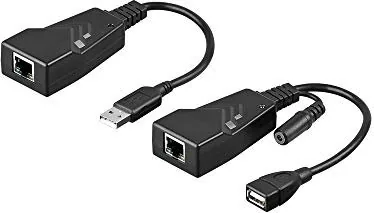
Goobay RJ-45 Extender USB 2.0
A simple way to place USB devices farther away
The Goobay RJ-45 Extender USB 2.0 is a practical solution for anyone who needs to move a USB connection beyond the short range of a standard cable. By sending the signal over Cat 5, Cat 5a, or Cat 6 network cable, it can extend a USB link up to 100 meters. That makes it a useful choice for workspaces where a printer, keyboard, mouse, or external hard drive needs to sit in a different room or at a more convenient distance from the computer.
Built for everyday USB accessories
This extender is designed around a sender unit and a receiver unit, keeping the setup clear and easy to understand. It supports USB 1.0, 1.1, and 2.0 devices, with a maximum data transfer rate of 480 Mbit/s. For many common peripherals, that is enough for dependable daily use. The system works with Windows 2000, XP, Vista, 7, and Mac OS X or later, and it does not require driver installation for the extender itself.
Straightforward installation and reliable use
Installation is refreshingly direct: connect the sender to a free USB port on the computer, attach the receiver to the USB device, link both units with a compatible network cable, and power the receiver with the included adapter. One important point from the Goobay RJ-45 Extender USB 2.0 Manual is to avoid crossover cables, because the wiring must match the device's pin layout. Once connected correctly, the extender offers a clean and stable way to relocate USB hardware without complicated software setup.
A compact tool for organized setups
This product is especially appealing in offices, classrooms, and home entertainment areas where cable management matters. Instead of leaving devices crowded around the computer, the extender allows a more flexible layout while keeping the connection wired and dependable. It is maintenance-free, but it should be used in dry conditions and protected from heat, cold, moisture, and physical stress. For users who value simplicity, compatibility, and distance, it is a small device with a very practical role.
Notes
- Use only Cat 5, Cat 5a, or Cat 6 cable.
- Do not use crossover cables.
- The receiver needs external power.
- Network cable is required and not included.
- Keep the unit dry and handle it carefully.
Search for 67,732 Manuals online


Type-in Brand or Model
Klara Sommer
7 months ago
Does this USB connection work reliably over longer distances (for example more than 5 m, up to 50 m)?
Manual.ly
7 months ago
Yes. Reviews highlight that the device has its own power supply on the equipment side, which helps maintain a stable and secure connection over long runs. With proper shielding and a network isolator, users report reliable operation even beyond 50 m. It is not the cheapest option, but it is often described as the best choice for extended USB distances.