

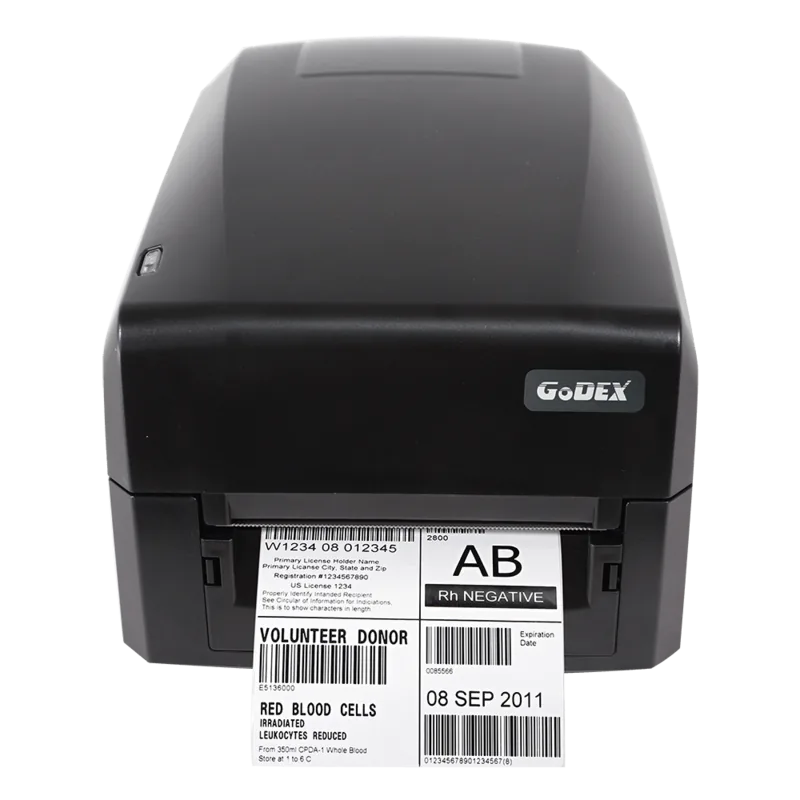
GoDEX GE300 Manual
PDF manual · 37 Pages
English



Quick check
Incorrect answer, please try again.
Chat with your GoDEX GE300 manual using AI
Get instant AI answers from your GoDEX GE300 manual
Ask anything about the GoDEX GE300. Answers come from this manual, with the pages they are based on.
Ask a Question
Do you recommend GE300?
Yes NoFrequently Asked Questions
The GE300 supports both direct thermal and thermal transfer printing. Use direct thermal for heat-sensitive labels without ribbon, and thermal transfer with wax, wax/resin, or resin ribbons for more durable prints.
Is this answer helpful?
Connect via the Ethernet port and use the NetSetting software (on the product CD or downloadable) to discover the printer, configure IP/DHCP or static settings, set alert paths (SMTP/SNMP), and update firmware. Default NetSetting password is 1111; change it for security.
Is this answer helpful?
Load the label stock, power off the printer, then power on while holding the FEED button. Release when the LED flashes red. The printer will measure label height and print a self-test with configuration and memory diagnostics.
Is this answer helpful?
Clean the print head weekly with a soft lint-free cloth dampened with alcohol after switching off and opening the mechanism. Remove ribbon and residues; avoid metal fragments on the cloth. Regular cleaning prevents streaks, missing prints, and head damage.
Is this answer helpful?
Refer to the error alert table: check for media detection issues, paper jams, ribbon absence, memory full, or print-head overheating. The NetSetting alerts can notify operators; resolve specific causes (reload media, clear memory, let head cool) and rerun self-test.
Is this answer helpful?
Drivers support Windows (including Server versions), Mac, and Linux. The product supports common platforms and includes Seagull drivers on the CD; select the correct model (GoDEX GE300) during installation.
Is this answer helpful?
Optional items include a cutter, external label unwind/rewind stands, Bluetooth, wireless LAN (802.11 b/g/n), RTC, and left-alignment mechanism. Some options require dealer installation.
Is this answer helpful?
Advantages and Disadvantages
Advantages

- Dual printing modes (thermal transfer and direct thermal) for flexible media use.
- Multiple interfaces: USB, RS-232 serial, and Ethernet with NetSetting remote management.
- Automatic label calibration and self-test for quick setup and diagnostics.
- Compact footprint with support for various label widths and ribbon types.
- Cross-platform driver support and bundled label design software (GoLabel).
Disadvantages

- Class A EMC rating may cause interference issues in residential areas.
- Memory and storage are limited (8MB flash, 16MB SDRAM) for large on-printer assets.
- Print speed (3 IPS) and resolution (203 dpi standard) may be insufficient for high-volume or ultra-high-resolution needs.
- Optional features (cutter, wireless, RTC) require additional purchases or dealer installation.
- Print-head care needed (weekly cleaning) to maintain quality and avoid defects.
Product Specification
Type
Label printer
Technology
Direct thermal
Print resolution
203dpi
Roll diameter
2.68in
Paper thickness
3.00-7.87mil
Print width
4.16in
Print length
68.02in
Print speed
5.00in/s
Memory
16MB (RAM), 8MB (Flash)
Connections
USB 2.0
Network
LAN
Display
N/A
Emulation
GZPL, EZPL, GEPL, GDPL
Dimensions
9.88x6.46x7.87in
Weight
3.97lb
Special features
Tear bar
Manufacturer's warranty
1 year
Product Description
GoDEX GE300 USB LAN Thermodirekt Manual
The GoDEX GE300 is a compact, versatile thermal label printer designed for small- to medium-volume labeling tasks. Combining direct thermal and thermal-transfer printing, the GE300 supports 203 dpi resolution with a 4.25-inch print width and speeds up to 3 inches per second. It’s engineered for reliable barcode, text, and graphic printing in retail, logistics, warehouse, and light industrial environments.
Key features and usage
The GE300 accommodates a range of media types—continuous labels, gap labels, black mark sensing, and punched holes—and supports ribbon types including wax, wax/resin, and resin for thermal-transfer jobs. Its media handling includes label rolls up to 5" diameter with 1" or 1.5" cores, and ribbon rolls up to 360". Interfaces include USB 2.0, serial (RS-232), and Ethernet for networked deployments. The printer ships with driver support across major OSes and a label design software (GoLabel) for EZPL language.
Loading media and consumables is straightforward: the cover and printing mechanism open with release buttons and catches, ribbon modules and rewind units snap into holders, and label rolls mount on a supply hub with adjustable guides. The FEED button advances labels and an automatic label calibration/self-test measures label height and prints diagnostics, including network, memory, and configuration info.
Controls, indicators, and network management
A tri-color LED indicates status (green standby, orange/red for errors). Error alerts and beep signals identify media errors, memory issues, or print-head overheating. NetSetting software manages Ethernet configurations, IP/DHCP settings, alert paths (SMTP/SNMP), firmware updates, remote commands, and can restore factory defaults. The default NetSetting password is 1111 (change recommended).
Maintenance and reliability
Routine maintenance includes weekly print-head cleaning with alcohol on a lint-free cloth to prevent print defects and extend head life. The manual documents troubleshooting steps for common problems—no power, no print, jams, missing prints, blurred output—and advises using correct media type, driver settings, and verifying sensor and guide positions.
Notes
- Supports EZPL, GEPL, GZPL printer languages and automatic switching.
- Optional accessories include cutter, external rewind/unwind, Bluetooth, WLAN, and RTC.
- Safety and compliance: CE, FCC Class A, UL, and other regional approvals. Follow grounding and power recommendations.
The GE300 is a practical choice for users needing a compact, network-ready thermal printer with flexible media handling, straightforward setup, and comprehensive configuration tools.
Search for 67,706 Manuals online


Type-in Brand or Model