

Free Glorious Manuals – Read, Download & Print
2 Manuals
Manuals
Categories


Glorious Manuals Overview and Comprehensive Guide
Introduction to Glorious Documentation
When purchasing high performance gaming peripherals, understanding the equipment is crucial. Glorious has built a reputation for quality and value in the market. Their approach to documentation reflects this commitment. The manuals provided cover every aspect of the user journey from unboxing to long term ownership. These documents serve as the primary reference for troubleshooting and optimization. They ensure that every customer can achieve the intended performance from their hardware. Proper reading of these guides prevents accidental damage to sensitive components. This document serves as a summary of what you can expect from Glorious Manuals.
Unboxing and Initial Inspection
The first step in any manual experience is the unboxing process. Glorious packaging is designed to protect the product during shipping. Carefully remove the items from the box to avoid crushing. Check the box contents against the checklist provided in the paper insert. Verify that there is no physical damage to the unit. Look for loose screws or missing parts in the accessories kit. If anything is missing, contact support immediately. This is the most effective time to resolve discrepancies. Take photos of the packaging in case of a shipping claim later. Do not throw away the box until you are sure everything is correct.
Mouse Assembly and Configuration
Most Glorious mice require no physical assembly but do require software setup. The manual explains the sensor location and cleaning requirements. Users should ensure the mouse surface is clean for optimal tracking. The side buttons on left and right hands models are adjustable in the software. The manual details the DPI adjustment methods using physical buttons on the unit. Polling rate selection is also mentioned to reduce latency. Wireless models include charging cables or dongles that need pairing. The manual explains how to reset the device if connection issues occur. It provides instructions on how to change the weight inside the mouse. Balancing weight can change the feel of the mouse for the user.
Keyboard Mechanics and Features
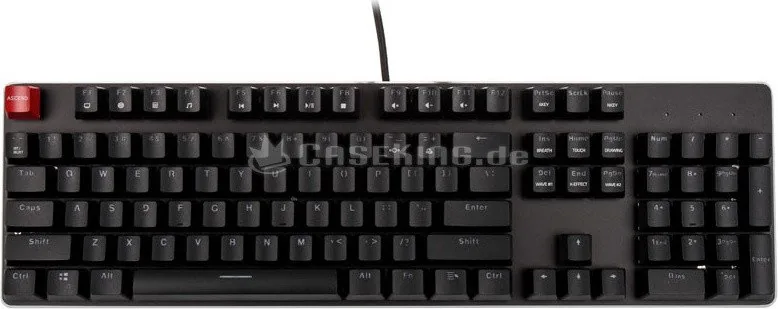
Mechanical keyboards from Glorious come with specific switch specifications. The manual lists the type of switches installed inside the frame. It explains how to hot swap switches if the model supports this feature. This allows users to change tactile feel without soldering tools. Keycaps are often included in specific colors or themes. The manual shows the layout of the keys including the numpad and macro row. Lighting effects are customized through the central software application. The manual instructs users on how to cycle through brightness levels. Power saving modes are described for battery operated wireless keyboards. Firmware updates are necessary to fix bugs and add features.
Chair Ergonomics and Assembly
Gaming chairs require more time to assemble than other products. The manual provides a step by step guide for attaching the base to the seat. Safety warnings regarding the gas lift cylinder are included prominently. Users should ensure they tighten all bolts to the recommended torque settings. Adjustments for height and tilt tension are detailed in the guide. The lumbar pillow placement is customizable and the manual shows the correct method. Armrest adjustments cover four directions of movement including height and angle. Users must stay within the weight limit specified in the document. Overloading the chair can cause structural failure or injury. Regular maintenance checks are recommended every few months.
Software Suite and Firmware Updates
The GG Surface software is the central hub for Glorious devices. The manual guides users through the installation wizard. It explains creating profiles for specific games or applications. Each profile allows unique settings for the mouse and keyboard. Lighting effects can be synced across multiple devices. The manual describes the process of backing up profiles to a cloud account. This helps in recovery if the local storage is corrupted. Firmware updates are downloaded directly through the interface. The manual warns to keep power connected during updates to prevent bricking. Device detection is automatic for most modern operating systems.
Warranty and Customer Support
Glorious offers a warranty that covers defects in materials and workmanship. The manual specifies the duration which often lasts two years or more. It details the exclusions such as accidental damage or normal wear. The contact form requires order numbers and proof of purchase photos. RMA instructions include sealing the device in original packaging when possible. Customer service representatives are available via email and chat. Shipping labels are often provided for warranty claims. The manual encourages reading the terms before making a claim. Support response times vary by region and volume of inquiries. Patience and clarity in communication help speed up the process.
Troubleshooting Common Issues
Technical problems can arise even with quality products. The manual lists the most frequent complaints from users. Mouse lag is often solved by checking USB ports and cables. Keyboard ghosting issues may require driver updates or BIOS checks. Chair wobbling is usually caused by loose screws on the base. Lighting not turning on might indicate a software conflict. The manual suggests restarting the computer to reset drivers. It also suggests checking Windows compatibility settings for legacy games. If the problem persists, the manual advises contacting the support team. Providing detailed logs helps engineers diagnose the root cause.
Maintenance and Longevity Tips
Keeping equipment clean extends its useful life significantly. Dust accumulates in the crevices of keyboards and mouse wheels. The manual recommends using compressed air to remove debris gently. Microfiber cloths should be used for wiping down plastic surfaces. Avoid using harsh chemicals that degrade the coating on shells. Battery powered devices should be charged when storage capacity drops low. Storage recommendations include keeping devices in a cool dry place. High humidity can cause corrosion on electronic contacts over time. The manual warns against moving the mouse while it is powered off.
Accessories and Compatibility
Glorious sells additional items to enhance the setup. Mouse pads are recommended for smooth tracking on different surfaces. Armrests may be compatible with specific chair models. Keycaps sets can be bought separately for customization. Cable management clips help keep the desk organized. The manual lists which accessories work with which devices. Compatibility charts are available in the digital support section. This ensures users do not purchase items that do not fit their gear.
Conclusion on Product Documentation
Following the Glorious Manuals ensures the best possible experience. It empowers users to manage and maintain their own gear effectively. The documentation is comprehensive and covers all hardware lines. Whether it is a budget friendly mouse or a premium chair, the advice applies. Users who read the fine print avoid frustration and disappointment. The investment in reading the manual pays dividends in product longevity. We recommend saving the digital copy for future reference. It remains a valuable resource throughout the product lifecycle. Enjoy your gaming experience with full confidence in your setup.
Search for 67,706 Manuals online


Type-in Brand or Model