
Gloria Cut & Brush Manual
PDF manual · 40 Pages
English



Quick check
Incorrect answer, please try again.
Chat with your Gloria Cut & Brush manual using AI
Get instant AI answers from your Gloria Cut & Brush manual
Ask anything about the Gloria Cut & Brush. Answers come from this manual, with the pages they are based on.
Ask a Question
Do you recommend Cut & Brush?
Yes NoFrequently Asked Questions
It is used to trim lawn edges beside fixed surfaces such as paving, paths, or kerbs. The disc cuts the turf edge while the brush clears grass and loose debris from the paved side.
Is this answer helpful?
The attachment is compatible with the GLORIA MultiBrush 000290.000, MultiBrush sc 000291.000, and MultiBrush li-on 000292.000.
Is this answer helpful?
Yes. The standard setup places the guide wheel on the lawn. After conversion, it can run on the paved surface. This gives users two ways to guide the attachment along an edge.
Is this answer helpful?
The side without the red marking must face the brush. The red-marked side must face the lawn, not the stones. Correct orientation helps prevent damage to the paved edge.
Is this answer helpful?
Replace the brush when it wears to about 90 mm in diameter. Replace the disc when it wears to about 140 mm in diameter. Using worn parts can reduce performance and control.
Is this answer helpful?
Wear eye protection, sturdy footwear, long trousers, and gloves as needed. Clear stones and other debris, keep people and animals away, work at walking pace, and never place hands or feet near rotating parts.
Is this answer helpful?
Advantages and Disadvantages
Advantages

- Combines edging and surface brushing in one attachment for tidier lawn borders.
- Two guide-wheel configurations support work from the lawn side or the paved side.
- Alignment marks and an adjustable safety guard assist accurate disc positioning.
- Lightweight design at about 0.6 kg suits routine edging in home gardens.
- Compatible with GLORIA MultiBrush, MultiBrush sc, and MultiBrush li-on models.
Disadvantages

- Designed only for lawn edges adjoining fixed, paved surfaces.
- Requires a compatible GLORIA MultiBrush power unit, which is not included.
- Disc and brush need replacement after reaching specified wear diameters.
- Incorrect disc orientation can damage stone or kerb edges.
- Loose debris must be cleared first because objects can be thrown by the rotating tool.
Product Specification
Compatible with
Gloria MultiBrush cordless cleaning brush
Product Description
Gloria Edge Trimmer Cut&Brush - Read, Download & Print Free
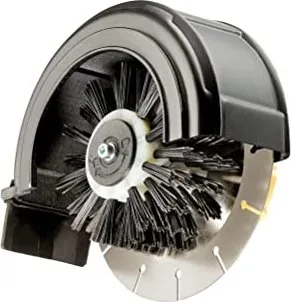
The Gloria Edge Trimmer Cut&Brush is a practical garden attachment designed to give lawn borders a neat, defined finish while helping keep adjoining paved areas clear. Built for compatible GLORIA MultiBrush machines, it combines a cutting disc and a compact brush in one working unit. The disc separates turf from the edge, while the brush sweeps loose grass and debris away from the hard surface as you move.
Clean lawn edges with one coordinated tool
Untidy grass edges can make paths, patios, and kerbs look neglected even when the lawn itself is freshly mown. The Cut&Brush attachment is intended for lawn edges beside fixed surfaces, such as paving stones or kerbs. Before edging, mow the lawn and make sure turf growth extending over the paved surface is no more than 3 cm thick. This helps the disc work smoothly and gives the brush room to clear the edge.
The unit has a 150 mm disc, a 100 mm brush with a 50 mm width, and a maximum rotational speed of 1800 rpm. At approximately 0.6 kg, it is a relatively lightweight attachment for regular home-garden maintenance. An adjustable safety guard includes alignment marks that help users position the disc accurately along the lawn and stone boundary.
Two guide-wheel positions for flexible edging
Cut&Brush can be used with the guide wheel running on the lawn, which is the standard configuration, or on the paved surface after conversion. This flexibility can make it easier to follow different edge layouts and choose a comfortable working position. For the lawn-side setup, the disc is inserted beside the paved area until the brush rests on the hard surface. Guide the MultiBrush slowly along the border with light pressure.
For the alternate setup, the brush and disc are rearranged. The red-marked side of the disc must face the lawn and never the stones, helping reduce the risk of damaging kerb edges. Always test the brush action on a small, inconspicuous area first, especially on sensitive paving materials.
Care and safe operation
Keep the attachment clean before use, remove stones, wire, screws, and other loose objects from the work area, and wear safety glasses, sturdy shoes, long trousers, and gloves when appropriate. Never operate near children, pets, or bystanders, and do not lift the tool while the brush is rotating. Disconnect the power source before fitting, converting, cleaning, or maintaining the attachment.
Notes
- Replace the brush when its diameter reaches about 90 mm.
- Replace the disc when its diameter reaches about 140 mm.
- Use original GLORIA replacement parts and have repairs completed by an authorized service point.
- Clean, dry, and lightly oil the disc before long-term storage.
Search for 67,706 Manuals online


Type-in Brand or Model
Julie Reid
4 months ago
Is this tool suitable for shaping and straightening edges?
Manual.ly
4 months ago
Yes. Reviewers find it very useful for bringing edges back into shape. It is designed to help form and straighten edges effectively.