
GETT InduKey Cleankeys CK4W Manual
PDF manual · 39 Pages
English



Quick check
Incorrect answer, please try again.
Chat with your GETT InduKey Cleankeys CK4W manual using AI
Get instant AI answers from your GETT InduKey Cleankeys CK4W manual
Ask anything about the GETT InduKey Cleankeys CK4W. Answers come from this manual, with the pages they are based on.
Ask a Question
Do you recommend InduKey Cleankeys CK4W?
Yes NoFrequently Asked Questions
Yes, it supports standard USB HID compatible operating systems including Windows, Linux, and Mac OS.
Is this answer helpful?
Lock the keys, use a soft cloth with vinegar or alcohol-based cleaner, then wipe with a damp cloth. Do not use abrasive materials.
Is this answer helpful?
A full charge takes 8 to 10 hours. The device shuts off after 3 minutes if disconnected to save power.
Is this answer helpful?
Yes, but only thin latex or silicone gloves are suitable for operating the capacitive touch surface.
Is this answer helpful?
Yes, the product documentation includes guides in multiple languages, including English, German, and French for international use.
Is this answer helpful?
Yes, placing a finger on the Keylock key for two seconds disables the keyboard to prevent accidental input.
Is this answer helpful?
Advantages and Disadvantages
Advantages

- Glass surface is hygienic and easy to clean
- Integrated touchpad reduces desk clutter
- LED indicators show battery and connection status clearly
- German engineering ensures high durability
Disadvantages

- Battery automatically powers off after three minutes disconnect
- Cannot use wireless and wired USB connection simultaneously
- Touch gloves must be thin latex or silicone only
Product Specification
Layout
DE
Type
Touch
Backlight
N/A
Keycap Level
Without Keycaps
Keycap Format
Without Keycaps
Keycap Crown
Without Keycaps
Numpad
Standard
Cursor Block
Separate
Control Keys
Standard
Enter Key
Compact
Delete Key
Standard
Status Indicator
CapsLock, NumLock
Wrist Rest
N/A
Housing
Plastic
Housing Color
Solid, White
Keycap Style
Solid, White
Key Legend
Solid, Black
Connectivity
Wireless (2.4GHz), USB (USB-A Receiver)
Power Source
Battery
Dimensions (WxHxD)
18.50 x 0.98 x 6.57 in
Weight
1.10 lbs
Features
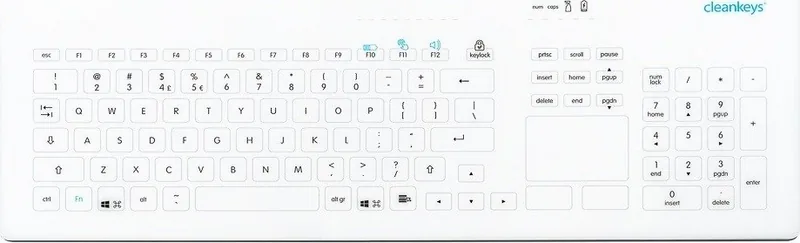
3 Multimedia Keys, Splash Resistant + IP65, FN Key, Touchpad, Glass Surface
Product Description
Discover the Future of Hygienic Typing
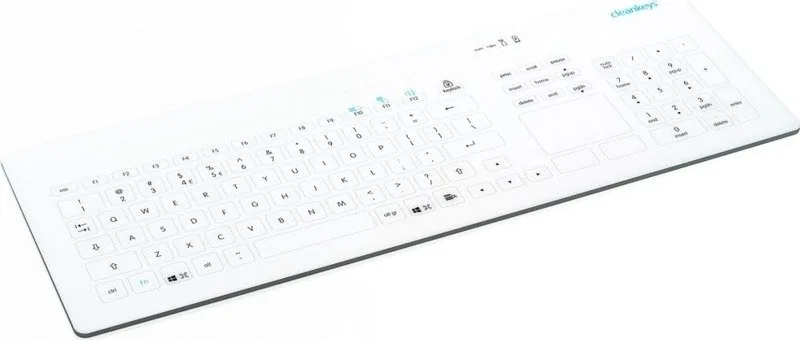
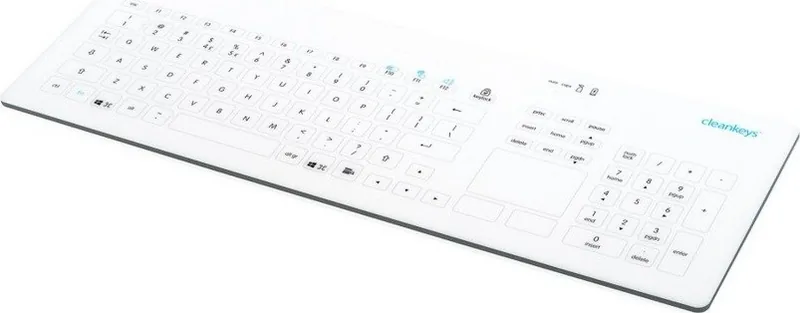
In a world where hygiene is paramount, the GETT InduKey KR24230 Cleankeys CK4W stands out as a superior choice for professionals seeking both style and sanitation. This wireless, touchpad enabled device combines sleek aesthetics with robust functionality, making it ideal for demanding environments. The surface is crafted from high-quality glass, offering a smooth typing experience that resists wear and tear while providing a high level of cleanliness. It is the perfect solution for users who place importance on design, cleanliness, and a high degree of usefulness.
Operating the GETT InduKey KR24230 Cleankeys CK4W is intuitive. The unit connects via a USB dongle using wireless technology, ensuring a clutter-free workspace. Users appreciate the German Manual included for comprehensive guidance on setup and operation. Once connected to a stable computer system, the keyboard registers automatically as an HID device. The LED status bar provides visual feedback on battery life and connection status. This white keyboard blends into any modern office decor effortlessly.
For those who value ergonomics, this model delivers. The touchpad is integrated seamlessly, allowing easy cursor control without needing a separate mouse. Special keys allow customization of sensitivity and volume levels. Cleaning is straightforward thanks to the glass surface, which can be wiped down with disinfectants without risk of damage. You can lock the keyboard to prevent unintentional triggering during the cleaning process safely.
When setting up the CK4W for the first time, users must ensure the battery is fully charged. The device switches off after three minutes of inactivity post-disconnect to protect the battery. This is a full shutdown, not a sleep mode. Charging takes approximately eight to ten hours for a full cycle. It is recommended to plug the unit into a PC for permanent use to extend battery life.
Whether you are in healthcare or a smart office, the CK4W meets high standards. It supports standard operating systems and maintains compatibility with various USB ports. The white finish adds a clean look. This manual provides detailed instructions to help you maximize the potential of your investment. Ensure you follow the temperature guidelines to maintain optimal performance during daily use.
With its touch principle, it requires no pressure, just a light touch on the glass. Thin latex gloves can be worn for operation. The integration of German engineering ensures strict quality conditions. Standard modifications like adding a logo are possible for clients. This flexibility ensures the keyboard adapts to specific needs effectively.
Search for 67,732 Manuals online


Type-in Brand or Model