
Getac UX10 G3 Manual
PDF manual · 95 Pages
English



Quick check
Incorrect answer, please try again.
Chat with your Getac UX10 G3 manual using AI
Get instant AI answers from your Getac UX10 G3 manual
Ask anything about the Getac UX10 G3. Answers come from this manual, with the pages they are based on.
UX10 G3 Maintenance Schedule
Do not store the battery for longer than six months without charging it to avoid damage.
Wipe the computer from the outside with a soft cloth moistened with water or an alkaline-free cleaner. Do not clean while powered on.
Wipe the screen with a soft, lint-free cloth. Turn off the computer before cleaning to prevent operational disturbances.
Remove dirt and oil using adhesive tape if necessary to ensure optimal performance.
Free maintenance reminders
Timed to your purchase date. Always free, unsubscribe anytime.
Ask a Question
Do you recommend UX10 G3?
Yes NoFrequently Asked Questions
Hold the P1 key longer than 2 seconds or press the power button for 5 seconds to force a shutdown and restart.
Is this answer helpful?
The device operates between negative 31 degrees Celsius and 63 degrees Celsius depending on the power source used.
Is this answer helpful?
Yes, hot-swapping is possible with specific models that have a bridging battery for seamless replacement without power loss.
Is this answer helpful?
Use the HDMI port or Thunderbolt 4 port for DisplayPort outputs to connect monitors or televisions for expanded workspace.
Is this answer helpful?
Getac provides G-Manager, G-Camera, and an OSD control panel to manage system functions and hardware settings remotely.
Is this answer helpful?
Use the Kensington lock slot to physically secure the device and enable security password features via BIOS settings.
Is this answer helpful?
Ensure it is within 0 to 50 degrees Celsius and check cable connections to the power source properly.
Is this answer helpful?
Advantages and Disadvantages
Advantages

- MIL-STD-810H compliance provides exceptional durability against drops and environmental hazards.
- High brightness display ensures visibility in direct sunlight up to 1000 nits.
- Hot-swappable battery option reduces downtime during critical field operations.
- Wide operating temperature range supports use in extreme cold and heat conditions.
- Thunderbolt 4 port allows for high-speed data transfer and external video connectivity options.
Disadvantages

- Rugged chassis adds weight compared to consumer tablets.
- Battery life varies significantly depending on usage intensity and configuration.
- Replacement parts and accessories can be expensive to source for maintenance.
- Some ports require specific optional modules to activate full functionality.
- Proprietary docking solutions may limit compatibility with third-party accessories.
Product Specification
RAM
8GB DDR4
Storage
256GB SSD
Graphics
Intel UHD Graphics 620 (iGPU), 24EU/192SP, 0.30-1.10GHz, Architecture "Gen 9.5" (Whiskey Lake GT2)
Display
10.1", 1920x1200, 224ppi, Multi-Touch, Digitizer, 1000cd/m2
Ports
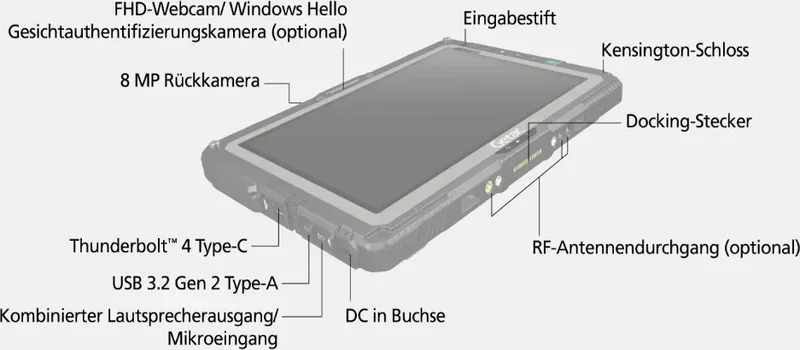
1x HDMI 2.0, 1x Thunderbolt 4 (40Gb/s), 1x USB-A 3.1 (10Gb/s), 1x 3.5mm Jack
Wireless
Wi-Fi 6E (WLAN 802.11a/b/g/n/ac/ax, 2x2, Intel AX211), Bluetooth 5.3
Card Reader
N/A
Cameras
2 Megapixel (front), 8 Megapixel, AF, Flash (back)
Operating System
Windows 11 Pro
Battery
Li-Ion, 4200mAh (removable)
Dimensions
10.98 x 7.66 x 0.93 inches
Weight
2.69 lbs (Tablet)
Color
gray/black
Features
MIL-STD-810G certified, MIL-STD-461G, IP66 certified, Docking connector, Stylus
Warranty
3 years
Note
Different country versions possible.
Product Description
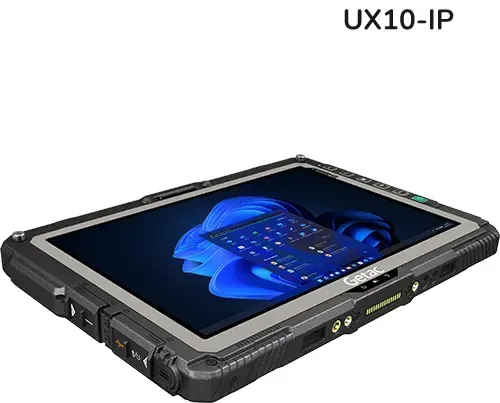
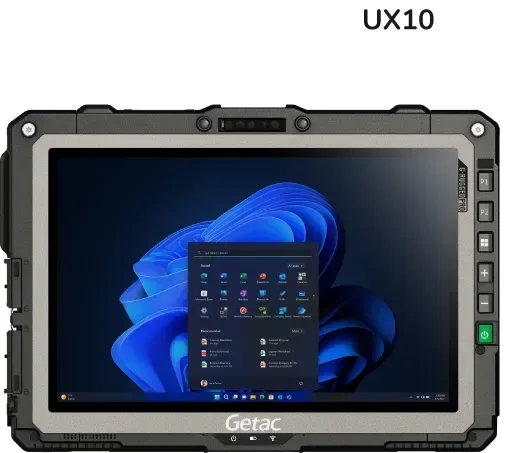
The Getac UX10 G3 represents a pinnacle in rugged mobile computing designed for demanding environments. This versatile tablet PC combines portability with durability, ensuring reliability where standard devices fail. Built to withstand extreme conditions, it meets military standards for shock, dust, and water resistance. The device features a bright 10.1-inch Full HD touchscreen that remains readable even in direct sunlight thanks to its high nit output.
Powering this system is the Intel Alder Lake U Platform, offering choices ranging from Pentium to Core i7 processors alongside substantial RAM configurations up to 32GB. Connectivity options are extensive, catering to diverse industrial needs. It supports Thunderbolt 4 for high-speed data transfer and video output. Wireless capabilities include WiFi 6 and Bluetooth 5.2 for seamless integration into modern networks.
Optional modules allow for WWAN connectivity via 4G LTE, enabling work anywhere with mobile data. Security is paramount with features like a fingerprint scanner, TPM chip, and smartcard reader integration. Users appreciate the long-lasting battery life, which can be swapped hot if the model supports this option, minimizing downtime during critical operations. The system is engineered to operate across a wide temperature range, ensuring functionality in freezing warehouses.
Maintenance and operation are simplified through specialized Getac software. The G-Manager utility allows administrators to control hardware settings remotely. The onboard OSD panel provides quick access to system functions. For field workers, tools like G-Camera assist in documenting tasks. The included stylus ensures precise input on the capacitive screen, which supports multi-touch gestures for intuitive navigation. Regular cleaning with a soft cloth maintains screen clarity and hygiene standards.
Whether managing inventory, conducting field surveys, or operating machinery, the UX10 G3 provides a robust platform. Accessories like docking stations expand functionality for office use. The device supports various operating system environments and includes comprehensive recovery options for system restoration. Detailed technical specifications ensure compatibility with existing infrastructure. Users looking for in-depth guidance often refer to the Getac UX10 G3 Manual for comprehensive instructions. This hardware solution ensures data integrity and operational continuity in the harsh environments typical of logistics.
The interface includes multiple USB ports supporting fast data streaming alongside legacy serial connections for older industrial equipment. Audio capabilities are enhanced with dual microphones and a combo jack for headsets. The screen is protected against scratches. Customization options allow specific configurations for scanning barcodes or reading RFID tags. This flexibility makes it ideal for complex workflows requiring specialized hardware inputs. The robust chassis protects internal components from vibration and accidental drops.
Search for 67,706 Manuals online


Type-in Brand or Model