

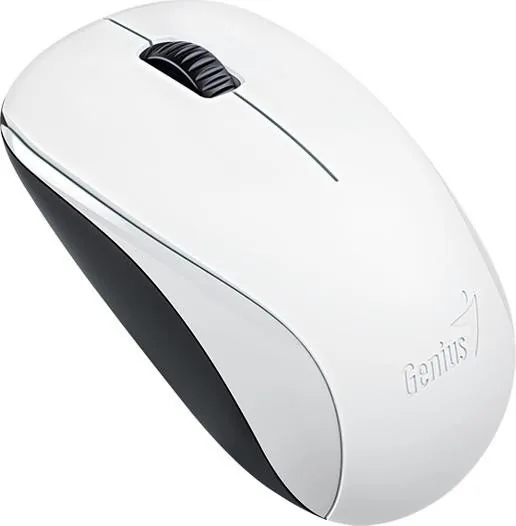

Genius NX-7000 Manual
PDF manual · 8 Pages
English



Quick check
Incorrect answer, please try again.
Chat with your Genius NX-7000 manual using AI
Get instant AI answers from your Genius NX-7000 manual
Ask anything about the Genius NX-7000. Answers come from this manual, with the pages they are based on.
Ask a Question
Do you recommend NX-7000?
Yes NoFrequently Asked Questions
The device operates on two standard AAA batteries for power.
Is this answer helpful?
This is a wireless mouse that connects via a receiver interface.
Is this answer helpful?
The operational frequency range is 2400-2483.5 MHz.
Is this answer helpful?
Yes, it complies with FCC rules Part 15 for digital devices.
Is this answer helpful?
You can email tech support or visit the official website for help.
Is this answer helpful?
There is a dedicated storage compartment to protect the receiver.
Is this answer helpful?
Modifications not expressly approved by the manufacturer could void your authority.
Is this answer helpful?
Advantages and Disadvantages
Advantages

- Wireless connectivity eliminates cable clutter for freedom of movement.
- Three essential buttons including Magic-Roller for versatile navigation.
- Operates on two standard AAA batteries for extended usage life.
- Complies with FCC rules for digital devices to prevent interference.
- Dedicated storage compartment protects receiver from loss and damage.
Disadvantages

- Requires battery replacements which adds long term cost.
- May cause interference if not installed in accordance with instructions.
- Unauthorized modifications could void user authority to operate equipment.
- Frequency operation is limited to specific uncontrolled environment standards.
- Product images shown on manual are for reference only not physical items.
Product Specification
Suitability
Both Hands (Left Hand, Right Hand)
Buttons
3 (Total), 2 (Main), 1 (Scroll Wheel Click)
Scroll Wheel
1 x 2-Way
Sensing Technology
Blue LED
Resolution
1,200 dpi
Lighting
N/A
Connectivity
Wireless (2.4 GHz), USB-A (USB-A Receiver)
Power Source
1 x AA
Features
Stowable Receiver
Product Description
Exploring the Genius NX-7000 Wireless Experience
The world of computer peripherals has evolved significantly over the recent years. Users require tools that blend comfort with high performance in their daily routine. The Genius NX-7000 stands out as a reliable choice for productivity tasks and entertainment. Many tech enthusiasts consult the Genius NX-7000 Manual when setting up their workspace to understand full capabilities. This resource ensures maximum efficiency without compromising on ergonomics or system stability.
Core Features and Performance
One of the primary advantages is the wireless connectivity provided here. It eliminates cable clutter, offering freedom of movement across the desk. The three essential buttons allow for standard operations. Left and right clicks function as expected for precise selection. The central Magic-Roller adds significant versatility for browsing the web. It allows quick navigation through documents without scrolling manually every time. This feature simplifies complex workflows for professionals.
Power and Battery Life
Battery sustainability is crucial for daily usage without interruption. This device operates on two standard AAA batteries. Users enjoy extended periods between replacements compared to other options. The included power switch conserves energy when the unit is idle. A dedicated storage compartment protects the receiver from loss in the drawer. This attention to detail reflects the manufacturer's commitment to quality building and long-term satisfaction.
Safety and Compliance
Technical safety remains a priority for all electronic equipment today. The unit complies with FCC rules for digital devices strictly. It prevents harmful interference in residential installations effectively and safely. RF exposure limits meet uncontrolled environment standards securely. Users benefit from regulatory assurance regarding electromagnetic compatibility. The declaration confirms adherence to EU directives on radio equipment globally. No unauthorized modifications void user authority to operate the equipment properly. Changes or modifications not expressly approved could void authority.
Design and Usability
Ergonomic design supports extended work sessions comfortably and reliably. The shape fits naturally in the user's hand for better control. Connectivity is stable within the specified frequency range of 24. This ensures consistent signal transmission without dropouts or lag. Support channels remain active for troubleshooting any issues that arise quickly. Contact information includes technical support emails for assistance. Contact dealer for further help regarding specific installation needs.
Conclusion
Investing in this peripheral enhances workflow efficiency significantly for everyone. The combination of features meets modern demands effectively and safely. Whether for office tasks or home entertainment, this tool delivers reliability. Proper usage ensures longevity and optimal functionality for the user daily. The product is designed for global markets meeting various regional standards.
Search for 67,732 Manuals online


Type-in Brand or Model