Manual.ly Logo

Genius Ergo 8250S Manual

0.0 · 0 Ratings

PDF manual · 32 Pages

English

M: qwen/qwen3.5-flash-20260224
page

/ 32

Loading...
88b159ceab75c342863d2d18b0607ed77281 page 8
Conformiteitsverklaring
Het volgende product:
Draadloze muis: Ergo 8250S, Ergo XXXXX Series
is hierbij conform verklaard met de eisen uit de Richtlijn van de Raad over de benadering van de Wetten van
de Lidstaten in verband met de R&TTE richtlijn (2014/53/EU). Voor de evaluatie met betrekking tot de
elektromagnetische compatibiliteit, werden de volgende normen gebruikt:
EN 300 440 / EN 301 489-1 / EN 301 489-3 / EN 62479 / EN 62368-1
Deze verklaring is opgesteld voor de fabrikant:
KYE SYSTEMS CORP.
#492, Sec. 5, Chongxin Rd., Sanchong Dist., New Taipei City 241017, Taiwan (R.O.C.)
_
Ricky Chen
Project Manager of QACSD
KYE SYSTEMS CORP.
3URKOiãHQtRVKRGČ
Následující výrobek㸸
%H]GUiWRYiP\ã Ergo 8250S, Ergo XXXXX Series
RYêURENXVH]GHWtPWRSRWYU]XMHåHMHYHVKRGČVH6PČUQLFt5DG\(6R$SUR[LPDFL
SRåDGDYNĤYHþOHQVNêFKVWiWHFKY]WDKXMtFtFKVHNHVPČUQLFL577((2014/53/EU).
K vyhodnocení elektromagnetické shody byly aplikované následující normy:
EN 300 440 / EN 301 489-1 / EN 301 489-3 / EN 62479 / EN 62368-1
7RWRSURKOiãHQtMHSĜLSUDYHQRSURQiVOHGXMtFtKRYêUREFH
KYE SYSTEMS CORP.
#492, Sec. 5, Chongxin Rd., Sanchong Dist., New Taipei City 241017, Taiwan (R.O.C.)
_
Ricky Chen
Project Manager of QACSD
KYE SYSTEMS CORP.
0HJIHOHOĘVpJLQ\LODWNR]DW
$N|YHWNH]ĘWHUPpN
Vezeték nélküli egér: Ergo 8250S, Ergo XXXXX Series
megfelel az R & TTE direktíva (2014/53/EU) DODSYHWĘEL]WRQViJLN|YHWelményeinek és
PHJN|]HOtWĘOHJHVHQD7DJiOODPRNH]HQGLUHNWtYiKR]NDSFVROyGyEL]WRQViJLHOĘtUiVDLQDN Az
HOHNWURPiJQHVHV|VV]HIpUKHWĘVpJUHYRQDWNR]ypUWpNHOpVDN|YHWNH]ĘV]DEYiQ\RNRQDODSXO
EN 300 440 / EN 301 489-1 / EN 301 489-3 / EN 62479 / EN 62368-1
$IHQWLQ\LODWNR]DWDN|YHWNH]ĘJ\iUWyV]iPiUDNpV]OW
KYE SYSTEMS CORP.
#492, Sec. 5, Chongxin Rd., Sanchong Dist., New Taipei City 241017, Taiwan (R.O.C.)
Ricky Chen
Project Manager of QACSD
KYE SYSTEMS CORP.
'HNODUDFMD]JRGQRĞFL
1LQLHMV]\PSRWZLHUG]DVLĊĪHQLĪHMR]QDF]RQ\SURGXNW
Bezprzewodowa mysz: Ergo 8250S, Ergo XXXXX Series
VSHáQLDZ\PDJDQLD]DáRĪRQHSU]H]'\UHNW\ZĊ5DG\Z VSUDZLH]EOLĪHQLDXVWDZRGDZVWZ3DĔVWZ
&]áRQNRZVNLFKRGQRĞQLH'\UHNW\Z\577( (2014/53/EU). W celu ocHQ\]JRGQRĞFL
HOHNWURPDJQHW\F]QHM]DVWRVRZDQRQDVWĊSXMąFHVWDQGDUG\
EN 300 440 / EN 301 489-1 / EN 301 489-3 / EN 62479 / EN 62368-1
1LQLHMV]DGHNODUDFMD]RVWDáDSU]\JRWRZDQDGODSURGXFHQWD
KYE SYSTEMS CORP.
#492, Sec. 5, Chongxin Rd., Sanchong Dist., New Taipei City 241017, Taiwan (R.O.C.)
_
Ricky Chen
Project Manager of QACSD
KYE SYSTEMS CORP.
Prehlásenie o zhode
1DVOHGRYQêXUþHQêSURGXNW
%H]GU{WRYiP\ã Ergo 8250S, Ergo XXXXX Series
VDWêPWRSUHKODVXMH]DVSĎĖDM~FLSRåLDGDYN\VWDQRYHQé v Smernici Rady o aproximácii
SUiYQ\FKQRULHPþOHQVNêFKãWiWRYWêNDM~FLFKVDVPHUQLFH577( (2014/53/EU). Na hodnotenie
HOHNWURPDJQHWLFNHMNRPSDWLELOLW\EROLSRXåLWpQDVOHGRYQpQRUP\
EN 300 440 / EN 301 489-1 / EN 301 489-3 / EN 62479 / EN 62368-1
Toto prehlásenie je pripravené pre výrobcu:
KYE SYSTEMS CORP.
#492, Sec. 5, Chongxin Rd., Sanchong Dist., New Taipei City 241017, Taiwan (R.O.C.)
Ricky Chen
Project Manager of QACSD
KYE SYSTEMS CORP.
'HFODUDĠLHGHFRQIRUPLWDWH
8UPăWRUXOSURGXs creat:
Mouse Wireless: Ergo 8250S, Ergo XXXXX Series
VHFRQILUPăFăHVWHFRQIRUPFXFHULQĠHOHVWDELOLWHvQ'LUHFWLYD&RQVLOLXOXLSULYLQGDSURSLHUHD
OHJLVODĠLHLVWDWHORUUHIHULWRDUHOD'LUHFWLYD577('LUHFWLYH (2014/53/EU).Pentru evaluarea
referitoare la FRPSDWLELOLWDWHDHOHFWURPDJQHWLFăDXIRVWDSOLFDWHXUPăWRDUHOHVWDQGDUGH
EN 300 440 / EN 301 489-1 / EN 301 489-3 / EN 62479 / EN 62368-1
$FHDVWăGHFODUDĠLHHVWHSUHJăWLWăSHQWUXSURGXFăWRU
KYE SYSTEMS CORP.
#492, Sec. 5, Chongxin Rd., Sanchong Dist., New Taipei City 241017, Taiwan (R.O.C.)
Ricky Chen
Project Manager of QACSD
KYE SYSTEMS CORP.
Federal Communication Commission(FCC) interference statement:
This equipment has been tested and found to comply with the limits of a Class B
digital device, pursuant to Part 15 of the FCC Rules.
These limits are designed to provide reasonable protection against harmful
interference in a residential installation.This equipment generates uses, and can
radiate radio frequency energy and, if not installed and used in accordance with the
instructions, may cause harmful interference to radio communications.
However, there is no guarantee that interference will not occur in particular
installations. If this equipment does cause harmful interference to radio or television
reception, which can be determined by turning the equipment off and on, the user is
encouraged to try to correct the interference by one or more of the following
measures:
• Reorient / Relocate the receiving antenna.
• Increase the separation between the equipment and receiver.
• Connect the equipment into an outlet on a circuit different from that to which the
receiver is connected.
• Consult the dealer or an experienced radio / TV technician for help.
This device complies with Part 15 of the FCC Rules. Operation is subject to the
following two conditions:
(1) this device may not cause harmful interference.and
(2) this device must accept any interference received, including interference that may
cause undesired operation.
FCC CAUTION: Changes or modifications not expressly approved by the
manufacturer responsible for compliance could void the user’s authority to operate
the equipment.
RF exposure warning: The equipment complies with RF exposure limits set forth for
an uncontrolled environment. The antenna(s) used for this transmitter must not be
co-located or operating in conjunction with any other antenna or transmitter.
You are cautioned that changes or modifications not expressly approved by the party
responsible for compliance could void your authority to operate the equipment.
Disclaimer
The following does not apply to any country where such provisions are inconsistent
with local law: KYE Systems Corp. makes no warranties with respect to this
documentation, whether expressed or implied. All material is provided “as is”. This
includes, but is not limited to, any implied warranties of merchantability and fitness is
for a particular purpose. The information covered in this document is subject to
change without notice.
KYE Systems Corp. assumes no responsibility for any errors that may appear in this
document. All brand names mentioned in this manual are trademarks or registered
trademarks of their respective companies.
Copyright KYE Systems Corp. All rights reserved.

Chat with your Genius Ergo 8250S manual using AI

Get instant AI answers from your Genius Ergo 8250S manual

Ask anything about the Genius Ergo 8250S. Answers come from this manual, with the pages they are based on.

Ask a Question

0/1000

Do you recommend Ergo 8250S?

Yes No

Frequently Asked Questions

A

The mouse features adjustable DPI settings of 800, 1200, and 1600. This allows users to customize cursor speed based on their specific tasks and preferences for precision control.

Is this answer helpful?

A

To power on the device, locate the switch on the underside of the mouse and flip it to the On position. Ensure the receiver is connected to a USB port before starting.

Is this answer helpful?

A

No, you should not use the mouse on glass or mirrored desk surfaces. The optical sensor may fail to track properly on such materials, causing movement issues.

Is this answer helpful?

A

The device operates using a single AA battery. If the mouse does not move smoothly, replace the battery and ensure it is inserted with the correct polarity.

Is this answer helpful?

A

The middle button is designed for navigation. Pressing it allows users to surf the internet directly or view documents within Windows systems more efficiently.

Is this answer helpful?

A

This product is manufactured by KYE SYSTEMS CORP, located in New Taipei City, Taiwan. They ensure compliance with various international safety standards.

Is this answer helpful?

A

Yes, it meets the Class B digital device limits of Part 15 of the FCC Rules. This ensures reasonable protection against harmful interference in residential installations.

Is this answer helpful?

M: qwen/qwen3.5-flash-20260224

Advantages and Disadvantages

Advantages

  • Ergonomic vertical design reduces wrist strain
  • Silent clicking ensures quiet operation
  • Wireless connection eliminates cable clutter
  • Adjustable DPI settings for speed control
  • Additional forward and backward navigation buttons
VS

Disadvantages

  • Not suitable for use on glass or mirrored surfaces
  • Requires AA batteries which need replacement
  • Vertical grip may take time to adjust to
  • Warranty voided by unapproved modifications
  • Sensitivity issues on reflective materials
M: qwen/qwen3.5-flash-20260224

Product Specification

Hand Usage

Right Hand (Vertical)

Buttons

6 (total), 2 (main), 1 (top), 2 (side), 1 (scroll wheel click)

Scroll Wheel

1x 2-Way

Tracking

LED-red / IR

Resolution

1600 dpi, adjustable down to 1200/800 dpi

Lighting

N/A

Connection

Wireless (2.40GHz), USB-A (USB-A Receiver)

Battery

1x AA

Dimensions (WxHxD)

3.08x2.91x4.38 inches

Approximate Volume

10.25 cubic inches (approximate shape)

Weight

3.42 oz (inc. receiver)

Features

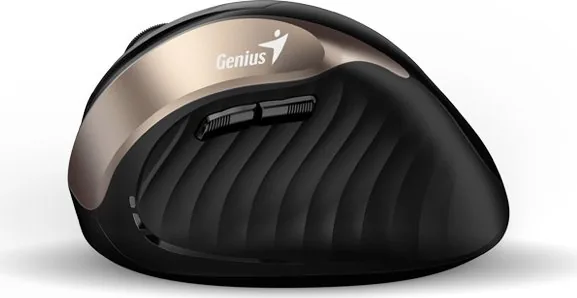
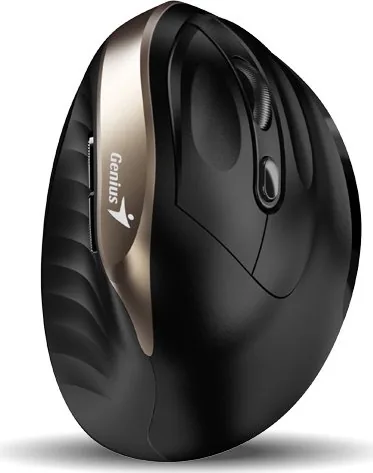
Thumb rest, reduced click noise, non-slip surface (side), storable receiver

M: qwen/qwen3.5-flash-20260224

Product Description

Elevate Your Workspace with Ergonomic Design

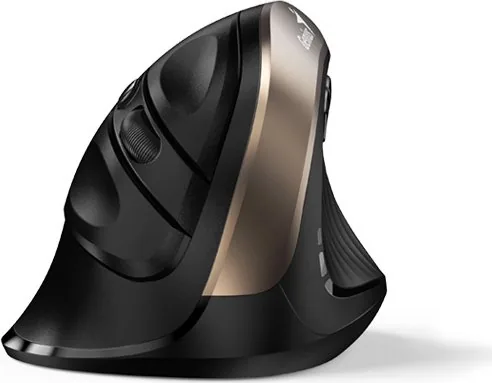
Finding the right mouse for your needs is crucial for maintaining productivity and health. The Genius Ergo 8250S Wireless Vertical Ergonomic Silent Mouse offers a specialized approach to computer interaction. This device is engineered to minimize strain on the wrist and forearm. By adopting a vertical orientation, users can avoid the pronation stress typical of standard flat mice. This natural handshake position promotes better posture during extended use.

Wireless Freedom and Quiet Operation

Connectivity plays a significant role in a modern workspace. This model features a wireless connection that eliminates cable clutter. Users simply plug the receiver into a USB port to establish a secure link. Another key feature is the silent clicking technology. This capability allows for discrete typing and clicking actions, which is ideal for environments where noise must be minimized. Traditional mice often produce audible clicks that can be distracting, but this version ensures a serene experience.

Advanced Configuration Options

Control over cursor speed is managed through adjustable DPI settings. The options include 800, 1200, and 1600 DPI modes. This flexibility accommodates various tasks, from detailed graphic work to fast-paced gaming. The device also includes extra buttons for navigation. You can scroll up or down the page using forward and backward buttons located on the side. Additionally, the middle button assists with internet browsing and document viewing within Windows systems.

Power Management and Usage Tips

The mouse operates using a standard AA battery. Installing the power source requires care, ensuring the correct polarity. If the cursor does not move smoothly, replacing the battery is often the first step in troubleshooting. Be sure to switch the power on using the button located underneath the device. Users should also note that this optical or laser mouse should not be used on glass or mirrored desks. Such surfaces may interfere with the sensor and cause tracking issues.

Safety and Compliance Standards

This product adheres to strict regulatory requirements for electronic devices. It complies with the R&TTE Directive 2014/53/EU regarding radio equipment. Furthermore, it meets Class B digital device limits set by the Federal Communications Commission. These standards ensure that the device does not cause harmful interference in residential settings. The unit is manufactured by KYE SYSTEMS CORP in Taiwan. This commitment to quality and safety guarantees that the device is reliable for daily computing tasks. Changes or modifications not expressly approved by the manufacturer could void the user's authority to operate the equipment. The RF exposure warning informs users about antenna placement and uncontrolled environment limits. Ensure you follow all guidelines to maintain warranty coverage. This design prioritizes user comfort and long-term health benefits.

M: qwen/qwen3.5-flash-20260224

© Copyright 2026 Manual.ly