
Geemarc TV10 Manual
PDF manual · 2 Pages
English



Quick check
Incorrect answer, please try again.
Chat with your Geemarc TV10 manual using AI
Get instant AI answers from your Geemarc TV10 manual
Ask anything about the Geemarc TV10. Answers come from this manual, with the pages they are based on.
Ask a Question
Do you recommend TV10?
Yes NoFrequently Asked Questions
Hold 1-2 and plus/minus for 5 seconds to see steady LED. Align sensors 2.5cm apart. Press TV10 key then original key. LED flashes for success.
Is this answer helpful?
No, batteries are not included. You need AAA units. Check the box for requirements before use.
Is this answer helpful?
Two years from purchase date. Keep receipt. Defects covered, accidents not.
Is this answer helpful?
Two devices. Profiles 1 and 2. TV, receiver, VCR.
Is this answer helpful?
Yes, email and phone lines for UK, France, Germany.
Is this answer helpful?
3 flashes mean correct signal. Solid means mode active.
Is this answer helpful?
Yes, press TV10 key then original remote key for each function in sequence.
Is this answer helpful?
Advantages and Disadvantages
Advantages

- Controls two devices and simplifies entertainment setup significantly for users.
- Learning mode works by copying original remote signals easily.
- Red LED confirms active profile number one or two clearly.
- Two year warranty covers manufacturing defects properly.
- Large buttons and labels suit seniors and visual impairments.
Disadvantages

- Batteries AAA are not included in the package box.
- Original device remote is required to program new functions.
- Manual contains typos and technical data may have deviations.
- No automatic code search requires manual alignment steps.
- Guarantee excludes accidents and user negligence completely.
Product Specification
Type
Universal Remote Control
Compatible Devices
2
Power Supply
2x AAA batteries
Features
programmable buttons
Product Description
Geemarc TV10 Overview
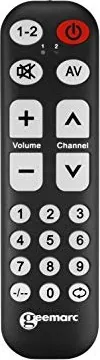
Are you struggling to find the right button among your living room clutter? Managing multiple devices often leads to frustration and lost time searching through stacks of plastic remotes. The Geemarc Telecom TV10 changes this dynamic significantly for modern households looking for simplicity. This universal remote simplifies home entertainment by consolidating control over two separate machines seamlessly without extra cost. Whether you own a standard television and a digital receiver or a VCR and a satellite box, this device handles both through dedicated profiles labeled one and two in the memory.
One of the standout features is the advanced learning capability embedded within the unit hardware. You do not need complex code entries or internet pairing to function correctly. Instead, the TV10 allows you to copy signals from your original controller directly using an infrared sensor. This ensures that every function works exactly as you expect without compatibility issues arising later. The process is straightforward and guided by clear LED indicators located on the faceplate for visibility. When you enter learning mode, a red light confirms the active profile for device number one or two immediately. This visual feedback removes guesswork during setup completely for users. Simply align the sensors face to face, press the desired button, and wait for confirmation flashes to verify success of the programming action.
Battery requirements are standard AAA units, though you must procure these separately for immediate use out of the box. Power management is efficient, ensuring long-term usability without frequent changes required from the daily user. The build quality supports ease of use for all age groups including seniors. Large buttons and intuitive labeling make navigation effortless for those with visual impairments or dexterity concerns. The manual covers multiple European languages including French, German, and Italian, reflecting the international availability of the product across borders. Users appreciate the durability and responsiveness during daily operation. The support contact is available in UK, France, Germany, and other regions.
Warranty coverage offers peace of mind for a full two years from the date of purchase officially. Accidents or negligence are excluded from coverage, but manufacturing defects are covered fully under the guarantee policy defined by law. Keeping the physical receipt is crucial for any claims to process efficiently later if needed. The device respects environmental standards with WEEE and CE markings visible on the packaging clearly. Contacting support is simple via email or phone lines available in various regions for assistance when problems occur. This remote control represents a practical upgrade for anyone seeking clarity in their media setup today rather than tomorrow.
Important Notes
Keep your receipt for warranty. Check battery direction.
Search for 67,706 Manuals online


Type-in Brand or Model
Lisa Stevens
7 months ago
Is the programming function reliable for all buttons or does the remote stop working after few keys are set up?
Manual.ly
7 months ago
Thank you for contacting support. We understand your frustration regarding the programming capability. If the device accepts only a few keys then stops, this suggests a hardware fault. Please try removing and reinserting the batteries. If that does not resolve the signal issue, we recommend initiating a return process for a replacement unit under warranty. Please provide your order number to our support team for further assistance with your exchange request.