
Gamdias Talos E3 Manual
PDF manual · 13 Pages
English



Quick check
Incorrect answer, please try again.
Chat with your Gamdias Talos E3 manual using AI
Get instant AI answers from your Gamdias Talos E3 manual
Ask anything about the Gamdias Talos E3. Answers come from this manual, with the pages they are based on.
Ask a Question
Do you recommend Talos E3?
Yes NoVideo Manual
Gamdias Talos E3 Build - Step by Step Guide
Frequently Asked Questions
This chassis supports ATX, Micro-ATX, and Mini-ITX motherboards, accommodating various build sizes within the mid-tower format.
Is this answer helpful?
The case allows for CPU cooler heights up to 160mm, ensuring compatibility with most high-performance air coolers.
Is this answer helpful?
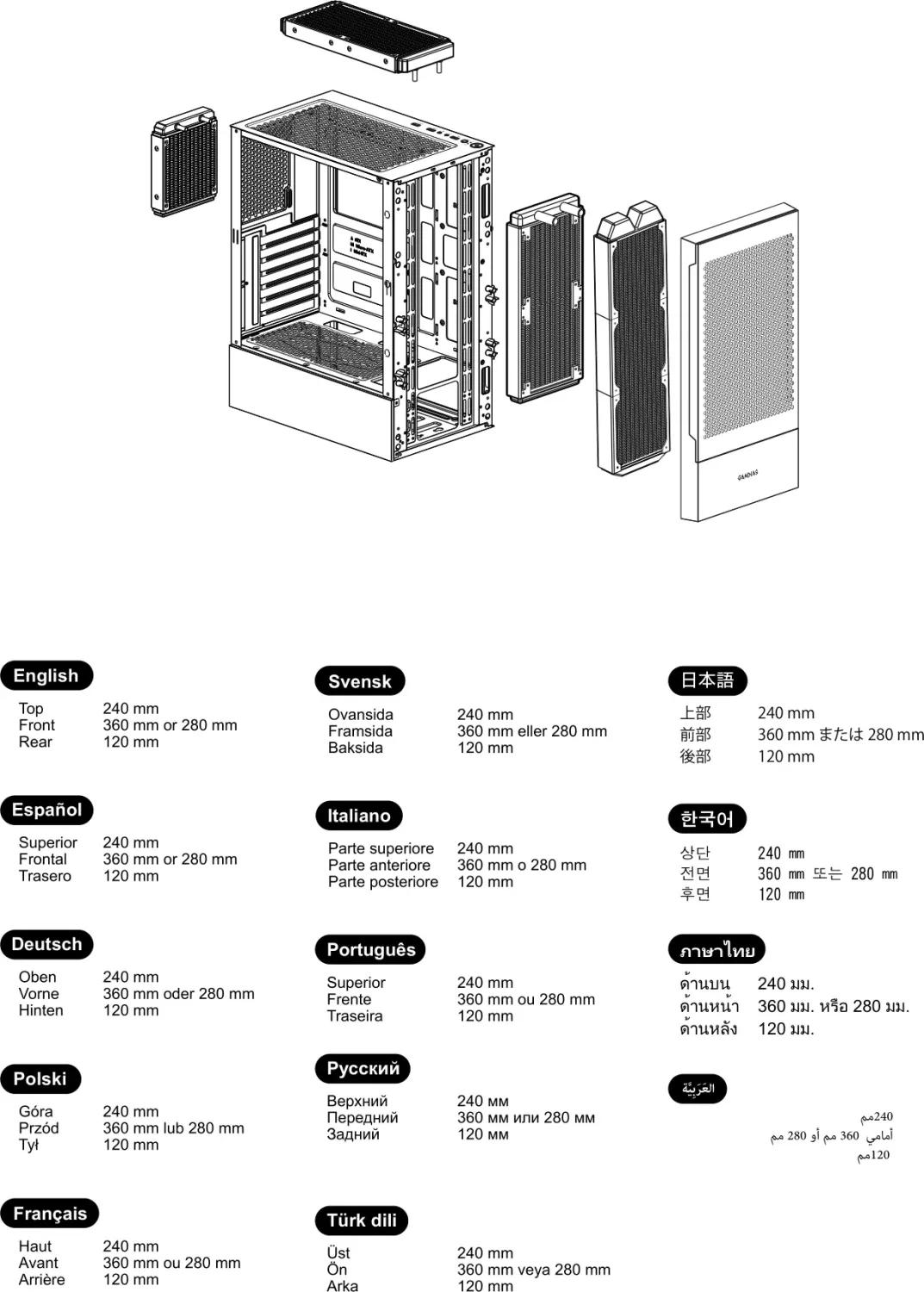
Yes, the front supports up to 360mm radiators, though removing the HDD cage is recommended. The top supports up to 240mm.
Is this answer helpful?
You can install graphics cards up to 300mm in length, fitting most standard mid-to-high end GPUs.
Is this answer helpful?
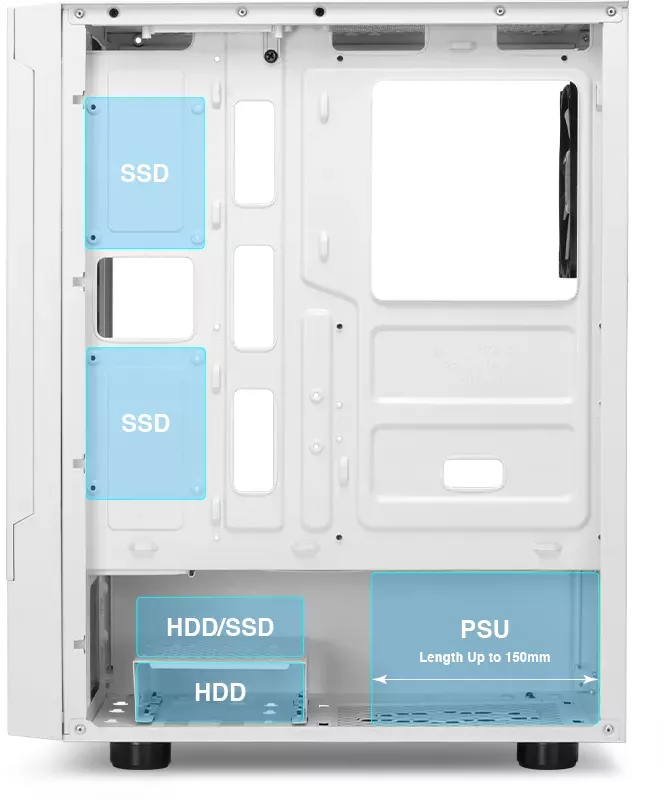
The PSU is mounted at the bottom and must not exceed 150mm in length to fit safely within the designated area.
Is this answer helpful?
A dedicated button on the I/O panel controls fan LED brightness levels, and they sync with the motherboard via a 5V header.
Is this answer helpful?
You can install up to two 3.5-inch hard drives or a combination including 2.5-inch SSDs depending on the HDD cage configuration.
Is this answer helpful?
Advantages and Disadvantages
Advantages

- Tempered glass side panel allows for excellent internal visibility and aesthetics.
- Pre-installed ARGB fans ensure vibrant lighting right out of the box.
- Supports a wide range of motherboard sizes from Mini-ITX to ATX.
- Large radiator options up to 360mm front for superior water cooling.
- USB 3.0 connectivity ensures fast data transfer speeds for peripherals.
Disadvantages

- HDD cage must be removed to accommodate large 360mm radiators.
- Cable management tools are standard which may require extra effort.
- PSU length is limited to 150mm in the bottom compartment.
- No dedicated fan hub is included for advanced lighting control.
- Bottom fan support is limited to two slots for extra cooling.
Product Specification
External
N/A
Internal
1x 3.5" (Horizontal, Drive Rails), 1x 2.5"/3.5" (Horizontal, HDD Cage), 2x 2.5"
Ports
1x USB-A 3.0 (5Gb/s), 2x USB-A 2.0 (480Mb/s), 1x 3.5mm Jack (Line-Out), 1x 3.5mm Jack (Line-In)
PCI Slots
7
Fan (Front)
2x 4.72" (RGB Illuminated) or 2x 5.51" (Optional)
Fan (Rear)
1x 4.72" (RGB Illuminated)
Fan (Left)
N/A
Fan (Right)
N/A
Fan (Top)
2x 4.72" (Optional)
Fan (Bottom)
N/A
Fan (Other)
2x 4.72" (Optional)
Radiator Sizes
4.72"/5.51"/9.45"/11.02"/14.17" Front, 4.72"/9.45" Top, 4.72" Rear
Motherboard Support
Up to ATX
Supported Motherboards
Mini-ITX (6.7"x6.7")/Micro-ATX (9.6"x9.6")/ATX (12"x9.6")
Power Supply
ATX (max. 5.91" deep)
PSU Position
Bottom
CPU Cooler
max. 6.30" Height
Graphics Cards
max. 11.81"
Lighting
RGB Header 3-Pin ARGB (+5V/DATA/GND), Integrated LED Control, Illuminated Fans
Dimensions (WxHxD)
8.27x17.60x14.29"
Volume
34.07 L
Weight
10.63 lbs
Case Type
Midi-Tower
Top
Partially closed, mostly Fan Grille, Dust Filter external
Bottom
Partially closed, Fan Grille rear, Dust Filter external
Left
Closed, mostly Glass
Right
Closed
Back
Partially closed, Fan Grille right top, PCI Slots (7x horizontal)
Front I/O Position
Case Side: Top, Height: Middle, Position: Right
Motherboard Orientation
Motherboard Orientation: Left
Features
Cable Management, Dust Filter, Glass View Window
USB Placement
Left
Product Description
Discover the Gamdias Talos E3 Series
Building a powerful gaming rig requires a chassis that balances aesthetics with functionality effectively. The Gamdias Talos E3 offers a premium mid-tower experience for dedicated PC enthusiasts. Whether you are constructing a high-end workstation or a competitive gaming station, this case provides the structure you need to succeed. It supports ATX, Micro-ATX, or Mini-ITX motherboards comfortably within its compact footprint. The dimensions allow it to fit in most gaming setups without overwhelming your desk space. Users often reference the Gamdias Talos E3 / E3 Mesh Manual to find setup help, but the case is designed for simplicity.
Aesthetics and Design
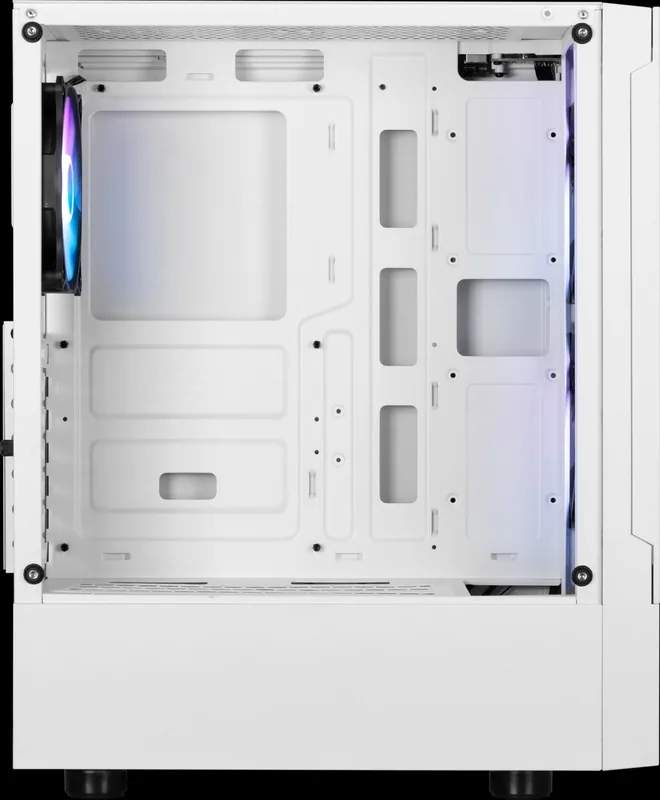
Visual appeal is crucial for gamers, which is why this unit features a large tempered glass side panel. This design choice allows you to display complex cable management and vibrant lighting effects inside your computer. The front mesh design promotes superior airflow, keeping critical components cool during intense sessions. Pre-installed fans include three ARGB units on the front and one on the rear. These fans sync with your motherboard via a 5V 3-Pin addressable header for seamless RGB control across the rig. The materials used include SPCC and ABS plastic for durability.
Installation and Compatibility
Ease of setup is a priority for first-time builders. The case includes clear instructions for installing the motherboard, PSU, and storage drives. You can mount up to two 3.5-inch drives or a combination of 2.5-inch SSDs and mechanical hard drives. Liquid cooling enthusiasts will appreciate the radiator support options significantly. The top mount accepts up to a 240mm radiator, while the front supports a massive 360mm radiator, though removing the HDD cage is suggested for optimal fit. Fan support extends to the bottom with two dedicated slots for extra cooling.
Connectivity and Expansion
On the I/O panel, users find essential connectivity options at their fingertips. This includes a USB 3.0 port for high-speed data transfer and two USB 2.0 ports for legacy devices. Audio jacks for headphones and microphones are present for convenient communication. A dedicated button controls the fan LED brightness levels directly. Cable management tools like ties are included in the accessory box to maintain a clean interior look. You can also control power and LED status through the front switches.
Notes on Build and Safety
Ensure CPU cooler height stays under 160mm to prevent interference with the case structure. VGA length should not exceed 300mm to ensure proper fitment. PSU length is limited to 150mm at the bottom. Always consult your motherboard manual for header pin-outs before connecting the front panel connectors. This chassis stands as a robust foundation for any custom desktop build requiring reliability.
Search for 67,706 Manuals online


Type-in Brand or Model