
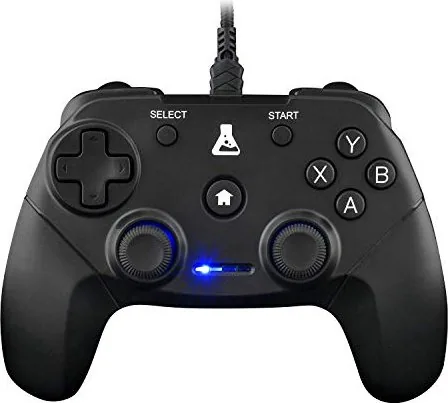
G-Lab K-Pad Thorium Manual
PDF manual · 2 Pages
English



Quick check
Incorrect answer, please try again.
Chat with your G-Lab K-Pad Thorium manual using AI
Get instant AI answers from your G-Lab K-Pad Thorium manual
Ask anything about the G-Lab K-Pad Thorium. Answers come from this manual, with the pages they are based on.
Ask a Question
Do you recommend K-Pad Thorium?
Yes NoFrequently Asked Questions
To switch to D-Input mode, press and hold the specific button on the controller for five seconds. This action toggles the device from X-Input to D-Input, making it compatible with PS3 setups.
Is this answer helpful?
It works with most modern PC games using X-Input. However, older games requiring DirectInput might need the D-Input toggle activated manually for full functionality.
Is this answer helpful?
Yes, by switching the controller to D-Input mode, it becomes fully functional on the PlayStation 3 console for supported games and applications.
Is this answer helpful?
Visit the official G-Lab website at www.the-g-lab.tech to check for the latest firmware updates and driver downloads for your specific region.
Is this answer helpful?
Do not throw the controller in regular trash. Take it to a designated collection point for recycling electrical and electronic equipment to comply with safety regulations.
Is this answer helpful?
The Testing Club is a program where users can sign up to become brand ambassadors and test upcoming G-Lab products before their official release to the public.
Is this answer helpful?
Advantages and Disadvantages
Advantages

- Supports both PC and PS3 platforms seamlessly
- Easy switching between X-Input and D-Input modes
- Durable build quality suitable for heavy use
- Ergonomic design reduces hand strain
- Access to exclusive testing programs via brand ambassador
Disadvantages

- Requires manual button hold for input mode switching
- Limited availability in some international regions
- No wireless connectivity option mentioned
- Battery life depends on external power source
- Driver installation may vary by operating system
Product Specification
Type
Gamepad
Compatibility
PC, PS3
Connection
Wired (5.9 ft), USB
Power Supply
USB
Buttons
13 (total), 3 (function keys), 4 (action keys), 2 (triggers), 2 (shoulder buttons), 2 (analog sticks)
Analog Sticks
1 concave (left below D-pad), 1 concave (right below action buttons)
D-Pad
concave
Colors
black
Features
2 vibration motors, LED lighting
Product Description
Discover the G-Lab K-Pad Thorium Controller
The G-Lab K-Pad Thorium Controller stands out as a versatile gaming peripheral designed for both PC and PS3 platforms. This controller bridges the gap between different gaming ecosystems, allowing players to enjoy their favorite titles without being locked into a single console environment. The device features a robust build quality that promises durability during intense gaming sessions.
Seamless Connectivity
One of the standout features of this controller is its dual-mode functionality. Users can effortlessly switch between X-Input and D-Input modes. For PC gamers, selecting X-Input ensures compatibility with modern Windows games that require standard gamepad support. Conversely, pressing and holding the designated button for five seconds switches the device to D-Input mode, which is essential for legacy titles or specific PlayStation 3 configurations. This flexibility makes it an excellent choice for collectors who own a mix of old and new games.
Design and Ergonomics
The Thorium model boasts an ergonomic design intended to reduce hand fatigue during long playthroughs. The layout mimics traditional controller schemes while incorporating unique buttons and triggers that enhance the user experience. The aesthetic appeal of the controller fits well in any gaming setup, offering a sleek look that complements high-end rigs.
Important Notes
Please remember that electronic devices should not be discarded with regular household waste. Always take your old controllers to designated recycling points to ensure proper disposal of electrical components. Joining the testing club on the official website allows enthusiasts to become brand ambassadors and test future releases before they hit the market.
Search for 67,732 Manuals online


Type-in Brand or Model