
Futurelight Stage Pixel Bar 10 Manual
PDF manual · 42 Pages
English



Quick check
Incorrect answer, please try again.
Chat with your Futurelight Stage Pixel Bar 10 manual using AI
Get instant AI answers from your Futurelight Stage Pixel Bar 10 manual
Ask anything about the Futurelight Stage Pixel Bar 10. Answers come from this manual, with the pages they are based on.
Stage Pixel Bar 10 Maintenance Schedule
A skilled person must inspect safety-relating and machine-technical installations annually. Check that all screws are tight, not corroded, and housings or fixations show no deformations.
An expert must inspect safety-relating and machine-technical installations every four years during an acceptance test to ensure compliance with safety standards.
Free maintenance reminders
Timed to your purchase date. Always free, unsubscribe anytime.
Ask a Question
Do you recommend Stage Pixel Bar 10?
Yes NoFrequently Asked Questions
It supports DMX512 (selectable 4/6/8/40/44 channel modes), RDM for remote device management, and Art‑Net via EtherCon RJ45. Standalone programs and a sound mode (microphone) are also available for controller‑free operation.
Is this answer helpful?
Yes. In 40‑channel and 44‑channel DMX modes each LED is segmented (4 channels per LED) allowing individual control of R, G, B and W per pixel for detailed chases and mapping.
Is this answer helpful?
Overhead mounting must follow applicable standards (e.g., EN 60598‑2‑17). Use the mounting bracket, secondary safety bond, and appropriately rated shackles/links. Installation should be performed by qualified rigging personnel and inspected regularly by a certified expert.
Is this answer helpful?
The unit provides power feed‑through to chain up to eight fixtures from one mains connection. After eight units a new mains feed is required to avoid overloading the supply.
Is this answer helpful?
No. The Stage Pixel Bar 10 is designed for indoor use only and must be kept away from moisture, rain or fog. Using it outdoors or in wet conditions risks electrical failure and voids safety assumptions.
Is this answer helpful?
The latest user manual and updates are available from Futurelight’s website (www.futurelight.com). Check product support pages for the current documentation and firmware where applicable.
Is this answer helpful?
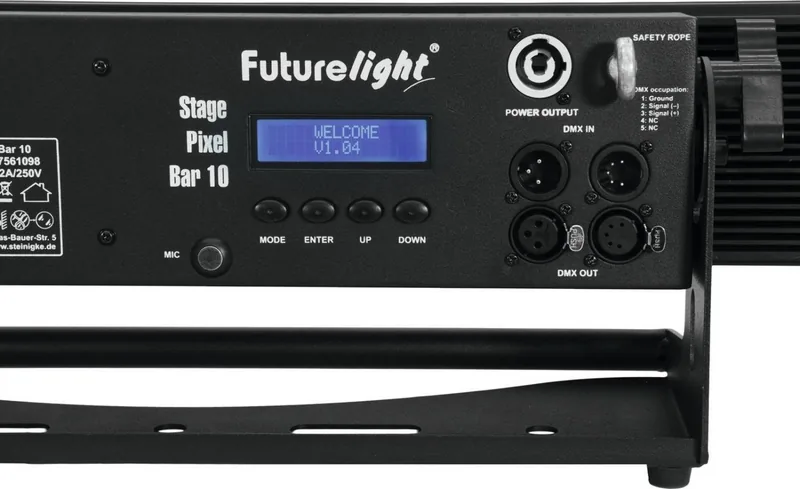
Use the onboard control board: press MODE until DMX MODE displays, ENTER to edit the start address (001–512), confirm with ENTER, then choose the DMX channel mode (4/6/8/40/44) via UP/DOWN and press ENTER to confirm.
Is this answer helpful?
Advantages and Disadvantages
Advantages

- High output 15W RGBW LEDs with collimator lenses produce bright, uniform 4° beams.
- Flexible control: DMX (4/6/8/40/44 CH), Art‑Net, RDM, standalone programs and sound mode.
- Per‑LED addressing in 40/44‑channel modes enables true pixel effects and complex chases.
- Robust installation features: Neutrik PowerCon feed‑through, EtherCon RJ45, mounting bracket and safety eyelet.
- Onboard LCD with menu controls for quick setup, IP/universe config and RDM fixture ID access.
Disadvantages

- Narrow 4° beam may require frost filter or multiple units for even wash coverage.
- Indoor use only; not rated for outdoor or wet environments without additional protection.
- Overhead rigging demands professional installation and compliance with safety standards.
- Maximum chainable power feed limited to eight units before re‑powering is required.
- Pixel control uses many DMX channels (40/44 CH), increasing controller and addressing complexity.
Product Specification
Type
Light bar
Light source
LED
Max. power consumption
170W
DMX control
yes (44 channels)
Dimensions
34.65x6.26x7.01in (WxHxD)
Weight
20.94lb
Product Description
Futurelight Stage Pixel Bar 10 — Powerful Pixel-Accurate RGBW Bar
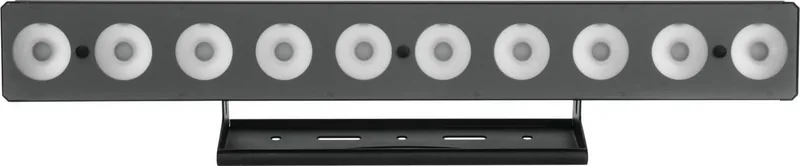
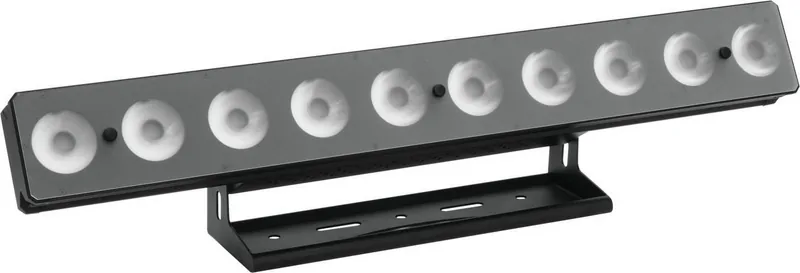
The Futurelight Stage Pixel Bar 10 is a high-output LED color changer designed for professional stage, club and event installations. Built around ten 15W 4‑in‑1 RGBW LEDs with collimator lenses, this linear fixture produces bright, flicker‑free beams with a tight 4° spread, ideal for long-throw accents, pixel effects and crisp color mixing. The unit supports flexible control options — standalone programs, music‑sync via a built‑in mic, DMX512 in multiple channel depths (4/6/8/40/44 CH), RDM for remote device management and Art‑Net via EtherCon RJ45 ports — making it easy to integrate into modern lighting systems.
Mechanically robust and installation‑ready, the Pixel Bar 10 can be floor‑mounted or rigged overhead with a mounting bracket and safety attachment points. It features a removable frost filter for beam softening, Neutrik PowerCon mains input with feed‑through to power up to eight chained units, and both 3‑ and 5‑pin XLR DMX connectors. The onboard control board with an LCD and four buttons lets you set DMX start addresses, choose internal macros and chaser patterns, adjust strobe and dimmer response, configure Art‑Net IP and universe settings, and manage RDM fixture IDs.
In standalone mode you can select static colors, 13 chase patterns, auto loop frequencies and sound‑triggered effects with adjustable sensitivity. DMX modes range from simple RGBW color control to full pixel addressing for per‑LED effects across 40 or 44 channels. Safety and serviceability are emphasized: protection class I grounding, replaceable fuse, clear maintenance guidance and recommended inspection intervals. Compact (880 x 159 x 173 mm) and relatively light at 9.5 kg, it’s suited for large stage backgrounds, façade accents and club installations that require concentrated, pixel‑controllable light.
Key usage highlights
- Ten individually controllable RGBW LEDs for both global color mixing and pixel mapping
- Multiple control paths: DMX (various channel counts), Art‑Net, RDM, standalone and sound mode
- Tight 4° beam with optional frost filter for either sharp beams or softened effects
- PowerCon feed‑through and EtherCon network connectors for practical chainability
Notes:
- Only for indoor use; mains 100–240 V AC. Observe rigging standards and secure with safety cable for overhead mounts.
- Avoid exposure to moisture; maintain minimum clearances for ventilation and flammable materials.
- Firmware/manual updates available at www.futurelight.com
Search for 67,706 Manuals online


Type-in Brand or Model