
FSP T-WINGS CMT710 Manual
PDF manual · 12 Pages
English



Quick check
Incorrect answer, please try again.
Chat with your FSP T-WINGS CMT710 manual using AI
Get instant AI answers from your FSP T-WINGS CMT710 manual
Ask anything about the FSP T-WINGS CMT710. Answers come from this manual, with the pages they are based on.
Ask a Question
Do you recommend T-WINGS CMT710?
Yes NoFrequently Asked Questions
The left chamber supports E-ATX, ATX, Micro ATX, and ITX motherboards, providing flexibility for various build sizes.
Is this answer helpful?
No, the design specifies one ATX PSU for the left side and one SFX PSU for the right side to optimize space and airflow.
Is this answer helpful?
Use hex screws to lock the VGA card to the motherboard on the left side. The right side supports horizontal installation only unless the HDD bracket is removed.
Is this answer helpful?
The maximum CPU cooler height supported is 155mm, ensuring compatibility with most large air coolers.
Is this answer helpful?
Yes, it features ARGB lighting effects with control via 5V ARGB sync connectors on the motherboard.
Is this answer helpful?
Yes, the case supports up to two 3.5-inch HDDs and three 2.5-inch SSDs per system configuration.
Is this answer helpful?
Always lift the entire unit from the bottom when moving it. Do not apply force to any structural columns to prevent cracking.
Is this answer helpful?
Advantages and Disadvantages
Advantages

- Supports dual independent systems with E-ATX/ATX on one side and ITX/SFX on the other
- Dual 360mm radiator support enables powerful liquid cooling for both systems
- Premium anodized aluminum frame with symmetrical wing design for superior aesthetics
- Translucent tempered glass panels showcase internal components effectively
- Special cable shroud keeps wiring organized and maintains a clean look
Disadvantages

- Complex assembly process due to dual-chamber separation and alignment requirements
- Right-side system is limited strictly to ITX motherboards only
- Requires careful handling during transport to avoid damaging structural columns
- Removal of HDD bracket needed for vertical GPU installation on right side
- Large footprint may require significant desk space for proper ventilation
Product Specification
Extern
N/A
Intern
2x 3.5", 3x 2.5"
Connections
1x USB-C 3.0 (5Gb/s), 2x USB-A 3.0 (5Gb/s), 1x 3.5mm Jack (Line-Out), 1x 3.5mm Jack (Line-In)
PCI Slots
8 (total)
Fan (front)
6x 4.72in (optional)
Fan (rear)
N/A
Fan (left)
N/A
Fan (right)
N/A
Fan (top)
N/A
Fan (bottom)
N/A
Fan (other)
N/A
Radiator sizes
14.17in front (2x 14.17in), N/A top
Motherboard
up to ATX (E-ATX with unknown dimensions possible, System1), up to Mini-ITX (System2)
Supported Motherboards
Mini-ITX (6.7"x6.7", System1, System2)/µATX (9.6"x9.6", System1)/ATX (12"x9.6", System1)/E-ATX (unknown dimensions, System1)
Power Supply
ATX (max. 9.45in deep, System1), SFX-L (max. 7.09in deep, System2)
PSU Position
bottom (vertical)
CPU Cooler
max. 6.10in height
Graphics Cards
max. 14.96in
Lighting
RGB Header 3-Pin ARGB (+5V/DATA/GND), integrated RGB LED lighting
Dimensions (WxDxH)
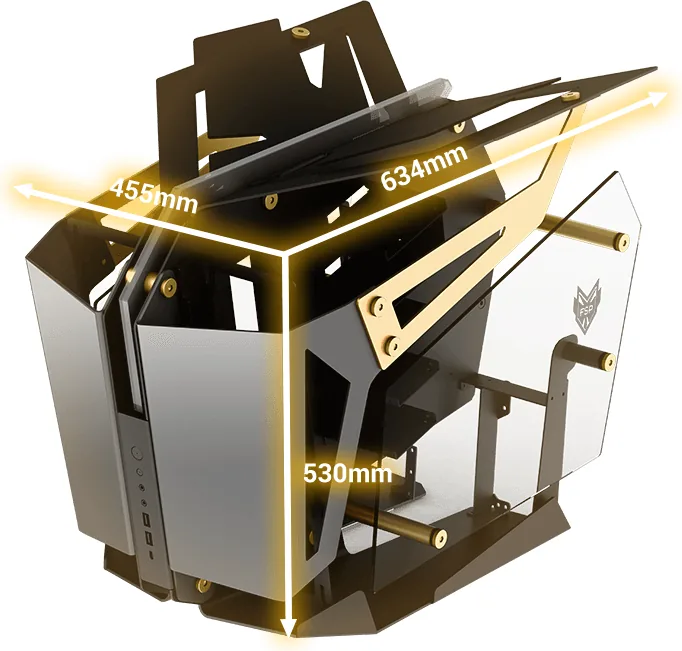
17.91x20.87x24.96in
Volume
9.33cu ft
Weight
26.06lbs
Case Type
Midi Tower
Front
partially closed, partially open
Top
partially closed, partially open
Bottom
partially closed, partially open
Left
partially closed, partially open, partially glass
Right
partially closed, partially open, partially glass
Rear
open, PCI Slots (modular, 8x horizontal or Variant2: 8x vertical)
Front I/O Position
Case Side: Front, Height: middle, Position: middle
Features
Aluminum case, semi-open case, dual system, cable management, graphics card mountable vertically, PCI slots mountable vertically, glass window, multi-chamber design
Note on E-ATX
Motherboard and case manufacturers designate different dimensions as E-ATX. This manufacturer provides no information on supported E-ATX dimensions. Motherboards with E-ATX/SSI EEB dimensions of 12.01x12.99in or 12"x13" may not be supported.
USB Spelling
Link
Product Description
Discover the FSP T-WINGS CMT710 Manual Experience
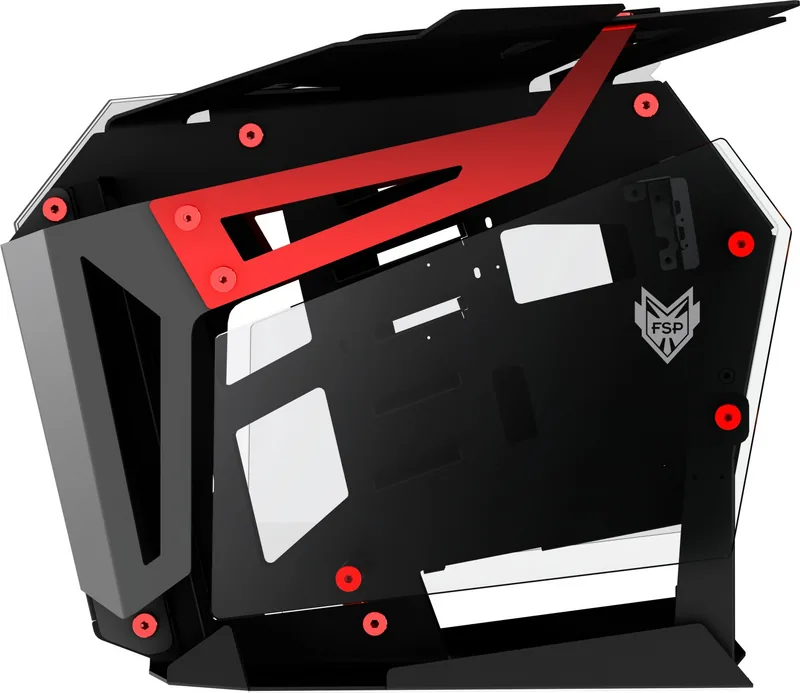
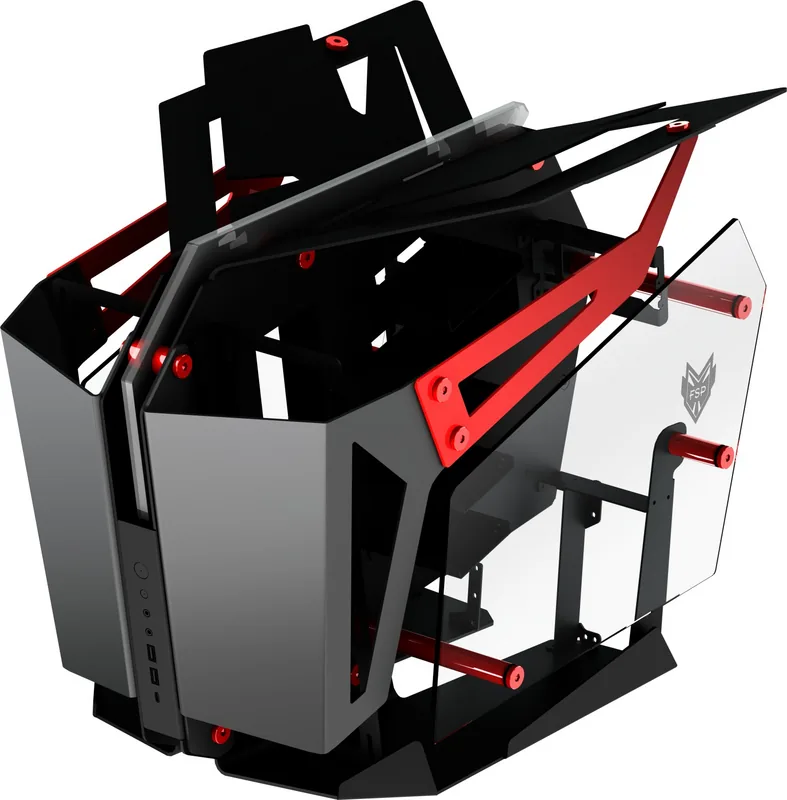
The FSP T-WINGS CMT710 represents a bold leap in PC chassis engineering, designed specifically for enthusiasts who demand dual-system capability without compromising on aesthetics or cooling performance. This unique open-frame case features anodized aluminum construction flanked by symmetrical wings, creating a striking visual balance that combines dynamic structure with elegant design. The core innovation lies in its dual-chamber architecture, allowing users to run two separate computer systems within a single enclosure.
One side of the chassis is dedicated to a primary system supporting E-ATX, ATX, Micro ATX, and ITX motherboards paired with an ATX power supply. The opposing side accommodates a secondary system built around an ITX motherboard and an SFX power supply. This configuration is ideal for users needing a high-performance main rig alongside a compact auxiliary machine for testing or media serving. Both chambers support up to 360mm radiators, ensuring robust liquid cooling solutions can be implemented for thermal management across both builds.
Aesthetics are enhanced by translucent tempered glass panels that showcase the internal components beautifully. The case includes ARGB lighting effects with full control capabilities, allowing users to synchronize colors and patterns via Type-C connectors or standard headers. A special cable shroud design ensures that wiring remains hidden, contributing to a clean and tidy appearance even with complex dual-system setups. The vertical GPU support offers flexibility for graphics card installation, further expanding customization options.
Key Features and Assembly
Assembly of the CMT710 is straightforward yet requires attention to detail. The unit separates into two halves connected by aluminum rods and screws. Users install motherboards first, securing them to copper columns with provided screws. Storage drives are mounted using specific brackets, with capacity for two 3.5-inch HDDs and three 2.5-inch SSDs per system depending on configuration. Power supplies are installed in rear troughs, with cables routed through central ducts to maintain organization.
The radiator mounting system supports both side and vertical orientations, giving builders freedom in their cooling layout. When transporting the unit, it is crucial to lift the entire assembly rather than applying force to structural columns to prevent damage. The included accessories cover all necessary hardware for installation, including specialized tools for screwdrivers and cable management.
Why Choose the T-WINGS?
This chassis stands out for its ability to merge two distinct computing environments into one cohesive unit. Whether for professional workstations requiring multiple OS environments or hobbyists building showpiece rigs, the CMT710 delivers unmatched versatility. Its open-frame design promotes excellent airflow, while the premium materials ensure durability and style. The manual provides clear instructions in multiple languages, making setup accessible to a global audience.
Search for 67,706 Manuals online


Type-in Brand or Model