


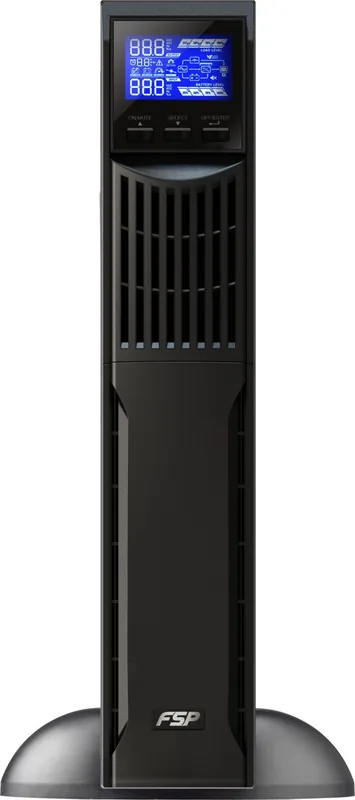
FSP Champ Rack Manual
PDF manual · 21 Pages
English



Quick check
Incorrect answer, please try again.
Chat with your FSP Champ Rack manual using AI
Get instant AI answers from your FSP Champ Rack manual
Ask anything about the FSP Champ Rack. Answers come from this manual, with the pages they are based on.
Champ Rack Maintenance Schedule
Recharge the UPS battery every 2 months at temperatures between 40 to 45 degrees C for 1-2 hours.
Recharge the UPS battery every 3 months at temperatures between -25 to 40 degrees C for 1-2 hours.
Replace batteries if the service life of 3 to 5 years has been exceeded or if capacity is defective.
Free maintenance reminders
Timed to your purchase date. Always free, unsubscribe anytime.
Ask a Question
Do you recommend Champ Rack?
Yes NoFrequently Asked Questions
The standard model batteries typically last between 3 to 5 years at 25°C ambient temperature. If the service life is exceeded, the batteries must be replaced. Regular maintenance and charging intervals should be followed during storage to extend their longevity effectively.
Is this answer helpful?
The unit is equipped with a USB communication port and an RS232 communication port for connecting to a PC. There is also an Intelligent Slot (option) available for an SNMP card to provide advanced network management and status monitoring capabilities remotely.
Is this answer helpful?
If the UPS indicates an overload, remove excess loads from the output immediately. The unit may enter bypass mode or shut down automatically depending on the severity. If fault code 43 or 14 appears, check for short circuits or excessive power draw and restart the unit after clearing the load.
Is this answer helpful?
Yes, the unit supports bypass mode either automatically during overload or via manual configuration. When input voltage is stable, ECO mode can bypass the inverter to save energy. You can also force bypass mode using the front panel buttons if the input voltage is within the acceptable range.
Is this answer helpful?
Basic operation is designed for individuals with no previous experience, but installation requires care. Do not block ventilation holes and ensure the unit is in a dry environment. Connect only to earthed shockproof outlets and use VDE-tested cables. Safety warnings must be read strictly before connecting.
Is this answer helpful?
Efficiency varies by load but reaches up to 90% in AC mode for the 3K model in standard configuration. In battery mode, efficiency is around 88% for the 3K version. This ensures minimal energy loss during normal operation and charging cycles for connected devices.
Is this answer helpful?
Before storing, charge the UPS fully for approximately 5 hours. Store it covered and upright in a cool, dry location. Recharge the battery every few months depending on the temperature to maintain capacity. Avoid exposing it to moisture or direct sunlight during the storage period.
Is this answer helpful?
Advantages and Disadvantages
Advantages

- Pure sine wave output ensures compatibility with sensitive electronics and servers.
- USB and RS232 communication ports allow for PC monitoring and software integration.
- Multiple operating modes including ECO provide energy savings during stable power conditions.
- Clear LCD panel displays real-time voltage, frequency, and load percentage data.
- Available in various capacities from 1KVA to 3KVA for different power needs.
Disadvantages

- Battery life expectancy is around 3 to 5 years requiring eventual replacement.
- High capacity versions require complex terminal wiring and specific cable gauges.
- Maintenance requires qualified personnel due to hazardous internal voltages.
- Noise level is present at less than 50dBA which may be noticeable in quiet rooms.
- Input is limited to single phase systems which might restrict some industrial setups.
Product Specification
Type
Rackmount
Classification
VFI (On-Line)
Interfaces
USB, serial
Data Line Protection
N/A
Charging Time
4 hours (90%)
Special Features
LCD
Manufacturer Warranty
2 years
Product Description
Protect Your Equipment with the FSP Champ Rack UPS Manual
Ensuring your critical devices remain operational during power interruptions is essential for modern businesses and data centers. The FSP Champ Rack UPS offers a robust solution designed for online uninterruptible power supply needs across various environments. This system comes with detailed documentation known as the FSP Champ Rack UPS Manual to guide you through setup and operation seamlessly. Whether you are managing small office servers, workstations, or large enterprise networks, this unit provides stable power delivery to prevent data loss.
The UPS line includes 1K, 2K, and 3KVA models available in both standard and long-run configurations. Installation involves connecting AC input and reconnecting battery wires carefully to ensure safety before operation. The front panel features an intuitive LCD screen displaying real-time data such as load levels, battery voltage, and current operating modes like online, ECO, or bypass. Users can monitor system status remotely via built-in USB or RS232 ports. For advanced needs, optional SNMP cards provide network management capabilities.
Safety warnings emphasize avoiding moisture and ensuring proper ventilation around the housing. Maintenance requires qualified personnel due to hazardous voltages even when disconnected from the mains supply. The unit supports various regional output voltages including 110V and 220V ranges to adapt to local grids. Efficiency reaches up to 90% in AC mode for the largest 3K model.
Understanding the provided manual is key to avoiding common faults. Common issues like overload or battery failure are tracked via specific fault codes on the digital display. Regular battery replacement every 3 to 5 years ensures longevity and performance. Storing the unit requires cooling and periodic charging intervals. Follow the guidelines strictly to maintain warranty compliance and safety standards for your investment. This product ensures your technology survives unexpected outages without damage.
Key Features Overview
The system includes multiple operating modes for flexibility. Online mode provides pure sine wave power. Bypass mode activates during overload conditions. ECO mode saves energy when grids are stable. Noise levels stay under 50dBA for office comfort. Software support allows for scheduled shutdowns on Windows, Linux, or MAC systems. Always refer to the FSP Champ Rack UPS Manual for exact terminal wiring instructions for 3KVA models. Proper cable management prevents tripping hazards and maintains a clean workspace.
Search for 67,706 Manuals online


Type-in Brand or Model