
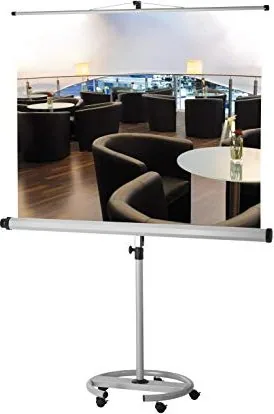
Franken Mobile Manual
PDF manual · 4 Pages
English



Quick check
Incorrect answer, please try again.
Chat with your Franken Mobile manual using AI
Get instant AI answers from your Franken Mobile manual
Ask anything about the Franken Mobile. Answers come from this manual, with the pages they are based on.
Ask a Question
Do you recommend Mobile?
Yes NoFrequently Asked Questions
Press the blocking head lever and simultaneously pull the inner tube up by about 10 cm. Then raise it to the required height while pressing the locking piece to secure the position.
Is this answer helpful?
No. Small rooms, animals, and playing children are potential sources of danger for damage to the projection surface and safety risks. Maintain a safe distance if children are present.
Is this answer helpful?
Yes. When used in assembly rooms, the tripod screen must be secured from toppling. If necessary, anchor it in solid brickwork or use spanners against a wall.
Is this answer helpful?
Turn the tensioner knob at the end of the screen case counter-clockwise. Usually, half a turn is sufficient to achieve proper tension without damaging the foil.
Is this answer helpful?
Yes. You can rotate the screen case around the vertical axis by loosening the screw marked A. Ensure the wheels are locked when re-tightening to prevent spinning.
Is this answer helpful?
The screen must be placed exclusively on a horizontal floor for stability reasons. Uneven surfaces increase the risk of the stand tipping over.
Is this answer helpful?
Advantages and Disadvantages
Advantages

- Integrated durable wheels with braking systems allow for easy mobility and stable positioning on flat surfaces.
- Robust telescopic inner tube enables precise height adjustment with a secure mechanical locking mechanism.
- High-quality matte white foil provides excellent contrast for projection and photography in varied indoor lighting.
- Keystone eliminator option assists in achieving a perfectly rectangular image during setup.
- Simple assembly and disassembly process allows quick preparation and storage for different event needs.
Disadvantages

- Requires a completely horizontal floor to ensure stability and prevent accidental toppling during use.
- Must be secured against toppling by anchoring into solid walls in venues with large public gatherings.
- Potential hazard exists with children and animals in nearby areas during active setup and operation.
- Screen surface requires careful handling to avoid tearing during the unrolling and rolling process.
- Limited use in crowded rooms without specific safety measures to protect both equipment and audience.
Product Specification
Screen Size
78.74x78.74in
Diagonal
111.02in
Aspect Ratio
1:1
Gain
1.2
Operating Mode
Manual
Mounting Type
Tripod
Border
No
Features
Portable
Product Description
Elevate Your Visual Presentations
When you need reliable display equipment for professional events, the Franken Mobile 1.2 Matte White Foil 200x200cm Tripod Backdrop Manual serves as an essential guide for installation success for models like XFSL15 and XFSL20. This system transforms how experts manage large screen setups efficiently across the globe. The unit features a robust telescopic inner tube that allows for precise height adjustment without the need for complex tools. Users simply press the blocking head lever while pulling the sturdy tube upwards. Once the desired vertical level is reached, the mechanical locking piece keeps it firmly in place. The surface material is a high-quality matte white foil perfect for high-contrast projection or photography backdrops in various lighting conditions indoors.
Mobility and Stability Features
Moving this heavy display equipment across smooth floors is straightforward thanks to integrated durable wheels with braking systems. You can simply tighten specific screws to stop any unwanted movement or rotation during active presentation use. Safety remains paramount when utilizing this apparatus in public venues or large assembly rooms where stability is required. The assembly instructions emphasize placing the stand on a completely horizontal floor to ensure balance. In venues with large gatherings, securing the stand against toppling is highly critical for attendee safety. Anchoring into solid walls might be required to prevent severe accidents involving children or pets wandering nearby.
Assembly and Tensioning Steps
Setting up the large projection surface involves unrolling the screen smoothly from the protective tubus casing. You must connect the hanging bracket ring to the upper hook securely to prevent slippage. The Keystone eliminator option helps achieve a rectangular image if keystone distortion occurs. Adjusting the tension ensures the surface remains flat without sagging. Turn the tensioner knob counter-clockwise at the end of the screen case until the surface is tight. This usually requires about half a turn for optimal results for models listed as XFSL18. After use, reverse the process carefully. Slide the inner tube down completely, unhook the large surface, and let it roll inside. Finally, swivel the tube into a vertical position for safe transport.
Safety Considerations and Maintenance
Crowded rooms present specific risks for this equipment. The product manual highlights that playtime areas nearby children are not ideal spots for display screens. Ensuring the screen stays upright prevents accidental tipping. The rubberized wheels help lock the position once set up. The modern design focuses on user safety. Following these guidelines ensures longevity for your professional media gear. Please observe safety hints when taking down the screen after use. Maintaining distance from animals and children keeps the environment safe. Check the wheels lock before projecting visual content to ensure performance.
Search for 67,732 Manuals online


Type-in Brand or Model