
Fractal Design Define XL R2 Manual
PDF manual · 50 Pages
English



Quick check
Incorrect answer, please try again.
Chat with your Fractal Design Define XL R2 manual using AI
Get instant AI answers from your Fractal Design Define XL R2 manual
Ask anything about the Fractal Design Define XL R2. Answers come from this manual, with the pages they are based on.
Define XL R2 Maintenance Schedule
Slide the filter toward the rear of the case and remove it to clean any accumulated dust.
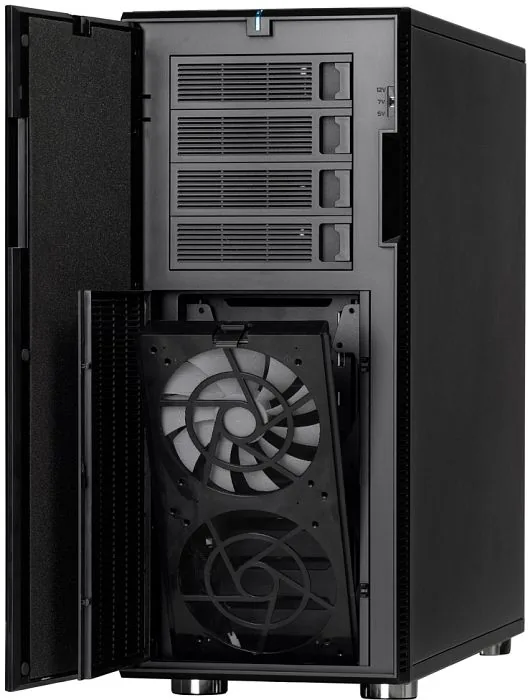
Open the front door panel and fan door, then pull down the lever to remove the filter for cleaning by hand or water.
Ask a Question
Do you recommend Define XL R2?
Yes NoFrequently Asked Questions
The Define XL R2 is designed to support a wide range of motherboard sizes, including E-ATX and XL-ATX. This makes it suitable for high-performance systems that require larger boards. The internal layout provides ample space to ensure all components fit comfortably without obstruction.
Is this answer helpful?
The case features two particle filters. To clean the PSU filter, slide it toward the rear and remove it to wipe away dust. For the front filter, open the door panel and open the fan door to remove the filter completely. These can be cleaned by hand or with water if fans are removed first.
Is this answer helpful?
Yes, the case supports graphics cards up to 400mm in length. This requires ensuring the upper hard drive cage is removed to create sufficient clearance within the chassis. The internal design accommodates long components while maintaining proper airflow.
Is this answer helpful?
Fractal Design Deftine XL R2 computer cases are guaranteed for twenty-four months from the date of delivery to the end-user. This warranty covers defects in materials and workmanship. Claims must be returned to the agent who sold the product with shipping prepaid.
Is this answer helpful?
Yes, the chassis supports mounting cooling radiators without extensive modification. Top panels fit two 120mm or 140mm units. Front panels fit two 120mm units if the hard drive cage is adjusted. Single 120mm radiators fit bottom and rear fan positions.
Is this answer helpful?
Advantages and Disadvantages
Advantages

- Accommodates E-ATX and XL-ATX motherboards with nine PCI expansion slots for versatile graphics setups.
- Silent performance achieved through minimalistic Scandinavian design and rubber fan spacers to reduce vibration noise.
- Highly flexible hard drive cages allow removal or repositioning for large graphics cards or radiators.
- Robust water-cooling support enables installation of multiple radiators on top, front, bottom, and rear panels.
- Built-in three-position fan controller allows manual voltage adjustment from low to high speed settings.
Disadvantages

- Upper hard drive cage removal and repositioning requires tools and careful handling during cable management.
- Front water-cooling radiator installation necessitates moving or removing the upper hard drive cage.
- Fan controller offers only three fixed voltage levels rather than dynamic speed curves.
- Cleaning front filters requires opening the door panel and handling small levers carefully.
- LED activity indicators for power and hard drives are optional connections on the motherboard.
Product Specification
External
4x 5.25", 1x 3.5" (in 5.25" bay)
Internal
8x 2.5"/3.5" (transverse, drive rails)
PCI Slots
9
Fan (front)
1x 5.51", 1000rpm or 2x 5.51" (optional)
Fan (rear)
1x 5.51", 1000rpm
Fan (left)
1x 5.51" (optional)
Fan (right)
N/A
Fan (top)
2x 5.51" (optional)
Fan (bottom)
1x 5.51", 1000rpm
Fan (other)
N/A
Motherboard
up to XL-ATX (13.5"x10.3")
Supported Motherboards
Mini-ITX (6.7"x6.7")/microATX (9.6"x9.6")/ATX (12"x9.6")/E-ATX (SSI EEB, 12"x13")/XL-ATX (13.5"x10.3")
Power Supply
ATX (max. 13.58" deep without bottom fan, 7.48" with bottom fan)
Power Supply Position
bottom
CPU Cooler
max. 6.69" height
Graphics Cards
max. 12.99" (18.90" without HDD cage)
Color
black, black interior
Lighting
no lighting
Dimensions (WxHxD)
9.13"x22.01"x22.05"
Volume
2.56 cu ft
Weight
36.16 lbs
Chassis Type
Big Tower
Bottom
partially closed, mostly fan grille, dust filter outside
Left
partially closed, fan grille center
Right
closed, sound dampening mat inside
Back
partially closed, fan grille right top, PCI Slots (9x horizontal)
Front I/O Position
Case Side: Top, Height: Front, Position: Center
Product Description
Fractal Design Define XL R2 Overview
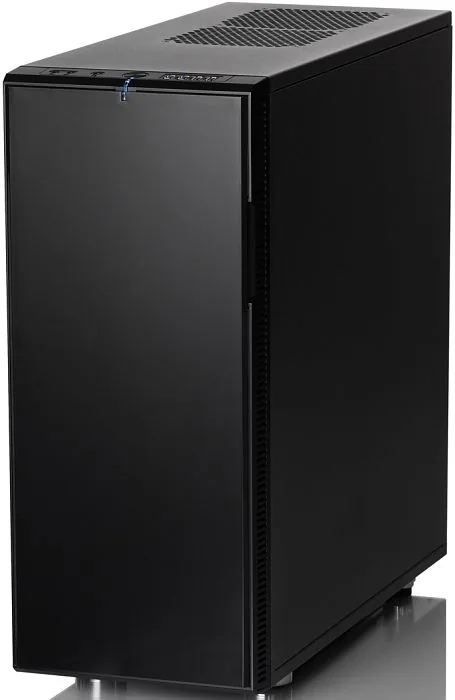
The Fractal Design Define XL R2 computer case stands as a testament to Scandinavian engineering principles. It combines sleek aesthetics with profound functionality for enthusiasts. Many users are drawn to designs that remain nearly transparent in the home office. This product reflects that philosophy perfectly. It focuses heavily on providing a silent computer system while offering flexibility and ease of use during installation and upgrades. The all-new interior layout accommodates a wider range of components effectively. Companions like Bang Olufsen represent this style and efficiency. We like these designs because they harmonize with our surroundings.
Interior Space and Compatibility
This chassis supports E-ATX and XL-ATX motherboards comfortably. It offers nine PCI expansion slots for versatile graphics card setups. The new layout allows for the installation of the largest CPU coolers available today. Users will find ample space for neatly organized cable routing in the back. For those aiming to achieve maximum sound reduction, installing water-cooling components is possible in both the front and top panel sections without modification. It ensures maximum compatibility with various hardware configurations including long GPUs.
Flexible Hard Drive Cages
The Adaptable hard drive cages are a standout feature. The upper cage may be removed or rotated to provide clearance for graphics cards up to 400mm in length. The lower HDD cage can be repositioned to provide more space in the front of the case for water-cooling radiators. This flexibility ensures maximum compatibility with various hardware configurations. Rubber spacers are supplied for installing additional fans in the top and side panel positions to minimize noise from vibrations.
Cooling and Control
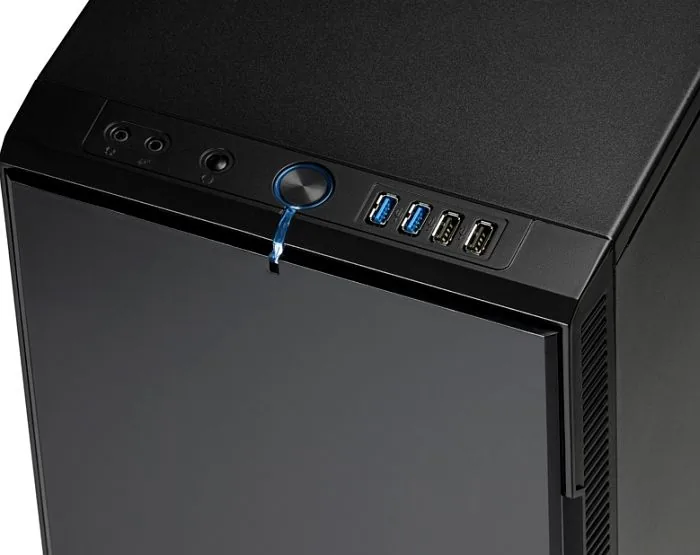
Top panel supports 2x 120mm fans or 2x 140mm radiators. Front panel requires cage adjustment. Bottom and rear allow single 120mm radiators at fan positions. Usability includes a three-position fan controller located behind the front door panel. It allows control of three chassis fans at low, medium, or high speeds corresponding to specific voltages. Maintenance is straightforward. Cleaning the filters ensures optimal cooling. Sliding the PSU filter or removing the front filter allows for direct hand or water cleaning. The LED connection is optional.
Warranty and Setup
Warranty coverage lasts for twenty-four months against defects in materials. Warranty excludes accidental damage, misuse, or tampering with serial numbers. For further details regarding installation procedures, users should consult the Fractal Design Define XL R2 Manual to ensure proper setup. Product support is available via regional email addresses. This case carries on the Define Series legacy of minimalistic and stunning design combined with maximum functionality. It completes the silent computing experience.
Search for 67,706 Manuals online


Type-in Brand or Model