
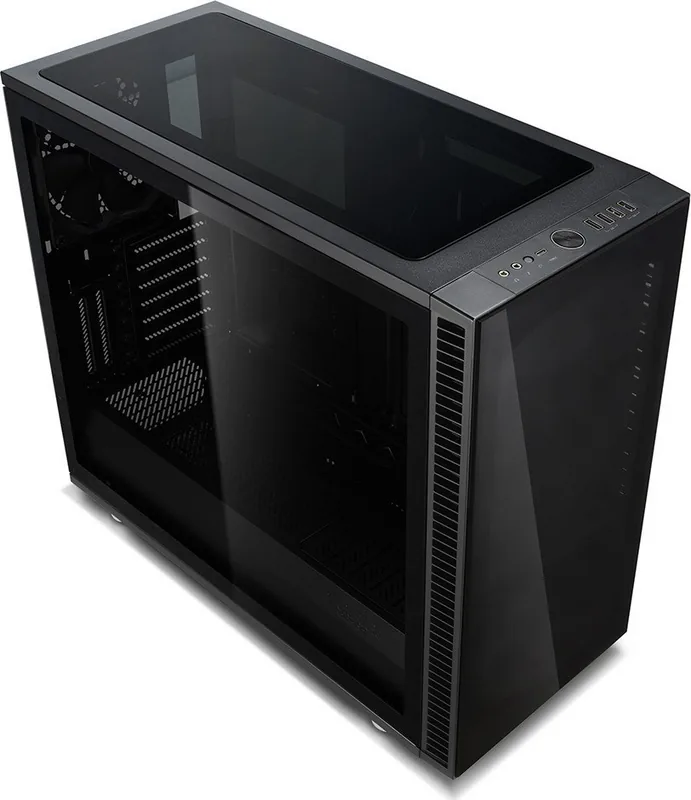
Fractal Design Define S2 Manual
PDF manual · 44 Pages
English



Quick check
Incorrect answer, please try again.
Chat with your Fractal Design Define S2 manual using AI
Get instant AI answers from your Fractal Design Define S2 manual
Ask anything about the Fractal Design Define S2. Answers come from this manual, with the pages they are based on.
Ask a Question
Do you recommend Define S2?
Yes NoFrequently Asked Questions
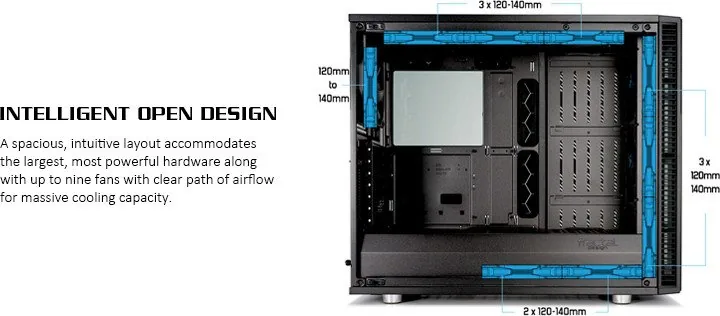
The guidance covers both air and liquid cooling. It lists fan placements for 120 mm and 140 mm configurations and provides water-cooling radiator options with multiple layout examples. It also explains how to connect PWM fans via the included PWM hub so cooling remains controlled and predictable.
Is this answer helpful?
The manual lists a maximum CPU cooler height of 185 mm and a maximum graphics card length of 440 mm. Using these values as your first planning step helps avoid late-stage fitment problems after the motherboard and drives are already installed.
Is this answer helpful?
The instructions state that RGB-related parts, including the Adjust R1 RGB controller, are included in the RGB version or sold separately. That means you should check your accessory box and confirm controller availability before starting RGB strip and fan connections.
Is this answer helpful?
The build steps show connecting front I/O headers such as POWER SW, POWER LED, HDD LED, USB 3.1 Gen 2, USB 3.0, USB 2.0, and HD Audio. The key idea is to match each connector to the correct motherboard header labels before fully securing components.
Is this answer helpful?
Yes. Optional steps describe removing the top glass panel for easier access, and replacing glass with a ventilated panel for improved airflow. This is useful during testing or when you want to prioritize cooling over window aesthetics.
Is this answer helpful?
The guide includes reservoir mounting bracket hardware and describes adding a water-cooling fill port as an optional step. It also provides radiator setup examples and notes on possible water-cooling configurations to help plan tube routing and clearance.
Is this answer helpful?
Support guidance points to the Fractal Design support portal, and the warranty section states a limited 24-month coverage from delivery to the end user for defects in materials and workmanship. It also outlines key exclusions such as misuse, rental use, unauthorized tampering, natural disasters, and installations not following the user manual.
Is this answer helpful?
Advantages and Disadvantages
Advantages

- Step-by-step build flow covers side panels, PSU, motherboard prep, and front I/O cable connections.
- Strong cooling options with explicit fan sizes and multiple water-cooling radiator layouts.
- Panel flexibility: top glass can be swapped for a ventilated alternative to improve thermals.
- Practical compatibility limits for CPU cooler height (185 mm) and GPU length (440 mm).
- RGB-ready guidance: PWM fan hub support plus RGB strip and fan connections (RGB version dependent).
Disadvantages

- Installation steps and optional upgrades can be complex for first-time builders.
- RGB components may be included only in the RGB version, requiring separate purchase in other configurations.
- Fitment limits (CPU cooler height and GPU length) may restrict certain large aftermarket parts.
- Some customization relies on using optional panels or additional brackets, increasing build planning needs.
Product Specification
External
N/A
Internal
3x 2.5"/3.5" (transverse, drive rails), 2x 2.5"
Ports
1x USB-C 3.1 (10Gb/s, 20-Pin Key-A Header), 2x USB-A 3.0 (5Gb/s), 2x USB-A 2.0 (480Mb/s), 1x 3.5mm jack (Line-Out), 1x 3.5mm jack (Line-In)
PCI Slots
9 (2x Riser Card)
Fans (left)
N/A
Fans (right)
N/A
Fans (top)
3x 5.51in (optional)
Fans (bottom)
N/A
Fans (other)
2x 5.51in (optional)
Motherboard
up to ATX (11.18in wide)
Supported Motherboards
Mini-ITX (6.7"x6.7")/µATX (9.6"x9.6")/ATX (12"x9.6")/E-ATX (12"x11.2")
Power Supply
ATX (max. 11.81in deep)
Power Supply Position
bottom
CPU Cooler
max. 7.28in height
Graphics Cards
max. 17.32in (18.31in without fans)
Dimensions (WxHxD)
9.17x18.31x21.38in
Volume
15.54gal
Case Type
Midi-Tower
Bottom
partially closed, mostly fan grille, dust filter outside
Left
closed, glass
Rear
partially closed, fan grille top right, PCI slots (7x horizontal, 2x vertical)
Front I/O Position
Case side: top, Height: Front, Position: center
Note on E-ATX
Motherboard and case manufacturers designate different dimensions as E-ATX. Motherboards with E-ATX/SSI EEB dimensions of 12.01x12.99in or 12"x13" are not supported.
USB notation
Link
Product Description
Fractal Design Define S2 Manual - Build, Cooling, and Customization Overview
Fractal Design Define S2 Vision is a premium PC case aimed at builders who want a clean look with serious hardware flexibility. The setup guidance highlights how to assemble core components efficiently, from removing the side panels to mounting the PSU, preparing the motherboard, and routing front-panel I/O. With clear accessory listing and step-by-step connections for power switches, LEDs, and USB headers, it is designed to make a first build feel controlled rather than chaotic.
A standout theme in the Define S2 Vision setup is airflow and cooling variety. The guidance covers PWM fan hub connection for stable fan control, plus options for RGB strip and RGB fans. You can also tailor the top and side visibility by swapping the upper glass panel with a ventilated panel for improved thermals when needed. Water-cooling support is treated as a first-class option, with multiple radiator layout scenarios and explicit size limits so you can plan before installing.
The Fractal Design Define S2 Manual also emphasizes compatibility boundaries. It lists maximum CPU cooler height (185 mm max) and graphics card length (440 mm), along with practical notes on where fans can be mounted (120 mm and 140 mm options). These constraints help you avoid the common build frustration of discovering fitment issues after routing cables and installing brackets.
From the accessory perspective, the included box is built for typical customization: PSU screws, 2.5-inch and 3.5-inch drive screws, standoffs and tools, reservoir mounting hardware, cable ties, and optional side panel screws. For RGB lighting, the instructions note that the Adjust R1 RGB controller and related components are included in the RGB version or sold separately, so you can identify what you have before beginning.
Key results
- Clear component order: side panels off, PSU and motherboard prep, then front I/O and fan hub connections for a smoother build.
- Cooling flexibility: multiple fan and radiator setups, plus panel swapping for better airflow.
- Fitment guidance: 185 mm CPU cooler height max and 440 mm GPU length help you plan early.
- RGB integration: PWM control plus RGB strip and fan hookups, with version-dependent controller availability.
- Water-cooling planning: reservoir brackets and radiator layout examples support cleaner loops.
Notes
- Always verify which RGB parts are included in your specific Define S2 Vision configuration.
- Keep cable routing tidy early, especially around front I/O and PWM hub connections.
Search for 67,706 Manuals online


Type-in Brand or Model