
Fractal Design Core 1000 USB 3.0 Manual
PDF manual · 38 Pages
English



Quick check
Incorrect answer, please try again.
Chat with your Fractal Design Core 1000 USB 3.0 manual using AI
Get instant AI answers from your Fractal Design Core 1000 USB 3.0 manual
Ask anything about the Fractal Design Core 1000 USB 3.0. Answers come from this manual, with the pages they are based on.
Ask a Question
Do you recommend Core 1000 USB 3.0?
Yes NoFrequently Asked Questions
The case supports Mini‑ITX and Micro‑ATX motherboards, providing a compact platform for small form‑factor builds while keeping essential expansion options.
Is this answer helpful?
With the lower HDD mount removed, the chassis supports graphics cards up to 350mm. If both HDD mounts are used, the maximum supported GPU length is approximately 210mm due to drive bracket clearance.
Is this answer helpful?
You can mount two 3.5" HDD trays or up to three 2.5" SSDs; it’s also possible to have one 3.5" HDD and one 2.5" SSD installed simultaneously using the provided trays and brackets.
Is this answer helpful?
Disconnect the front fan power, use the bottom handle to pull off the front panel, remove and clean the filters, then reattach the panel and reconnect the fan. Regular cleaning maintains optimal airflow and temperatures.
Is this answer helpful?
The case includes one 120mm front fan (1200rpm) and supports two additional fans: a 92mm rear fan and a 120mm side fan, allowing you to increase airflow for heavier systems.
Is this answer helpful?
No, the Core 1000 is sold without a PSU. The case features a filtered PSU intake located under the chassis that can be removed for cleaning.
Is this answer helpful?
The case supports CPU coolers up to 135mm in height. External dimensions are 175 x 355 x 420 mm (W x H x D) with front and top bezels in place.
Is this answer helpful?
Advantages and Disadvantages
Advantages

- Compact micro‑ATX design with clean Scandinavian styling and contrasting interior accents.
- Removable vertical HDD bracket with anti‑vibration grommets allows GPU lengths up to 350mm.
- Preinstalled 120mm front fan and mesh front with dust filters for quiet, dust‑controlled airflow.
- Supports Mini‑ITX and Micro‑ATX boards, CPU coolers up to 135mm, and multiple fan mounting options.
- Easy front panel removal and accessible filters for fast maintenance and cleaning.
Disadvantages

- No PSU included, requiring separate purchase and attention to PSU sizing and cable routing.
- Lower HDD mount must be removed to fit the longest graphics cards, reducing storage bays.
- Limited interior space compared to larger ATX cases, which may restrict large cooling solutions.
- Only one fan included; additional fans needed for higher cooling performance under load.
- 12‑month warranty period is modest compared with some competitors offering longer coverage.
Product Specification
External
2x 5.25", 1x 3.5" (in 5.25" bay)
Internal
2x 3.5" or variant2: 3x 2.5"
Ports
1x USB-A 3.0 (5Gb/s), 1x USB-A 2.0 (480Mb/s), 1x 0.14in jack (Line-Out), 1x 0.14in jack (Line-In)
PCI slots
4
Fan (front)
1x 4.72in, 1200rpm
Fan (rear)
1x 3.62in (optional)
Fan (left)
1x 4.72in (optional)
Fan (right)
N/A
Fan (top)
N/A
Fan (bottom)
N/A
Fan (other)
N/A
Motherboard
up to µATX
Supported motherboards
µATX (9.6"x9.6")
Power supply
ATX (max. 7.28in deep)
Power supply position
top
CPU cooler
max. 5.83in height
Graphics cards
max. 8.27in (13.78in without second HDD cage)
Color
black, interior black
Lighting
without lighting
Dimensions (WxHxD)
6.89x13.98x16.54in
Volume
6.89 gal
Weight
9.04 lb
Case type
Mini-Tower
Front
Mesh
Top
closed
Bottom
closed
Left
partially closed, fan grille bottom
Right
closed
Rear
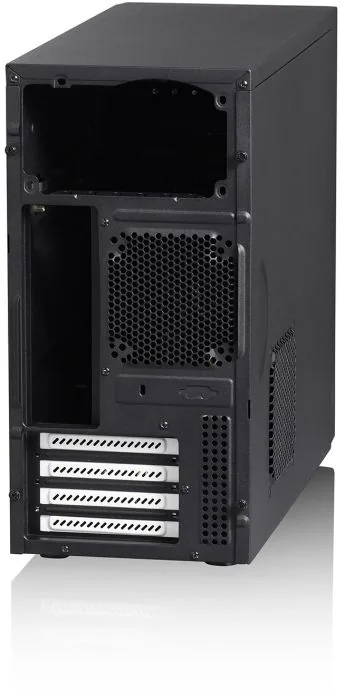
partially closed, fan grille right center, PCI slots bottom (4x horizontal)
Front I/O Position
Case side: right, Height: bottom, Position: Front
Special features
incl. fan control
USB notation
Link
Product Description
Fractal Design Core 1000 USB 3.0 Manual
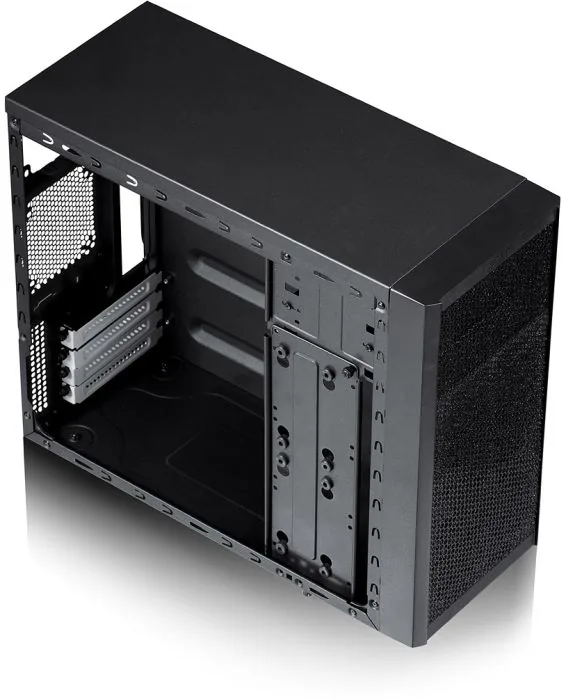
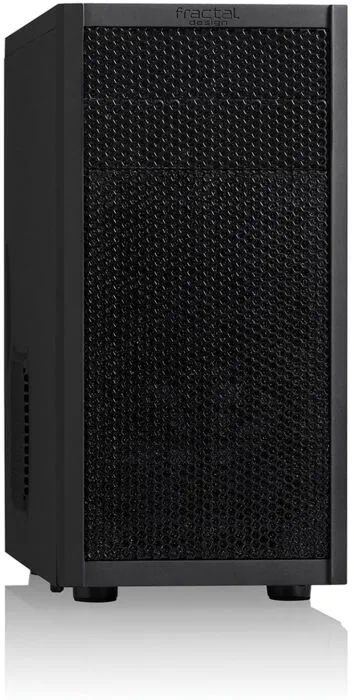
The Fractal Design Core 1000 USB 3.0 is a compact micro‑ATX computer case that blends Scandinavian minimalism with practical features for small builds. Its clean mesh front with preinstalled dust filters and a single included 120mm Fractal Design fan deliver quiet, efficient airflow while keeping dust out. Internals are finished in sleek black with contrasting white expansion slot covers for a refined look.
Despite its small footprint (175 x 355 x 420 mm) and light weight (4.1 kg), the Core 1000 offers surprising flexibility: two 3.5" HDD trays (or up to three 2.5" SSDs), two 5.25" bays (one converter included), and compatibility with Mini‑ITX and Micro‑ATX motherboards. The case supports CPU coolers up to 135mm and provides four expansion slots. Front I/O includes one USB 3.0, one USB 2.0 and audio connectors mounted conveniently on the front panel side.
A highlight is the innovative removable vertical HDD bracket with anti‑vibration silicone grommets. Removing the lower drive mount frees room for long graphics cards — up to 350mm when the lower HDD mount is not used, or up to 210mm with both mounts installed. Additional fan mounting options (92mm rear and 120mm side) permit extra cooling when needed.
Practical maintenance and user friendliness are built in: the front panel is easy to remove via a bottom handle and clip‑on fan slots simplify filter access. Filters at intake points are removable for regular cleaning to maintain optimal airflow. The chassis ships without a PSU, and power supply intake filtration can be accessed for cleaning as well.
Engineered and specified in Sweden, the Core 1000 brings higher‑end case features to an affordable, space‑saving package: tool‑friendly drive trays, vibration damping, dust filtration, and support for long GPUs. A limited 12‑month warranty covers material and workmanship defects under normal consumer use.
Notes
- Removing the lower HDD tray is required to accommodate long GPUs; watch for interference with GPU power connectors.
- Regularly clean front and PSU intake filters to maintain airflow and cooling efficiency.
- The case does not include a power supply.
- Product codes and identifiers: FD-CA-CORE-1000-USB3-BL, EAN 7350041081098, UPC 817301011099.
Search for 67,706 Manuals online


Type-in Brand or Model
Lea Schuster
8 months ago
Does this case fit a micro-ATX motherboard, and what should I watch out for during installation (for example the fixed drive cage or clearance issues)?
Manual.ly
8 months ago
This case is meant to support standard builds including micro-ATX, but some configurations can be tight. If your micro-ATX board area is close to the upper drive cage, you may need patience with the order of installation. A common workaround is to first install the motherboard, set the standoffs correctly, and then mount any rear fans or other parts afterward to avoid clearance problems. Also check that all screws/standoffs are tightened into the right positions; a few reviews report standoffs that can spin if not seated properly. If anything is missing or the case arrives with damaged threads, please contact support so we can help with replacement parts.