

Foreo FAQ 101 Manual
PDF manual · 9 Pages
English



Quick check
Incorrect answer, please try again.
Chat with your Foreo FAQ 101 manual using AI
Get instant AI answers from your Foreo FAQ 101 manual
Ask anything about the Foreo FAQ 101. Answers come from this manual, with the pages they are based on.
FAQ 101 Maintenance Schedule
Wash the entire device with warm water and soap, rinse, and pat dry. Spray with Silicone Cleaning Spray and rinse for optimal results.
Recharge using the USB cable for up to 2 hours until fully charged when the indicator lights show low battery or blinking.
Ask a Question
Do you recommend FAQ 101?
Yes NoFrequently Asked Questions
The package includes one FAQ 101 device, a 2ml sample of P1 primer, USB cable, travel pouch, cleaning cloth, stand, quick start guide, and basic manual.
Is this answer helpful?
Press and hold the universal button for three seconds to power on or off. The indicator lights will flash when entering Bluetooth pairing mode.
Is this answer helpful?
Yes, you can use it manually, but you must register via the app first to unlock it. Without the app, you are limited to Basic mode with lower intensity levels.
Is this answer helpful?
Yes, using the FAQ P1 primer is essential as it creates a conductive barrier for safe energy transfer and helps the device glide smoothly over the skin.
Is this answer helpful?
In Basic mode, use 2-3 times weekly for eight weeks then monthly. In Pro mode, limit use to once weekly initially, then monthly for maintenance.
Is this answer helpful?
Basic mode offers the lowest five intensity levels suitable for beginners. Pro mode unlocks higher clinical-level intensities after completing app training.
Is this answer helpful?
Wash with warm water and soap, rinse, and pat dry. Use Silicone Cleaning Spray if desired. Never use alcohol, petrol, or acetone.
Is this answer helpful?
Advantages and Disadvantages
Advantages

- Combines three advanced technologies: Power-RF, LED-Pulse, and T-Sonic pulsations
- Ultra-hygienic silicone surface prevents bacterial growth
- Interactive app allows customization of settings and unlocks Pro mode
- USB rechargeable with long standby time of ninety days
- Includes travel pouch and stand for convenient storage
Disadvantages

- Requires mandatory app registration and Bluetooth pairing for initial use
- Prohibited use on sensitive areas like eyes, thyroid, and broken skin
- Mandatory use of specific FAQ P1 primer for effective operation
- Battery is non-replaceable and requires careful disposal procedures
- Device cannot be used while plugged in or charging
Product Specification
Operating Mode
Battery Powered (3.7V, Li-Ion)
Light Source
LED, RGB
Package Contents
Bag, USB Charging Cable, Cleaning Cloth
Product Description
Elevate Your Skincare Routine with the Foreo FAQ LED Skin Tightening Device 101
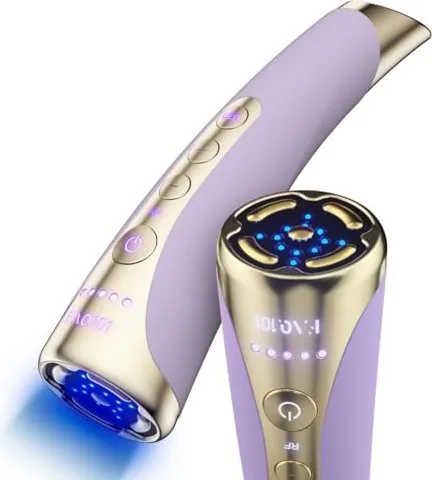
Discover a new era of anti-aging with the Foreo FAQ LED Skin Tightening Device 101. This innovative home-use device brings professional facial rejuvenation technology directly to your bathroom counter. Designed for non-invasive cosmetic treatment, it combines three powerful modalities: Swiss Power-RF, LED-Pulse light therapy, and T-Sonic pulsations. The heated radiofrequency waves stimulate collagen production to smooth fine lines, while red, green, and blue LED beams penetrate deep into the skin to promote natural healing and radiance. Complementing these is the gentle massaging action of T-Sonic technology, which helps melt away stress and enhances product absorption.
Using the device is simple yet effective. You must first download the interactive app to unlock the device and register your warranty. After cleaning your face, apply the exclusive FAQ P1 primer to create a conductive barrier that ensures safe energy transfer. The device features an ultra-hygienic silicone surface free from bacteria buildup. During treatment, you glide the five gold plates over your skin in circular motions or straight lines. The interface includes intuitive controls to adjust Power-RF intensity levels and select specific LED colors. For safety, the device automatically shuts off after ten minutes to prevent overheating or overuse.
The Foreo FAQ LED Skin Tightening Device 101 Manual provides comprehensive guidance on usage, warnings, and maintenance. It emphasizes avoiding sensitive areas like the eyes and neck midline, and warns against use on broken skin or near metal implants. Proper care involves washing the device with warm water and mild soap, avoiding harsh chemicals like alcohol or acetone. With a rechargeable battery offering up to thirty minutes of use per charge, this tool is perfect for maintaining a tighter, more sculpted complexion at home.
Search for 67,706 Manuals online


Type-in Brand or Model