
Fontastic Vita Manual
PDF manual · 12 Pages
English



Quick check
Incorrect answer, please try again.
Chat with your Fontastic Vita manual using AI
Get instant AI answers from your Fontastic Vita manual
Ask anything about the Fontastic Vita. Answers come from this manual, with the pages they are based on.
Ask a Question
Do you recommend Vita?
Yes NoFrequently Asked Questions
Turn on both devices ensuring they are in Bluetooth mode. Press the mode button twice on one speaker to initiate the connection. An acoustic signal will confirm success. Remember that the connection will not restore automatically after disconnection, so manual steps are needed again.
Is this answer helpful?
The internal 2000mAh lithium-ion battery provides up to 8 hours of operating time at medium volume. The status LED indicates charge level, and voice prompts warn when battery is below 10%. It will auto turn off if below 3%.
Is this answer helpful?
The speaker requires approximately 3 hours for a full charge cycle. For the first use, you should charge the device for a minimum of 2.5 hours to calibrate the battery properly before starting operation.
Is this answer helpful?
Yes, simply insert a Micro SD card into slot 8 with contacts facing up. The card mode starts automatically and begins playback immediately. You can switch modes by holding the play/pause button for two seconds.
Is this answer helpful?
Yes, it has a built-in microphone for hands-free calling in Bluetooth mode. To answer, press the power key once. To reject, hold it for one second. Be aware that high volume can cause echo feedback on the far end.
Is this answer helpful?
Use the dedicated volume plus and minus buttons located on the device. Press them repeatedly until you reach the desired sound level. The device responds instantly to these inputs during music playback or calls.
Is this answer helpful?
The device operates on Bluetooth 5.3 technology. This ensures a stable connection with A2DP and AVRCP profiles supported. It works well for streaming audio and controlling playback from most modern mobile devices.
Is this answer helpful?
Advantages and Disadvantages
Advantages

- Supports True Wireless Stereo for dual speaker setup
- Provides up to 8 hours of continuous playback time
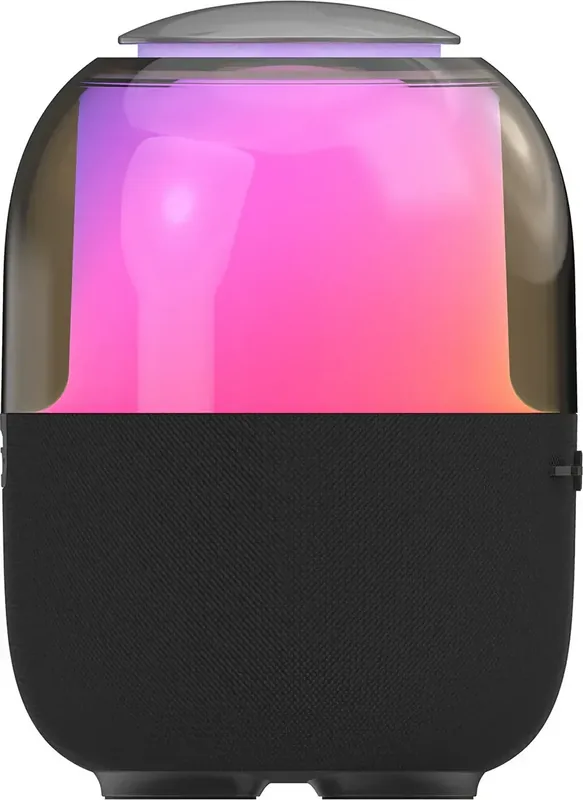
- Features 360-degree customizable RGB lighting display
- Equipped with Bluetooth 5.3 for stable connections
- Includes built-in Radio and Micro SD playback support
Disadvantages

- TWS connection does not reconnect automatically after disconnection
- Device is not waterproof and must be protected from moisture
- Requires full 3 hours for a complete charge cycle
- Echo feedback may occur on phone calls at high volume
- Initial charging requires at least 2.5 hours before use
Product Specification
Power
8W Peak
Display
No
Tuner
FM
Frequency Range
20Hz-20kHz
Connections
CardReader (microSD)
Wireless
Bluetooth 5.3
Power Supply
Battery (2000mAh), USB-C
Battery Life
8h
Features
Stereo Pairing, Hands-free, Light Effects
Color
Black
Dimensions
3.92x5.39x3.92 inches (WxHxD)
Weight
1.09 lbs
Product Description
Discover the Ultimate Wireless Sound System
Immersive Audio and Lighting
The Vita wireless speaker represents a significant leap in portable audio technology tailored for modern lifestyles. Designed for individuals who value both style and substance, this device delivers crisp sound with a powerful 8W maximum output. The driver size of 57mm ensures bass depth that rivals larger systems. A standout feature is the 360-degree RGB lighting system which adds a dynamic visual element to any room. This lighting adapts to music rhythms, creating an immersive atmosphere perfect for parties or relaxation sessions. Users can enjoy up to 8 hours of continuous playtime on a single charge, powered by a robust 2000mAh internal lithium-ion battery. This longevity ensures your playlist keeps going without interruption during travel or extended gatherings.
Connectivity Versatility
Seamless operation is at the core of the design philosophy. Utilizing the latest Bluetooth 5.3 standard, the speaker offers reliable pairing with smartphones, tablets, and laptops. The Hands-Free function allows calls to be managed directly through the device, thanks to the high quality built-in microphone. However, it is recommended to keep volume moderate to avoid echo feedback. For those preferring local files over streaming, the Micro SD card slot provides independent playback options without needing an active internet connection. The integrated Radio function further expands entertainment possibilities, allowing automatic searches for available stations within reach of the frequency band.
Setup and Advanced Features
Setting up the device is intuitive for most technology users. However, to fully leverage capabilities like the True Wireless Stereo function, specific procedures must be followed. This function allows connecting two units together to output music simultaneously for a true surround sound effect during large events. While the interface is generally simple, understanding the exact button sequences enhances the user experience significantly. The speaker features a status LED indicator for battery health and connection feedback, reducing anxiety about remaining power. Connecting to a power source via the USB Type-C port is straightforward and compatible with standard adapters.
Design Safety and Build Quality
Beyond the technology specs, the build quality impresses daily users. The casing combines durable ABS plastic with metal elements, offering resilience against daily wear without excessive weight. Weighing approximately 493 grams, it remains portable despite its sturdy construction dimensions. Whether you are gaming, listening to podcasts, or hosting guests, the Vita elevates the ambient quality of any space. Its compact diameter makes it fit easily on shelves or bedside tables, making it a versatile addition to modern homes. Safety instructions advise against submerging the unit in water, ensuring longevity against moisture.
Conclusion
In conclusion, this speaker blends functionality with flair effectively. By following standard guidelines found in resources like the Fontastic Vita Manual, owners can maximize longevity and performance over time. The investment in sound and visual enjoyment pays off immediately through consistent daily use. Proper care ensures it remains a reliable companion for years.
Search for 67,706 Manuals online


Type-in Brand or Model