


Fontastic Soca Manual
PDF manual · 11 Pages
English



Quick check
Incorrect answer, please try again.
Chat with your Fontastic Soca manual using AI
Get instant AI answers from your Fontastic Soca manual
Ask anything about the Fontastic Soca. Answers come from this manual, with the pages they are based on.
Ask a Question
Do you recommend Soca?
Yes NoFrequently Asked Questions
Take the earbuds out of the case. Search for SOCA on your Bluetooth device and select it to pair. White LED will blink during pairing and turn off when connected.
Is this answer helpful?
The earbuds support up to four hours of continuous streaming. The charging case extends this time significantly with a 300 mAh battery.
Is this answer helpful?
It takes approximately one to two hours to fully charge the earbuds. The case battery charging status is displayed via LED lights at 25 percent, 50, 75, and 100 percent levels.
Is this answer helpful?
No. Never immerse the device in water. Always protect it from moisture to avoid damage and safety hazards.
Is this answer helpful?
To increase volume, tap the sensor on the right earbud three times. To decrease volume, tap the sensor on the left earbud three times.
Is this answer helpful?
Press the multifunction sensor to reconnect. If placed in the case, connection is interrupted. It reconnects automatically when removed.
Is this answer helpful?
Advantages and Disadvantages
Advantages

- Bluetooth 5.0 ensures stable connectivity up to a ten-meter range
- USB Type-C charging port allows for modern fast cable compatibility
- Multifunction sensor simplifies music and call control operations easily
Disadvantages

- Battery lasts only up to four hours of continuous play time
- Device must never be immersed in water or high moisture exposure
- Connection automatically cuts off when placed inside charging case
Product Specification
Type
Earbuds (In-Ear)
Form Factor
True Wireless, No Ear Hooks
Design
Closed
Microphone
Built-in
Wireless
Bluetooth 5.0
Control
Touch Control
Battery Life
4 Hours
Battery
USB-C Charging Port, Charging Case (300mAh), 1.5 Hours Charging Time
Frequency Range
20Hz-20kHz
Sensitivity
85dB
Driver
0.39 inches
Weight
0.14 oz (per Earbud), 1.09 oz (Charging Case)
Product Description
Unlock Potential with Fontastic Soca Headset
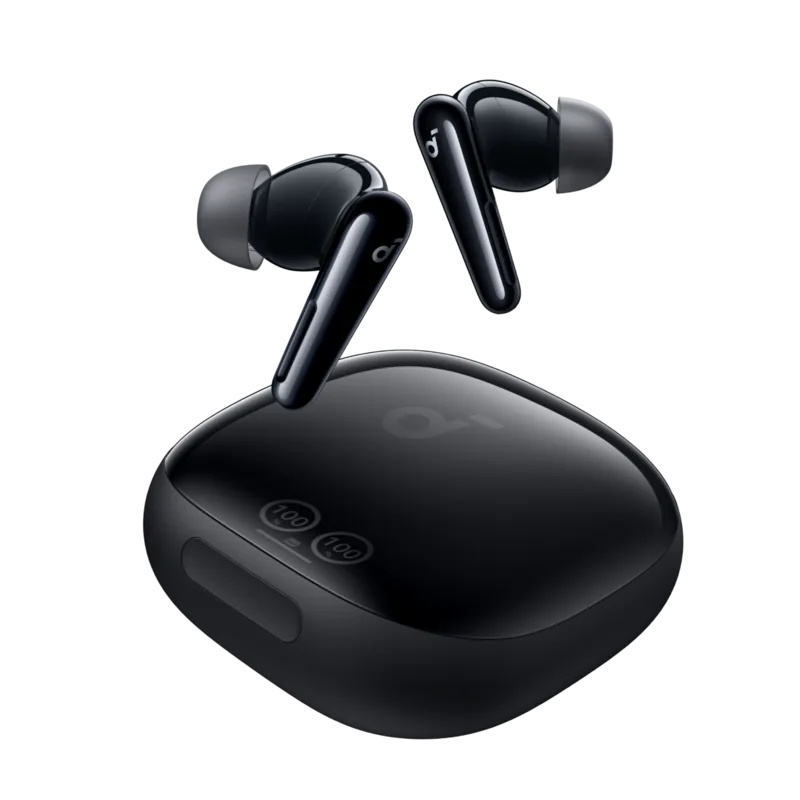
Welcome to the world of premium audio technology with the Fontastic Soca wireless headset. This device represents a significant leap in personal audio design for modern users. We demand high quality sound without the hassle of tangled cords. This headset delivers crystal clear stereo audio perfect for calls or listening to favorite tracks. Many users rely on the Fontastic Soca Manual to maximize all available features completely and safely. The package includes two wireless earbuds and a compact storage charging case. A USB Type-C cable ensures fast and universal charging capabilities for you. Three pairs of earbuds fit various ear shapes for maximum comfort and security.
Connectivity and Specs
Bluetooth 5.0 connectivity offers a stable wireless link up to ten meters away reliably. The 10 mm drivers provide deep bass and crisp highs for an immersive listening experience. Battery life supports up to four hours of continuous streaming before requiring power. The charging case extends this time significantly for all day usage convenience. Status LEDs indicate power levels and connection states clearly and efficiently. A multifunction sensor on each earbud controls playback and phone calls easily.
Usage Instructions
To connect your device, search for SOCA in your Bluetooth settings quickly. A white LED light blinks steadily during initial pairing mode for you. Tap the sensor once to play or pause your current music track. Double tap the left sensor skips track backwards and right sensor skips forward. Adjust volume by tapping three times on the specific earbud side correctly. Call handling is simple with the same sensor interface for answers. Voice commands activate with a long press for hands-free operation efficiency.
Safety and Regulations
Protect the device from water exposure at all times during use carefully. Do not use while operating heavy machinery or vehicles safely always. Keep volume moderate to protect hearing health over long periods regularly. The device complies with strict EU directives for safety and environmental protection standards. Technical specs show a 35 mAh battery per earbud designed for longevity and daily life usage. The case holds 300 mAh for extra power and storage convenience. Weighs only four grams per unit for lightweight comfort always.
Final Conclusion
You should always ensure the device is dry before charging. The case stores earbuds securely when not in use. This headset is perfect for daily commutes or intense workouts effectively. The Fontastic Soca Manual guides you through setup easily without confusion. Remember to charge the case when LEDs turn off completely. Contact support if issues arise during pairing or connection failures. Enjoy your music fully with the Fontastic Soca today and improve your listening habits. The design fits securely with included ear tips ensuring a custom fit. This ensures optimal performance for years of reliable service.
Search for 67,706 Manuals online


Type-in Brand or Model