
Fontastic Jive Manual
PDF manual · 12 Pages
English



Quick check
Incorrect answer, please try again.
Chat with your Fontastic Jive manual using AI
Get instant AI answers from your Fontastic Jive manual
Ask anything about the Fontastic Jive. Answers come from this manual, with the pages they are based on.
Ask a Question
Do you recommend Jive?
Yes NoFrequently Asked Questions
Remove the earbuds from the charging case; they power on and pair with each other automatically. One earbud then enters pairing mode. Search for and select "Jive" in your device's Bluetooth settings. The LED will blink white and turn off once pairing succeeds.
Is this answer helpful?
Each earbud has a 35 mAh battery offering up to about 4 hours of playback. Charging time for the earbuds is approximately 1–2 hours. The charging case holds a 300 mAh battery to recharge the earbuds multiple times and itself charges via USB-C or the included wireless pad.
Is this answer helpful?
A multifunction sensor on each earbud handles all commands: single tap play/pause or answer/end call, double taps skip tracks (left for previous, right for next), triple taps adjust volume (right up, left down), long presses power on/off or activate voice control.
Is this answer helpful?
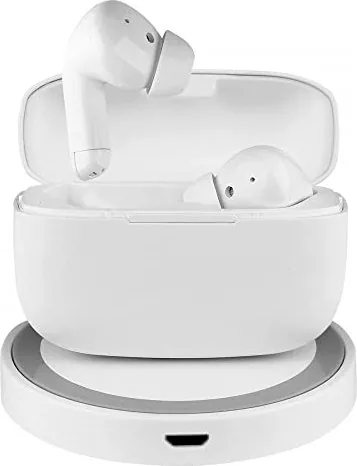
Connect the included wireless pad to power via its Micro USB input. Place the case centered on the pad's charging area; a blue LED indicates charging. Ensure no metal or magnetic media is placed between the case and pad to avoid heating or charging failure.
Is this answer helpful?
Avoid prolonged high-volume listening, don't use both earbuds while driving, protect devices from moisture, do not open units, and avoid using the wireless charger near medical equipment or pacemakers without medical advice. Stop use if visible damage appears.
Is this answer helpful?
If connection is interrupted, place the earbuds back in the case then remove them to trigger reconnection, or press the multifunction sensor to manually reconnect. If issues persist, reset by fully charging the case and earbuds and retry pairing.
Is this answer helpful?
For technical support contact [email protected]. The device carries CE marking and complies with RED 2014/53/EU; the full EU Declaration of Conformity is available at the manufacturer’s website listed in the manual.
Is this answer helpful?
Advantages and Disadvantages
Advantages

- Automatic pairing and reconnection simplify daily use and reduce setup time.
- Compact, lightweight earbuds with secure fit options (3 ear tip sizes) for comfort.
- Multiple charging options: USB-C charging plus included 5W wireless charging pad.
- Bluetooth 5.0 with widely used audio/control profiles for stable connectivity.
- Integrated microphone and simple multifunction controls for calls and voice commands.
Disadvantages

- Up to 4 hours playback per earbud may be limited for heavy users without case recharges.
- Small 35 mAh earbud batteries require frequent case returns for extended use.
- Controls rely solely on taps/presses which can be unintuitive in noisy environments.
- Wireless charging requires correct centering; misalignment may prevent charging.
- Warnings about medical interference limit use near sensitive medical devices.
Product Specification
Design
Earphones (In-Ear)
Form Factor
True Wireless, no ear hooks
Acoustic Design
closed
Microphone
integrated
Wireless
Bluetooth 5.0
Control
Touch Control
Operating Time
4h
Battery
USB-C charging port, Charging case (300mAh), wireless charging (Qi), 1.5h charging time
Frequency Range
20Hz-20kHz
Sensitivity
105dB
Driver
0.39 in
Special Features
incl. Wireless charging pad
Color
white
Weight
0.01 lb (per earphone), 0.07 lb (charging case)
Product Description
Fontastic Jive — Manual
Discover the Fontastic Jive, a compact true wireless stereo (TWS) headset designed for everyday listening, calls and on-the-go convenience. The Fontastic Jive Manual outlines intuitive controls, reliable connectivity and multiple charging options to keep your earbuds ready throughout the day.
Key product highlights
The Jive earbuds pair automatically when removed from their case and offer Bluetooth 5.0 connectivity with support for headset, handsfree, A2DP and AVRCP profiles. Each earbud houses a 10 mm driver and a built-in high-performance microphone for clear voice calls. With up to four hours of playback per charge and a slim charging case (300 mAh), the Jive balances portability and performance for commuters, remote workers and casual listeners.
The package includes two Jive earbuds, a storage/charging case, a wireless charging pad, USB Type-C and Micro USB cables, and three pairs of ear tips (small, medium, large) for a tailored fit. The case supports wired USB-C charging or Qi-style wireless charging via the included pad, with a multi-step LED indicator to show charge levels (25/50/75/100%). The wireless pad provides 5W output and a centered placement ensures proper charging.
Controls and usability
All functions use a multifunction sensor on each earbud. Single taps play/pause or answer/end calls; double taps skip tracks (left for previous, right for next); triple taps adjust volume (right to raise, left to lower). Long presses enable power on/off and voice assistant activation. The earbuds automatically reconnect to the last paired device when removed from the case.
Safety and care
The manual emphasizes safe use: avoid prolonged high-volume listening, do not use while driving or in hazardous situations, protect devices from moisture, and avoid opening the units. The charging pad should not host magnetic strips or metal objects and should be kept away from medical equipment or pacemakers if uncertain.
Technical snapshot
- Bluetooth 5.0, range up to 10 m
- 10 mm drivers, 20 Hz–20 kHz frequency, 105 dB ±3 dB sensitivity
- Earbud battery: 35 mAh — charging time 1–2 hours — up to 4 hours operation
- Case: 300 mAh, USB Type-C input; dimensions and light weight for portability
- Wireless pad: 5 W
Notes:
- Automatic pairing and auto on/off when removing/returning earbuds to case
- LED indicators show charging and pairing status
- Contact [email protected] for support
Search for 67,706 Manuals online


Type-in Brand or Model