
Fontastic Cobra Manual
PDF manual · 12 Pages
English



Quick check
Incorrect answer, please try again.
Chat with your Fontastic Cobra manual using AI
Get instant AI answers from your Fontastic Cobra manual
Ask anything about the Fontastic Cobra. Answers come from this manual, with the pages they are based on.
Ask a Question
Do you recommend Cobra?
Yes NoFrequently Asked Questions
Open the charging case to power the earbuds on; they auto-sync and enter pairing mode. On your Bluetooth-enabled device, search for and select “Cobra”. If connection fails, return the earbuds to the case, remove them again, or power-cycle each manually.
Is this answer helpful?
Each earbud has a 30 mAh battery for up to about 5 hours of use per charge. The charging case has a 300 mAh battery that can recharge the earbuds up to four times. Use the supplied USB Type-C cable to charge the case; LED indicators show charging progress.
Is this answer helpful?
Touch and hold the multifunction sensor on either earbud for three seconds to toggle modes. Gaming mode engages the low-latency 3D sound profile; music mode prioritizes standard audio playback.
Is this answer helpful?
Single tap plays or pauses music and answers/ends calls. Double taps skip tracks (right for next, left for previous). Hold for 2 seconds to reject calls, 3 seconds to switch mode, three taps for voice assistant and four taps to redial.
Is this answer helpful?
The Cobra earbuds are not rated as waterproof. They should be protected from moisture and not immersed in water. For exercise, avoid heavy sweating exposure and store them dry after use to prevent damage.
Is this answer helpful?
The earbuds use Bluetooth 5.1 and support HFP, A2DP, AVRCP and AVDTP profiles, providing compatibility with most smartphones and devices within a typical 10 m range.
Is this answer helpful?
If the super bass is overdriven by your phone’s settings, use the audio settings to enable a “Normalize” or similar volume adjustment feature. Adjust EQ or reduce bass enhancement on the connected device to prevent distortion.
Is this answer helpful?
Advantages and Disadvantages
Advantages

- Low latency gaming mode (50–60 ms) with 3D sound for better audio-video sync during gameplay and TV.
- Compact earbuds with up to 5 hours runtime and a 300 mAh charging case providing up to four full recharges.
- Bluetooth 5.1 with common profiles (HFP/A2DP/AVRCP/AVDTP) and up to 10 m range for stable wireless connectivity.
- Intuitive touch controls for playback, calls, voice assistant, mode switching and quick redial.
- Lightweight design, multiple ear tips for comfort, and RGB LED case lighting for style and portability.
Disadvantages

- Relatively small earbud battery (30 mAh) limits single-charge runtime to about 5 hours for heavy users.
- Volume must be controlled from the connected device; no onboard volume adjustment on the earbuds.
- Super bass may be overdriven by some phone EQ settings, requiring users to normalize audio in device settings.
- Not waterproof; exposure to moisture or immersion can damage the device.
- Minimal physical controls—reliance on touch sensors may lead to accidental inputs for some users.
Product Specification
Design
Earbuds (In-Ear)
Form Factor
True Wireless, earhook-less
Acoustic Design
closed
Microphone
integrated
Wireless
Bluetooth 5.1
Control
Touch Control
Operating Time
5h
Battery
USB-C charging port, charging case (300mAh)
Frequency Range
20Hz-20kHz
Sensitivity
96dB
Driver
0.39 in
Device Features
RGB lighting
Software Features
Voice Assistant
Color
black
Weight
0.01 lb (per earbud)
Product Description
Fontastic Cobra Manual — TWS Gaming Headset
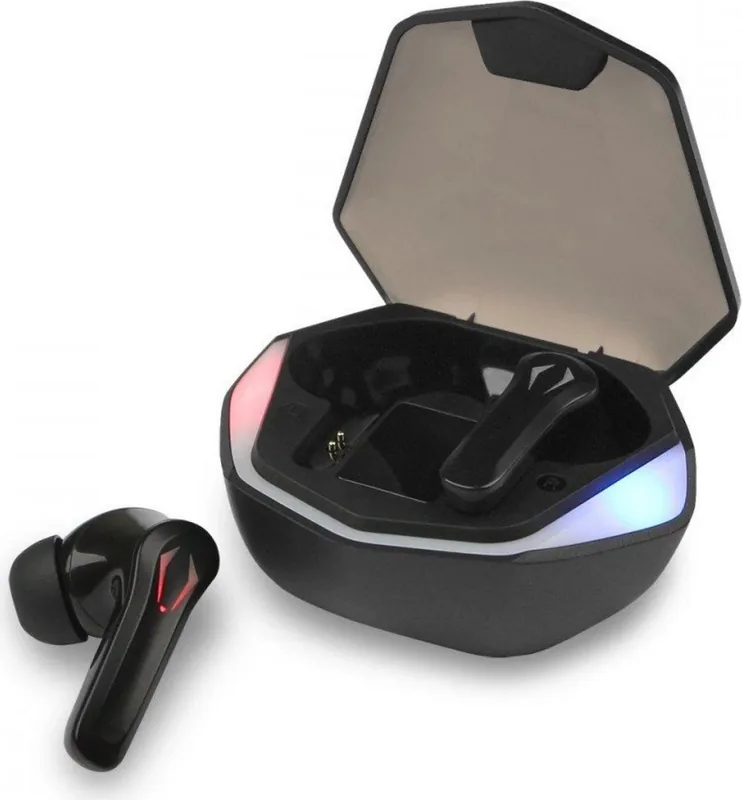
The Fontastic Cobra is a compact true wireless stereo (TWS) headset tailored for both immersive music listening and low-latency gaming. Featuring a dedicated gaming mode with 3D sound and latency around 50–60 ms, the Cobra aims to deliver tight audio sync for gameplay and TV while also serving as a reliable hands-free solution for calls. Each earbud houses a 10 mm driver and a built-in microphone, offering a frequency response spanning 20 Hz–20 kHz and a sensitivity of 96 ± 3 dB.
The earbuds charge in a 300 mAh Type-C powered case that can recharge the buds up to four times. Individual earbuds carry a 30 mAh battery providing up to five hours of playtime on a single charge. Status and charging indicators on both buds and the case make it simple to monitor battery levels. Controls are handled via multifunction touch sensors: tap patterns control playback, calls, voice assistant activation, and switching between modes (music and gaming).
Setup is straightforward: open the case to automatically power on and enter pairing mode, then select “Cobra” from your device’s Bluetooth list. The headset uses Bluetooth 5.1 and supports standard profiles (HFP, A2DP, AVRCP, AVDTP) with a typical range up to 10 m. The case includes RGB LED effect lighting for a modern look, and multiple ear tip sizes are provided for comfort and fit.
Practical features include automatic on/off when removing or inserting earbuds, simple multi-tap controls for track and call management, and compatibility with voice assistants. Volume control is managed from the connected device. The product includes standard safety advice—avoid prolonged exposure to high volumes, protect from moisture, and do not open the device. The device is CE marked and complies with EU RED directives; end-of-life disposal should follow local e-waste regulations.
Notes:
- Charging: Fully charge the case and earbuds before first use. The earbuds show a steady red LED while charging and switch off when complete.
- Pairing: If earbuds fail to auto-connect, place them back in the case and remove them or manually power-cycle each unit.
- Modes: Long-press the touch sensor to toggle between music and gaming modes.
Search for 67,706 Manuals online


Type-in Brand or Model