
FLIR TG275 Manual
PDF manual · 40 Pages
English



Quick check
Incorrect answer, please try again.
Chat with your FLIR TG275 manual using AI
Get instant AI answers from your FLIR TG275 manual
Ask anything about the FLIR TG275. Answers come from this manual, with the pages they are based on.
TG275 Maintenance Schedule
If the TG275 is not used for more than 3 months, charge it to at least 70% and recharge every 6 months to prevent battery failure.
Wipe the housing with a damp cloth. Clean lenses with high-quality lens cleaner. Do not use abrasives or solvents.
Free maintenance reminders
Timed to your purchase date. Always free, unsubscribe anytime.
Ask a Question
Do you recommend TG275?
Yes NoFrequently Asked Questions
Download the update file from the FLIR support website onto a PC. Connect the TG275 to the PC using a USB-C to USB-A cable. Copy the file to the root directory of the camera drive, then disconnect and follow the on-screen prompts to complete the update.
Is this answer helpful?
Yes, the camera has an IP54 rating which protects it from dust and water splashes. However, you must keep the top flap covering the USB-C jack completely sealed when operating in such conditions to maintain this protection level.
Is this answer helpful?
The standard range goes up to 752°F (400°C). By engaging the high-temperature lever switch, you can extend the measurement range up to 1022°F (550°C).
Is this answer helpful?
No, the high-resolution visible camera mode does not support object temperature measurements. You must use the Thermal Plus Visible or standard Visible modes to get temperature data.
Is this answer helpful?
The rechargeable lithium battery provides approximately five hours of scanning time with medium brightness. If the laser pointer is turned on, the runtime decreases to about 4.5 hours.
Is this answer helpful?
Turn on Bluetooth in the device settings menu. Open the FLIR Tools app on your mobile device, select Instruments, search for the TG275, and tap to pair once the camera is powered on.
Is this answer helpful?
Advantages and Disadvantages
Advantages

- Combines thermal imaging and non-contact thermometer in one handheld device
- MSX technology adds visible details to thermal images for better diagnostics
- Wide temperature range up to 1022°F with a dedicated high-temp switch
- Bluetooth connectivity allows live monitoring and image transfer to mobile devices
- Durable IP54 rated enclosure resists dust, dirt, and oil effectively
Disadvantages

- Not fully compatible with USB-C to USB-C cables during firmware updates
- High-resolution visible camera mode does not support temperature measurements
- Reflected temperature setting is fixed at 77°F and cannot be changed
- Battery is not user-serviceable and requires professional contact for replacement
- Minimum focus distance may limit close-up inspection capabilities in tight spaces
Product Specification
Camera
160x120 (max. sensor resolution), 320x240 (max. display resolution), 57 degrees (horizontal field of view), 44 degrees (vertical field of view)
Features
SD card, USB, laser spot
Smart Home
App control (Bluetooth)
Power supply
Battery powered (Li-ion)
Dimensions
8.27x3.19x2.52 in (WxHxD)
Weight
13.9 oz
Product Description
FLIR TG275 Thermal Imaging Camera - Read, Download & Print Free
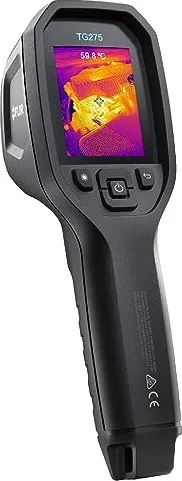
The FLIR TG275 Thermal Imaging Camera stands as a premier tool for automotive diagnostics and general maintenance. It seamlessly combines non-contact temperature measurement with high-quality thermal imaging to help technicians quickly identify heat-related issues and potential faults. This device is designed for professionals who need reliable data in challenging environments.
Equipped with a 160 x 120 pixel true thermal imager using Lepton microbolometer technology, the TG275 delivers clear thermal images. The MSX feature enhances these images by adding visible spectrum details, making it easier to spot defects. A 2-megapixel digital camera provides sharp visible light images, while the adjustable 320 x 240 color LCD display ensures easy readability even in bright conditions.
Users can measure temperatures ranging from -13 to 1022°F (-25 to 550°C). For extreme heat scenarios above 752°F, a dedicated high-temperature switch extends the range. The camera includes an intuitive menu system supporting over 21 languages, allowing for customized settings like emissivity adjustments and auto power-off timers. Connectivity options include USB-C for file transfers and Bluetooth for real-time monitoring via the FLIR Tools mobile app.
Built for durability, the IP54 enclosure protects against dust, dirt, and oil. The rechargeable battery offers up to five hours of operation, and the unit features a built-in LED flashlight and laser pointer for precise targeting. With 4 GB of internal storage, users can capture thousands of images for later analysis or reporting.
Key Features
- Advanced Imaging: 160x120 thermal resolution with MSX enhancement.
- Versatile Measurement: Wide temperature range with high-temp mode.
- Connectivity: Bluetooth and USB-C for seamless data transfer.
- Durability: Rugged IP54 design suitable for harsh workshops.
Important Notes
Always ensure the top flap is closed to maintain the IP54 rating. Do not use USB-C to USB-C cables for firmware updates; only use USB-C to USB-A cables. Register the device within 60 days to activate the extended warranty.
Search for 67,706 Manuals online


Type-in Brand or Model