
Fixpoint WZ Manual
PDF manual · 20 Pages
English



Quick check
Incorrect answer, please try again.
Chat with your Fixpoint WZ manual using AI
Get instant AI answers from your Fixpoint WZ manual
Ask anything about the Fixpoint WZ. Answers come from this manual, with the pages they are based on.
Ask a Question
Do you recommend WZ?
Yes NoFrequently Asked Questions
It is used to prepare and crimp modular cable connectors. Depending on the model, it can cut cable, strip insulation, and crimp common RJ connector types for telephone, network, and low-voltage wiring tasks.
Is this answer helpful?
The listed 310 mm variants are product codes 50284, 11951, and 77272. Their connector support and operating features differ, so check the selected version before use.
Is this answer helpful?
No. RJ45 support is available on selected versions. Models 50284 and 11951 support RJ10, RJ11, RJ12, and RJ45, while model 77272 is intended for shielded RJ45 modular connectors.
Is this answer helpful?
Cut the cable to the required length, strip the insulation using the appropriate tool position, arrange the conductors correctly, and push the prepared cable fully and straight into a compatible modular connector before crimping.
Is this answer helpful?
Squeeze the handles firmly until the mechanism completes and opens. If it remains stuck, use the emergency release specified for the model, such as turning the release wheel or pressing the release control.
Is this answer helpful?
Remove cable and crimping residue after use, clean with a soft dry cloth, and avoid aggressive chemicals. Keep pivot joints free of dirt and apply light machine oil periodically. Store the tool in a dry, dust-protected location.
Is this answer helpful?
Advantages and Disadvantages
Advantages

- 310 mm models provide added leverage for controlled crimping pressure.
- Selected versions support RJ 10, RJ 11, RJ 12, and RJ 45 modular connectors.
- Integrated cutting and stripping functions reduce the number of tools needed.
- Ratchet models include forced completion and an emergency release.
- Some models work with shielded and unshielded cable types.
Disadvantages

- Connector compatibility varies by model, so the tool must be selected carefully.
- Incorrect cable insertion or stripping can produce an unreliable crimp.
- Ratchet mechanisms require proper release handling if the tool jams.
- Regular cleaning and pivot lubrication are needed for smooth operation.
- The tool must be kept dry and protected from dust during storage.
Product Specification
Head
burnished
Handle
plastic
Stripping capacity
Diameter 0.24 in, diameter 0.47 in
Overall length
12.2 in
Special features
for RJ45/RJ11, locking
Weight
1.23 lb
Product Description
Fixpoint WZ Crimping Pliers 310mm - Read, Download & Print Free
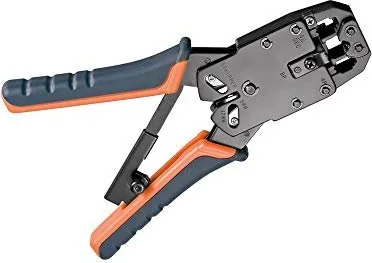
The Fixpoint WZ Crimping Pliers 310mm are designed for dependable installation work on modular connectors and communication cables. Built for users who need a practical hand tool for network, telephone, and low-voltage wiring, this range combines crimping, cutting, and stripping functions in a compact workshop-ready format. The 310 mm versions provide generous leverage for controlled pressure during repeated connector assembly.
Designed for Modular Connector Work
Selected Fixpoint WZ models support common RJ 10, RJ 11, RJ 12, and RJ 45 connector formats. This makes them useful for preparing telephone leads, Ethernet-style patch cables, and other modular cable connections. Depending on the version, the tool accommodates 4-, 6-, and 8-pole plugs as well as shielded or unshielded cables. Always match the connector, cable type, and tool station before beginning work.
The integrated cable cutter and stripper simplify cable preparation. Users can cut a lead to length, remove insulation, arrange conductors, insert the connector, and crimp the assembly with one tool. Certain models offer 6 mm and 12 mm stripping positions, helping create a consistent preparation length before connector installation.
Controlled Crimping and Practical Safety Features
Several 310 mm versions include a ratchet-based finishing mechanism. This feature helps ensure that the handles complete their crimping travel before reopening, supporting more consistent results. An emergency release is provided on relevant ratchet models to help free the tool if it becomes locked during operation. Other versions use a safety lock for secure storage.
For best results, insert the prepared cable straight and fully into the correct crimping holder. Close the handles completely, then inspect the connector to confirm that the conductors and strain relief have been pressed evenly. Incomplete insertion, incorrect stripping, or debris in the crimping area can reduce connection quality.
Care for Reliable Everyday Use
Keep the pliers clean before and after each job. Remove insulation and crimping residue from the jaws, cutter, and stripping section. The pivot joints should be protected from dust and lubricated periodically with a small amount of light machine oil. Store the tool in a dry, dust-protected place and keep it out of reach of children.
Note: Use the pliers only with compatible modular connectors and cables. Keep fingers away from moving parts, do not use damaged components, and avoid modifying the tool. A properly prepared cable and full handle closure are essential for a secure crimp.
Search for 67,706 Manuals online


Type-in Brand or Model
Kory Gulgowski
6 months ago
Is the wire stripper easy to use without damaging cables, and how well does the crimping function work?
Manual.ly
6 months ago
The tool is suitable for occasional hobby use. Please use the stripping function carefully, as excessive pressure or incorrect positioning can damage the cable insulation. Connector placement for crimping may require some patience, but once positioned correctly, the crimping result is generally solid.