
Fixpoint WZ SL 150 D Manual
PDF manual · 1 Pages
English


Quick check
Incorrect answer, please try again.
Chat with your Fixpoint WZ SL 150 D manual using AI
Get instant AI answers from your Fixpoint WZ SL 150 D manual
Ask anything about the Fixpoint WZ SL 150 D. Answers come from this manual, with the pages they are based on.
Ask a Question
Do you recommend WZ SL 150 D?
Yes NoFrequently Asked Questions
The standard model covers 150 mm (6"); other versions exist in 100 mm (4"), 200 mm (8") and 300 mm (12") ranges depending on the chosen configuration.
Is this answer helpful?
Blinking digits indicate low battery voltage (around or below 1.45 V). Replace the battery with a fresh cell and ensure correct orientation and firm contact in the battery compartment.
Is this answer helpful?
This can be a temporary circuit fault. Remove the battery, wait about 30 seconds, then reinsert it. If the problem persists, check battery contacts and replace the battery. Clean the slider area to remove debris that might interfere with sensing.
Is this answer helpful?
Use the two adjustment screws located near the jaws to fine-tune the measuring faces. Also clean the contact surfaces and check calibration against a gauge block. Repeat checks regularly and adjust when deviations exceed acceptable tolerance.
Is this answer helpful?
Yes. For long-term storage or infrequent use, remove the battery to prevent discharge or leakage. Automatic-off models can still draw a small current and drain the cell over time.
Is this answer helpful?
Do not dispose of the caliper or batteries with household waste. Follow local recycling regulations and hand in batteries and electronic tools at designated disposal or recycling centers.
Is this answer helpful?
Regularly clean the slider and measuring faces, check battery condition, perform periodic calibration checks, and use the adjustment screws when necessary. Avoid impacts, moisture, and excessive jaw force to prolong accuracy.
Is this answer helpful?
Advantages and Disadvantages
Advantages

- Clear digital readout with inch/mm conversion and zero-setting for convenience.
- Adjustable jaws via two screws enable field recalibration when accuracy drifts.
- Automatic shutoff and data-hold help conserve battery and capture measurements.
- Compact 150 mm (6") range suits common workshop and hobby measuring tasks.
- Optional accessories (roller, depth bar, hardened faces, larger display) increase versatility.
Disadvantages

- Battery-dependent electronics require periodic replacement and can freeze if voltage drops.
- Sensor and slider surfaces collect dirt; performance declines without cleaning.
- Accuracy may drift over long use and requires manual readjustment.
- Not intended for heavy industrial use without regular calibration and care.
- Small battery compartment/contacts can cause intermittent display if not seated correctly.
Product Specification
Measurement Range
0-5.91in
Product Description
Fixpoint WZ SL 150 D Digital caliper Manual
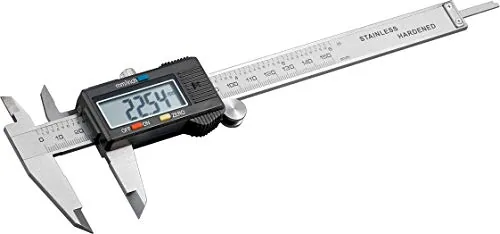
The Fixpoint WZ SL 150 D Digital caliper is a precise, user-friendly measuring instrument designed for workshop and hobby use. Featuring a clear digital readout, standard measurement ranges up to 150 mm (6"), and a sturdy sliding mechanism, this caliper balances affordability with practical functionality. It includes common features such as inch/mm conversion, zero-setting at any position, data-hold ability, and an automatic shutoff to extend battery life. The unit may be offered with optional accessories like a roller, round depth bar, hardened measuring faces, and an enlarged display.
Mechanical construction emphasizes durability and repeatability. Two adjustment screws allow fine recalibration of the jaws if accuracy drifts after extended use. The caliper’s sensing surfaces require periodic cleaning to prevent measurement errors caused by dirt or debris on the slider or jaws. The manual recommends routine accuracy checks and readjustment when deviations exceed the specified tolerance.
Battery power is provided by a small cell; the display may flash or fail to respond when voltage drops below approximately 1.45 V. In such cases, replace the battery. If the display freezes or does not change when the slider moves, remove and reinsert the battery after about 30 seconds to reset the circuit. Ensure the battery seat makes good contact when inserting a fresh cell. For no display at all, confirm correct battery orientation and seating or replace a depleted cell.
Common error symptoms and remedies include blinking digits (low battery), frozen or unresponsive readout (power cycle the battery), large reading errors (clean the measuring faces and slider), and no display (check contacts and replace battery). Keep the caliper dry and avoid excessive force on the jaws to maintain long-term accuracy.
Safety and disposal: remove the battery if the caliper will be stored for extended periods to avoid drain or leakage. Do not dispose of the caliper or battery with household waste; follow local recycling and disposal regulations. Regular maintenance and careful handling will keep the Fixpoint WZ SL 150 D performing reliably for both casual and professional measuring tasks.
Notes:
- Check calibration regularly and use the adjustment screws if readings drift.
- Clean slider and measuring faces before precise measurements.
- Replace battery promptly when digits blink or readings become unstable.
- Store with battery removed for long-term storage to prevent drain and leakage.
Search for 67,706 Manuals online


Type-in Brand or Model
Lena Kruger
7 months ago
My caliper seems to keep the display on and the battery drains quickly. Does the power switch truly shut it off, and what should I do if it randomly turns on after long storage?
Manual.ly
7 months ago
The power switch does not fully power down the unit. It mainly deactivates the digit display, but when the caliper is moved the display turns back on. Because of this, battery runtime can be limited (often weeks rather than years). For longer storage, remove the battery to prevent drain and possible contact oxidation. If it turns on by itself, check the battery and contact points: oxidation can cause unwanted switching. Clean the contacts carefully (dry cloth/cotton swab) and reinstall the battery with correct polarity, replacing the battery if needed. Also handle the device carefully, as the housing edges can be quite sharp.