
Finnlo Finum III Manual
PDF manual · 26 Pages
English



Quick check
Incorrect answer, please try again.
Chat with your Finnlo Finum III manual using AI
Get instant AI answers from your Finnlo Finum III manual
Ask anything about the Finnlo Finum III. Answers come from this manual, with the pages they are based on.
Finum III Maintenance Schedule
Regularly inspect all parts of the equipment and ensure all screws and connections are securely seated.
Regularly inspect parts subject to wear indicated by an asterisk in the parts list to ensure safety.
Clean handlebars and saddles that come into contact with perspiration using only a damp cloth.
Ask a Question
Do you recommend Finum III?
Yes NoFrequently Asked Questions
The Finnlo Finum III Crosstrainer supports a maximum user weight of 130 kg. Exceeding this limit may compromise safety and void warranty or cause damage.
Is this answer helpful?
No. The machine is classified as EN 957-1/9 Class HC and is not intended for therapeutic medical training. It is designed for home fitness and general endurance training only.
Is this answer helpful?
During pulse-controlled training press RECOVERY and stop pedalling; the computer counts down one minute and displays a fitness grade (F1–F6). The grade reflects the pulse drop within 60 seconds; F1 is very good and F6 very poor. For meaningful results, train at least 15 minutes.
Is this answer helpful?
The computer alternates RPM/speed, and displays time, distance, calories, pulse, scan and room temperature. It uses 2x AA batteries inserted in the back; removing batteries clears stored settings.
Is this answer helpful?
Aim for mostly aerobic work: spend ~80% of session time at up to 75% of your max heart rate (220 minus age), gradually increase intensity over months, and include 20% higher-intensity intervals to raise aerobic threshold.
Is this answer helpful?
Regularly check screws, nuts, pedals and handles for tightness. Replace defective or worn parts immediately (wear parts are marked with * in the parts list). Clean surfaces with a damp cloth and avoid moisture entering the computer.
Is this answer helpful?
A typical session includes 5–10 minutes warm-up, 15–40 minutes training, and 5–10 minutes cool-down. Train with a relatively low resistance and higher cadence; aim for about 80 RPM for efficient endurance training.
Is this answer helpful?
Advantages and Disadvantages
Advantages

- Joint-friendly elliptical motion combining walking, jogging and stepping for effective aerobic training.
- Integrated computer with RPM/speed, time, distance, calories, pulse, recovery function and auto on/off.
- Adjustable footplate positions and movable arms enable ergonomic customization and full-body workouts.
- Robust construction with detailed parts list, exploded drawings and replaceable wear parts for serviceability.
- Clear training guidance: pulse-oriented programs, cadence recommendation (~80 RPM) and phased session structure.
Disadvantages

- Not intended for therapeutic or medical rehabilitation use (EN 957-1/9 Class HC restriction).
- Requires battery power (2x AA) for electronics; incorrect insertion or battery removal erases settings.
- Some assembly required despite partial preassembly and may need periodic parts replacement after heavy use.
- Pulse measurement relies on hand sensors which can lose contact and need both hands held firmly.
- Max user weight limited to 130 kg, which may exclude heavier users.
Product Specification
Colors
grey, silver
Resistance
10-level adjustable
Brake system
magnetic
Drive system
Belt
Flywheel weight
35.27 lb
Max. user weight
286.60 lb
Dimensions
51.57x24.80x63.78in
Weight
92.59 lb
Features
Hand pulse measurement
Product Description
Finnlo Finum III Crosstrainer Manual — Product Overview
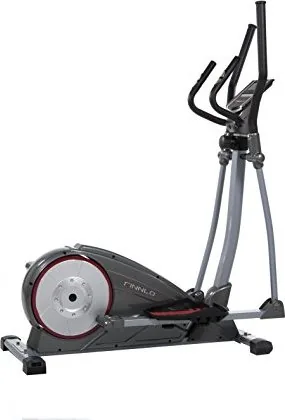
The Finnlo Finum III Crosstrainer is a home-class elliptical trainer designed for low-impact, efficient cardio and full-body workouts. Built to EN 957-1/9 Class HC standards with a 130 kg maximum user weight, it delivers smooth elliptical motion that combines walking, jogging and stepping for gentle joint loading and effective endurance conditioning. The trainer features moveable arm handles for synchronized upper-body engagement, adjustable footplate positions to optimize biomechanics, and a robust frame with a flywheel drive and belt system for reliable performance.
Key Features and Use
The onboard computer provides speed/RPM, time, distance, calories, and pulse monitoring, plus scan and auto on/off functions. A hand-pulse sensor and optional pulse-cable input support pulse-controlled training and a recovery-function that rates fitness from F1 (very good) to F6 (very poor) based on pulse drop one minute after stopping. The computer runs on two AA batteries and shows room temperature, time/date, and supports preset targets for time, distance, calories and heart rate. Assembly arrives partly preassembled and includes a detailed parts list and exploded drawings for servicing.
Training Guidance
The manual emphasizes safe use and correct technique: maintain an upright posture, avoid excessive forward or backward lean, warm up and cool down, and prefer higher cadence with lower resistance (target ~80 RPM). Recommended training frequency is at least three times per week, with session lengths of 15–40 minutes after warming up. Pulse-oriented training is encouraged—aim for 70–85% of max heart rate (220 minus age) with ~80% of session time in the aerobic zone. Recovery, gradual intensity progression, and regular inspection of wear parts are stressed.
Maintenance, Safety and Disposal
Minimal maintenance is required beyond routine inspections and timely replacement of worn parts (marked * in the parts list). Clean with a damp cloth; avoid moisture ingress into the computer. Packaging materials are recyclable and the product and batteries must be disposed of via appropriate electronic and battery recycling channels.
Notes
- Max user weight: 130 kg. - Not suitable for therapeutic medical training. - Keep a 1.5 m clearance around the unit. - Do not use barefoot; wear appropriate training clothing and shoes. - Service and parts ordering available via Finnlo/Hammer Sport customer service.
Search for 67,706 Manuals online


Type-in Brand or Model
maria_k
9 months ago
Is this cross trainer stable for everyday use, and what is the maximum user weight and pulse measurement method?
Manual.ly
9 months ago
Yes. Customers describe it as very stable and robust, with smooth, even motion and ergonomic handles. The resistance can be adjusted comfortably via a 10-gang, stepless dial, and the footplates are adjustable in three positions. The flywheel mass is about 16 kg. It is designed for users up to 130 kg. Heart rate measurement is provided via hand pulse sensors (grip pulse). Many buyers find this sufficient for basic training feedback.