
FIMI Palm Manual
PDF manual · 18 Pages
English



Quick check
Incorrect answer, please try again.
Chat with your FIMI Palm manual using AI
Get instant AI answers from your FIMI Palm manual
Ask anything about the FIMI Palm. Answers come from this manual, with the pages they are based on.
Ask a Question
Do you recommend Palm?
Yes NoFrequently Asked Questions
Connect USB-C to 5V 2A adapter.
Is this answer helpful?
0 degrees Celsius to 40 degrees Celsius.
Is this answer helpful?
Yes, via Type-C to 3.5mm adapter.
Is this answer helpful?
UHS-3 Speed Grade recommended.
Is this answer helpful?
Use calibration menu in settings to fix drift.
Is this answer helpful?
Yes, supports IEEE 802.11 and Bluetooth 4.0.
Is this answer helpful?
FIMI PLAY APP from App Store or Google Play.
Is this answer helpful?
Advantages and Disadvantages
Advantages

- Ultra-compact 120g design fits in pocket without bulk.
- Three-axis gimbal ensures smooth footage during movement.
- Intuitive touch screen and joystick for navigation.
- Multiple shooting modes including slow-motion and panorama.
- Supports external microphone for improved audio recording.
Disadvantages

- External adapter required to connect microphone.
- Gimbal cover and base sold separately from unit.
- Lithium battery is not user-replaceable.
- No built-in microphone hardware listed in manual.
- Minimum SD card speed grade required for performance.
Product Specification
Effective megapixels
12.0 Megapixels
Sensor
CMOS 1/2.6"
Recording media
microSD/microSDHC/microSDXC
Video function
H.264, MOV, 3840x2160@30p, 1920x1080@50p
Photo resolution
JPEG (max. 4000x3000 pixels)
Lens
Fixed lens
Digital zoom
No
Image stabilization
Optical
Display
LCD
Viewfinder
No
Flash/Video light
No
Wireless
Wi-Fi 5 (WLAN 802.11a/b/g/n/ac), Bluetooth 4.0
Power source
Li-Polymer Battery
Color
Black
Dimensions
0.89 x 5.0 x 1.2 inches (W x H x D)
Weight
0.26 lbs
Product Description
FIMI Palm Gimbal Camera Overview
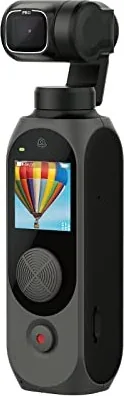
The FIMI Palm Gimbal Camera stands as a significant innovation in portable cinematography tools available today. Designed specifically for content creators who value mobility, this pocket-sized device integrates professional-grade stabilisation into an incredibly compact form factor. This comprehensive article serves as your essential FIMI Palm Gimbal Camera Manual to unlock the full potential of your handheld gimbal system.
Weighing merely 120 grams, the Palm fits easily into any bag or jacket pocket without adding significant bulk. Despite its diminutive size, it features a robust three-axis gimbal that ensures remarkably smooth footage even during dynamic movements. The rolling angle support extends from negative two-four-zero to plus sixty degrees for yaw. Precision control is maintained at a remarkable plus-minus zero point zero-zero five degrees accuracy, ensuring steady shots for professional results.
Powering the device involves the dedicated USB-C port located on the bottom. A standard five-volt two-ampere adapter is highly recommended for efficient charging. Status LEDs located on the front provide immediate feedback on battery health, recording status, and system errors. A green light indicates normal operation, while red illumination signals low battery levels or critical system errors requiring attention.
Controls are designed to be intuitive for both beginners and experts. An integrated five-way joystick manages complex camera movement commands. Long presses adjust movement speed settings, while short presses mark video timestamps or switch shooting modes rapidly. The high-definition touch screen offers fluid swipe gestures for accessing quick settings, opening the media library, and selecting between shooting modes. Available modes include standard video, photos, slow-motion, time-lapse sequences, and multi-directional panorama.
Advanced settings allow manual adjustments for shutter speed, ISO, and white balance temperatures. MicroSD cards support high-resolution video recording, and a UHS-3 Speed Grade card is strongly recommended. An external microphone can be attached via a Type-C to 3.5mm adapter sold separately to enhance audio quality. The optional base adds stability and provides a standard microphone port.
For maintenance, keep the lithium battery away from intense heat sources. Do not operate below zero degrees Celsius. Ensure the gimbal is never blocked during movement to prevent motor damage. Calibration is necessary if drifting occurs or images appear tilted. Always update firmware via the FIMI PLAY APP available on both iOS and Android platforms. Whether you are capturing fast-paced sports or serene landscapes, the Palm delivers versatile options for high-quality imaging.
Note: Accessories like the gimbal cover and carrying base are often sold separately. Please ensure all components are compatible and charged before your next outdoor shoot.
Search for 67,706 Manuals online


Type-in Brand or Model