
FeinTech VAX04201 Manual
PDF manual · 35 Pages
English



Quick check
Incorrect answer, please try again.
Chat with your FeinTech VAX04201 manual using AI
Get instant AI answers from your FeinTech VAX04201 manual
Ask anything about the FeinTech VAX04201. Answers come from this manual, with the pages they are based on.
Ask a Question
Do you recommend VAX04201?
Yes NoFrequently Asked Questions
The device supports Ultra-HD video resolutions up to 4K at 60 frames per second.
Is this answer helpful?
Yes, you can connect a soundbar to Input 1 using the HDMI eARC connector for audio return channel support.
Is this answer helpful?
No, the HDMI-CEC passthrough function is not supported on this specific matrix switch model.
Is this answer helpful?
There are a total of 4 HDMI inputs available for connecting various media sources.
Is this answer helpful?
For 4K HDR usage, keep HDMI input cables under 5 meters and output cables under 3 meters.
Is this answer helpful?
The switch offers AUTO, COPY, and STD modes to manage video format negotiation between displays.
Is this answer helpful?
You must power cycle the connected external players after changing EDID settings or wiring configurations.
Is this answer helpful?
Advantages and Disadvantages
Advantages

- Supports high-quality 4K 60Hz video resolution
- Includes dedicated eARC input for soundbar audio
- Enables independent playback on two separate displays
- Feature-rich remote control included for easy operation
- Advanced EDID management with three configurable modes
Disadvantages

- Does not support HDMI CEC passthrough functionality
- Maximum input cable length is limited for 4K transmission
- Requires specific power adapter for safe operation
- May need manual troubleshooting for signal handshake errors
- Does not support automatic device power switching
Product Specification
Video Inputs
4x HDMI 2.1 Input
Video Outputs
2x HDMI 2.1 Output
Additional Connections
1x USB
Resolutions up to
4096x2160@60Hz
Dimensions
7.20x0.63x3.35in (WxHxD)
Product Description
Revolutionize Your Home Entertainment Setup
Upgrading your home cinema often requires more than just a new screen. It demands seamless audio integration and robust connectivity. This is where the FeinTech HDMI eARC Pass Matrix Switch 4x2 stands out for modern enthusiasts. It allows you to manage four different HDMI sources while outputting to two displays. Whether you utilize a large primary TV alongside a secondary monitor or projector, flexibility is key. The ability to handle simultaneous independent playback ensures that guests can enjoy sports on one screen while you manage content on your main set.
One standout feature is the dedicated eARC support. You can connect your soundbar directly to the eARC input. This ensures high-quality audio formats like Dolby Atmos return to your soundbar from your television without complex passthrough issues. The documentation for the FeinTech HDMI eARC Pass Matrix Switch 4x2 for Soundbar Manual details how to configure this for optimal performance. You can play TV audio or internal apps through your external speaker system effortlessly.
Video quality remains a priority. The switch supports Ultra-HD resolutions up to 4K at 60 frames per second. It handles HDR10, HDR10+, HLG-HDR, and Dolby Vision. This means your next-gen gaming or 4K movies look their best. However, compatibility relies on the connected displays. The device manages Extended Display Identification Data, or EDID, through three distinct modes. The AUTO mode negotiates settings between both screens to find a common denominator. The COPY mode prioritizes the primary display output settings. The STD mode forces standard signaling to ensure playback capability even if the screen does not display the specific resolution.
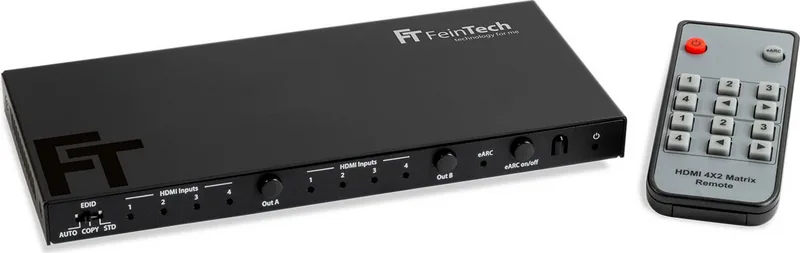
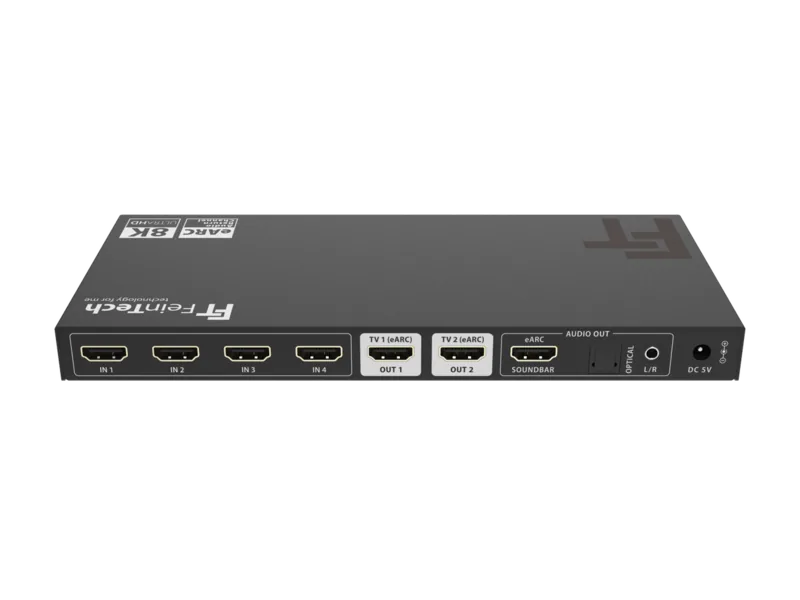
Installation involves connecting sources to inputs two through four. Input one is reserved for the soundbar via eARC. Output A connects to the primary display. Output B handles the secondary screen. A remote control manages source selection independently for each screen. You might even have different inputs active on both displays simultaneously. For those seeking detailed configuration steps regarding EDID modes or potential troubleshooting for handshake errors, the resource is essential. Note that HDMI-CEC pass is not supported on this matrix switch.
Cable length is also critical for 4K transmission. Keep inputs under five meters and outputs under three meters for HDR reliability. Fiber optic hybrid cables help maintain signal integrity over longer distances. Power cycling might be necessary if you change EDID settings significantly. Restarting the source players is a standard troubleshooting step for handshake issues.
System Notes and Care
Keep the device ventilated to prevent overheating. Do not obstruct the housing. Cleaning should be done with a dry soft cloth. Avoid moisture and direct heat. If liquids penetrate the unit, disconnect power immediately. Service requires professional attention. Never open the casing yourself. For extended storage, remove the power plug. Recycling involves designated facilities to recover valuable materials safely.
Search for 67,732 Manuals online


Type-in Brand or Model