
Exsys Mini PCIe Gigabit Ethernet Card Manual
PDF manual · 4 Pages
English



Quick check
Incorrect answer, please try again.
Chat with your Exsys Mini PCIe Gigabit Ethernet Card manual using AI
Get instant AI answers from your Exsys Mini PCIe Gigabit Ethernet Card manual
Ask anything about the Exsys Mini PCIe Gigabit Ethernet Card. Answers come from this manual, with the pages they are based on.
Ask a Question
Do you recommend Mini PCIe Gigabit Ethernet Card?
Yes NoFrequently Asked Questions
The card supports Microsoft NDIS5 and NDIS6. It works with Win98SE, ME, 2K, XP, XP64, Vista, Win7, and Linux. Drivers are shipped in a specific folder on the driver CD for installation.
Is this answer helpful?
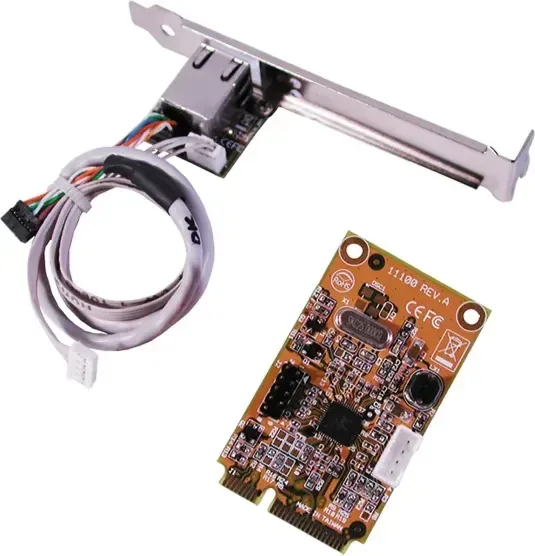
Remove the card from packaging and install LAN and LED cables on J2 and J3. Connect them to the RJ45 daughter board. Insert the card into the motherboard socket and secure with a screw. Verify with Device Manager.
Is this answer helpful?
The card supports Jumbo Frames up to 9K bytes. This allows for efficient handling of large data packets on supported networks and provides higher throughput for specific applications.
Is this answer helpful?
Normal PCI and low profile brackets are optional. They may not be included in the package box and should be ordered separately if needed for your specific computer case.
Is this answer helpful?
You can use Device Manager to check the installation. Screenshots on the driver CD also show what the installed connection looks like to confirm success.
Is this answer helpful?
The card offers Gigabit Ethernet Port throughput. It delivers full x1 Mini PCI Express throughput reaching 250Mbytes/sec for fast data transfer and network operations.
Is this answer helpful?
Yellow LED shows LINK/ACT status where steady is linked and blinking is transferring data. Green LED indicates Gigabit Mode status is active on the board.
Is this answer helpful?
Advantages and Disadvantages
Advantages

- Full x1 Mini PCI Express Throughput providing 250Mbytes/sec speed for high performance.
- Fully Compliant with PCI Express Base Specifications Revision 1.1 for reliability.
- Supports Microsoft NDIS technologies for IPv4, IPv6, TCP, UDP offload effectively.
- Compatible with Win98SE through Win7 and Linux operating systems for flexibility.
- Supports Jumbo Frames up to 9K bytes for enhanced throughput in networks.
Disadvantages

- RJ45 daughter board requires manual cable connection to the main card initially.
- Normal PCI and low profile brackets may require separate ordering if not in box.
- Limited to Embedded PCs with specific Mini PCIe Express Card slots available.
Product Specification
Type
LAN Adapter
Form Factor
1x PCIe Mini Card (fullsize, with PCI bracket, full height)
Interface
1x PCIe Mini Card (1x PCIe 1.0 x1)
Port
1x RJ-45
Transmission
1x RJ-45 (10/100/1000Base-T)
Chipset
Realtek RTL8111B (LAN Adapter, RJ-45)
Dimensions
1.18 x 0.24 x 2.01 inches (WxHxD)
Weight
0.44 lbs
Compatibility
Universal
Features
VLAN, Wake on LAN
Product Description
Introduction to the Exsys LAN-Adapter
Upgrading your embedded system requires reliable networking hardware to maintain efficiency. The Exsys LAN-Adapter offers a robust solution for high-speed connectivity needs in industrial settings. This device is a high performance Mini PCI Express Gigabit Ethernet card built for modern demanding applications. It operates on a high speed PCI Express bus and adheres to plug-and-play compliance standards for ease of use.
Compatibility and Performance
Compatibility is a major strength across different environments. The card supports IEEE 802.3/u/ab standards ensuring broad network integration. It handles Jumbo Frames up to 9K bytes effectively which enhances throughput for large data packets in enterprise environments. It delivers full x1 Mini PCI Express throughput reaching 250Mbytes/sec. This speed facilitates fast file transfers and smooth media streaming.
Driver Support and Features
Driver support spans across multiple operating systems ensuring flexibility. Windows users benefit from support for versions ranging from Win98SE to Win7. Linux users also find compatibility available for their distributions. The card utilizes Microsoft NDIS5 and NDIS6 technologies for efficient packet handling. Checksum offload features include IPv4, IPv6, TCP, and UDP support. Segmentation Task-offload functions handle Large Send versions one and two effectively.
Installation Process
Installation involves a specific daughter board setup to enable the RJ-45 port. The connector connects to the main Mini PCIe card via included cables for signal transmission. You must attach these cables to the J2 and J3 ports on the card board. The daughter board fits into computer rear panels using built-in adjustable brackets. Normal PCI and low profile brackets may require separate ordering depending on your specific case configuration.
Software Setup
When setting up software, drivers reside on the included media disc. Locate the correct folder for your OS version carefully. Follow on-screen instructions to complete the process smoothly. Verify status using Device Manager to ensure successful connection is established. Green LEDs indicate Gigabit Mode is active while Yellow LEDs show LINK status. Blinking signals data transfer activity happening in real time.
Conclusion
This hardware solution integrates seamlessly into Embedded PCs containing Mini PCIe Express Card slots. It represents a solid choice for systems needing Gigabit Ethernet capabilities without occupying standard expansion slots. Whether building workstations or maintaining equipment, the Exsys LAN-Adapter remains a versatile tool. Users referencing the Exsys LAN-Adapter, RJ-45, PCIe Mini Card Manual can find specific diagrams for cable routing. Ensuring proper connection prevents signal loss during operation.
Final Thoughts
Careful attention during installation guarantees optimal network performance for your device. The combination of speed, compatibility, and feature set makes this card recommended for demanding users today.
Search for 67,706 Manuals online


Type-in Brand or Model