
Exsys EX-6684 Manual
PDF manual · 2 Pages
English



Quick check
Incorrect answer, please try again.
Chat with your Exsys EX-6684 manual using AI
Get instant AI answers from your Exsys EX-6684 manual
Ask anything about the Exsys EX-6684. Answers come from this manual, with the pages they are based on.
Ask a Question
Do you recommend EX-6684?
Yes NoFrequently Asked Questions
Yes, the unit supports Mac and Linux distributions alongside Windows versions from 9.x through 8 for broad compatibility.
Is this answer helpful?
No drivers are necessary as the host controller handles connection automatically upon hardware installation.
Is this answer helpful?
Never use a wet cloth for cleaning to avoid moisture damage. Use a dry fluffless cloth with gentle pressure.
Is this answer helpful?
You can connect 7 devices plus 1 uplink port for the PC for a total of 8 functional connections.
Is this answer helpful?
Data transfer speeds reach up to 800Mbit per second effectively using the IEEE 1394b interface technology.
Is this answer helpful?
Only for internal assembly after consulting support, not for external use without specific conditions.
Is this answer helpful?
Yes, the operating system compatibility list explicitly includes Mac operating systems for versatile use.
Is this answer helpful?
Advantages and Disadvantages
Advantages

- Supports IEEE 1394a and IEEE 1394b standards for broad compatibility with various devices.
- Includes external 12V power supply ensuring stable power for all seven device ports.
- Automatic driver installation simplifies setup on Windows, Mac, and Linux operating systems.
- Capable of functioning as a repeater to extend the reach of the FireWire bus network.
- High transfer rates up to 800Mbit per second provide excellent performance for data throughput.
Disadvantages

- Cannot use internal PC power for external operation without specific support consultation.
- Fixed power configuration means I/O addresses cannot be manually adjusted by the user.
- Requires specific 9x9Pin cable for installation which might need replacement if lost.
- Must avoid moisture during cleaning to prevent damage to the internal connectors.
- Some older operating systems may require specific host controller driver updates for stability.
Product Description
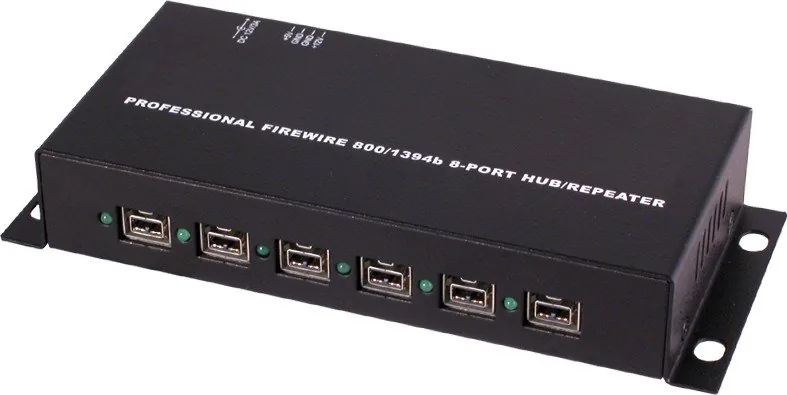
Operating computers require expanding connectivity options frequently. The Exsys FireWire 800 8-port External Hub stands out as a robust solution for high-speed data transfer needs. This device leverages IEEE 1394b technology to ensure maximum performance across multiple peripherals. Users seeking stability will appreciate the dedicated external power supply, which guarantees sufficient power for all connected devices without draining host resources. The hub features one uplink port for the PC and seven independent ports for end devices, effectively managing complex setups with ease. It ensures a secure data transmission experience with excellent performance rates up to 800Mbit per second across every active line. Compatibility remains a strong suit for this specific hardware platform. It supports a vast range of operating systems including Windows versions from 9.x through 8, as well as Mac and Linux distributions. This versatility makes it an ideal choice for heterogeneous environments where mixed hardware must coexist seamlessly without conflicts. The design utilizes a high-speed TI chipset, optimizing data throughput to reach rates up to 800Mbit per second consistently. Installation is straightforward, adhering to plug and play standards, meaning no additional drivers are typically required once the host controller detects the unit automatically. The system configures settings, removing the need for manual address adjustments or interrupts management. Maintaining the unit involves simple cleaning practices using dry cloths to avoid moisture damage entirely. Dust and dirt should be removed with gentle pressure to avoid pushing debris into the delicate ports. Never use wet cloths for cleaning. Technical specifications highlight robust connectivity with specific pin configurations ensuring reliable signaling between devices at all times. Advanced features allow the hub to function as a repeater within the FireWire bus network, extending reach and connectivity for larger setups effectively. Safety is prioritized through strict voltage management and specific instructions regarding the 12V connector. Users must use the included power supply to avoid damage during external operation scenarios. The 12V connector is intended for internal assembly or specific supported setups only. Users should always adhere to the guidelines for power and cable management to maintain optimal operation constantly. It is not possible to manually adjust I/O addresses as the system handles this automatically. This automation simplifies the user experience significantly for all skill levels. For those integrating older technology with modern systems, compatibility bridges are essential. This product fills that gap effectively while delivering consistent performance metrics. The package includes the EX-6684 unit, a guide, a power supply, and a cable. Certifications such as CE and FCC confirm adherence to safety standards. The layout supports both internal assembly considerations and external usage. Attention must be paid to connector orientation to prevent physical damage. The LED indicators provide visual feedback regarding power and data status. Adding this hardware enhances network capabilities without sacrificing speed. Inserting plugs gently without force protects the internal pins from harm.
Search for 67,706 Manuals online


Type-in Brand or Model