
Exsys EX-41016-2 Manual
PDF manual · 16 Pages
English



Quick check
Incorrect answer, please try again.
Chat with your Exsys EX-41016-2 manual using AI
Get instant AI answers from your Exsys EX-41016-2 manual
Ask anything about the Exsys EX-41016-2. Answers come from this manual, with the pages they are based on.
Ask a Question
Do you recommend EX-41016-2?
Yes NoFrequently Asked Questions
It expands a computer with 16 RS-232 serial ports for connecting multiple legacy or industrial devices through a single PCI or PCI-X slot.
Is this answer helpful?
It is suitable for RS-232 peripherals such as terminals, modems, plotters, controllers, and similar serial equipment.
Is this answer helpful?
Yes. It supports several Windows versions, server editions, and Linux/Unix environments, making it useful for older and newer setups.
Is this answer helpful?
Yes, power can be enabled on pin 9 through jumper settings, but only if the connected device is designed to accept that voltage.
Is this answer helpful?
No. You can select either 3.3V or 5V for the UART with a jumper, which helps match different hardware requirements.
Is this answer helpful?
The card supports baud rates up to 921.6 Kbps, which is strong performance for a multi-port serial expansion solution.
Is this answer helpful?
Advantages and Disadvantages
Advantages

- 16 serial ports in one PCI card simplify large RS-232 setups.
- Up to 921.6 Kbps per port supports fast and stable data transfer.
- Broad OS support helps in both legacy and mixed-system environments.
- Low-profile bracket and jumper options improve installation flexibility.
Disadvantages

- Manual jumper settings require careful checking before use.
- Pin 9 power is only suitable for devices that support it.
- The card is focused on RS-232, so it is not a universal serial solution.
- Driver installation may take extra steps on older operating systems.
Product Specification
External
16x serial
Internal
N/A
Interface
PCI
Chipset
SystemBase 16C1054PCI
Features
low profile PCB
USB notation
Link
Product Description
Exsys EX-41016-2: A Practical Way to Scale Serial Connectivity
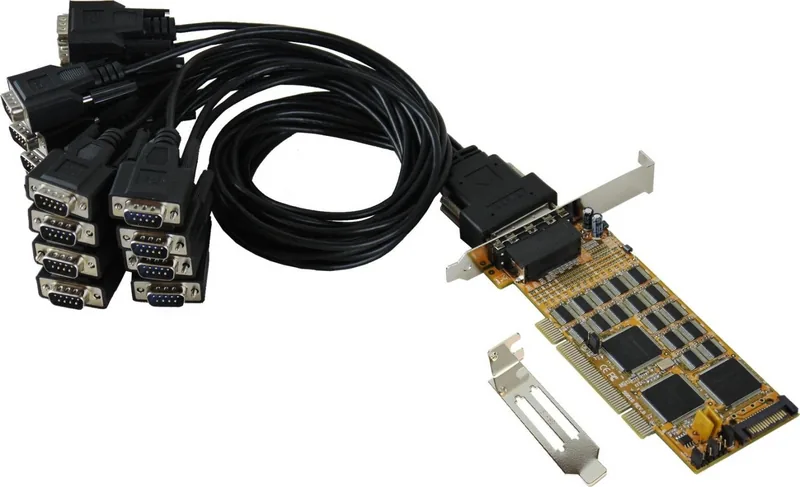
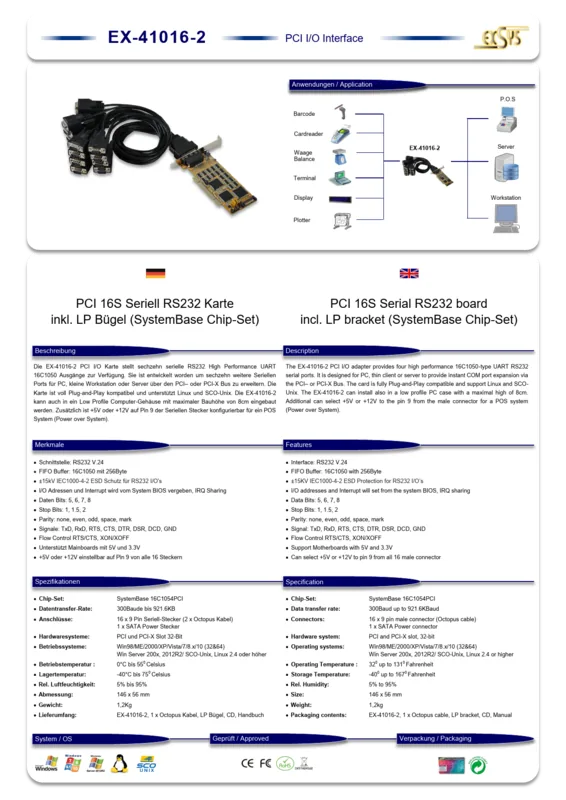
The Exsys EX-41016-2, 16x serial, PCI Manual highlights a card built for one clear purpose: turning a single PC into a serious multi-port RS-232 workstation. With 16 independent serial ports, this PCI/PCI-X expansion solution is ideal for environments that still rely on terminals, modems, industrial controllers, plotters, or other legacy devices. Instead of juggling adapters and hubs, you get a cleaner and more dependable connection strategy in one compact board.
At the heart of the card is the SystemBase chipset with a 256-byte FIFO buffer, helping maintain stable communication even when multiple devices are active at once. The card supports transfer rates up to 921.6 Kbps per port, which makes it well suited for demanding serial tasks where speed and reliability matter. It is designed for RS-232, and the system handles address and IRQ assignment automatically through the BIOS and operating system, reducing manual configuration work.
A useful detail for installers is the flexible jumper design. You can choose whether pin 9 provides power, and you can also select 3.3V or 5V for the UART. That makes the board more adaptable to different peripheral needs, though it also means users should verify device compatibility before enabling power options. The included low-profile bracket is another thoughtful touch, making the EX-41016-2 easier to fit into slim cases and smaller server enclosures.
Compatibility is broad, covering several generations of Windows as well as Linux and Unix-based systems. This makes the card a solid choice for mixed-technology setups where modern PCs still need to communicate with older serial hardware. The installation process is straightforward for experienced users, and the manual provides port checks and driver paths for multiple operating systems.
Overall, the EX-41016-2 is best seen as a high-density serial expansion card for professional and technical environments. It is not a flashy consumer accessory, but a dependable tool for keeping essential RS-232 equipment connected, organized, and performing consistently.
Notes
- Verify device voltage requirements before enabling pin 9 power.
- Use the low-profile bracket when installing in compact PC cases.
- Reboot after driver installation to complete setup properly.
Search for 67,706 Manuals online


Type-in Brand or Model