
Exsys EX-1635 Manual
PDF manual · 2 Pages
English



Quick check
Incorrect answer, please try again.
Chat with your Exsys EX-1635 manual using AI
Get instant AI answers from your Exsys EX-1635 manual
Ask anything about the Exsys EX-1635. Answers come from this manual, with the pages they are based on.
Ask a Question
Do you recommend EX-1635?
Yes NoFrequently Asked Questions
The device ensures secure data transfer rates of up to 5 Gbit per second when connected via USB 3.0.
Is this answer helpful?
It supports SD, SDHC, TF, M2, MMC, and Memory Stick types through four dedicated slots.
Is this answer helpful?
Yes, it supports all major operating systems and automatically installs drivers upon connection.
Is this answer helpful?
Yes, a 5V DC power supply is included and recommended to provide 900mA per port.
Is this answer helpful?
Use only a dry, non-flocculent cloth gently. Avoid moisture or wet cloths to prevent damage.
Is this answer helpful?
Advantages and Disadvantages
Advantages

- Supports data transfer rates up to 5 Gbit per second for fast file movement.
- Features four slots compatible with SD, SDHC, TF, M2, MMC, and Memory Stick.
- Includes three external USB 3.0 A-ports for simultaneous peripheral connection.
- Self-powered mode provides 900mA per port via external 5V DC supply.
- Automatic driver installation with full backward compatibility to USB 1.1.
Disadvantages

- Requires external power supply which can reduce portability.
- Only three USB output ports available for external devices.
- Strict cleaning requirements to avoid moisture damage in connectors.
- No manual configuration available for I/O addresses or interrupts.
- Requires careful handling when inserting connectors to avoid damage.
Product Specification
Type
USB-Hub, Card Reader
Form Factor
1x external wired
Connection
1x USB 3.0 Micro-B (Port, 5Gb/s), 1x USB-A 3.0 (Plug via Cable, 5Gb/s)
Ports
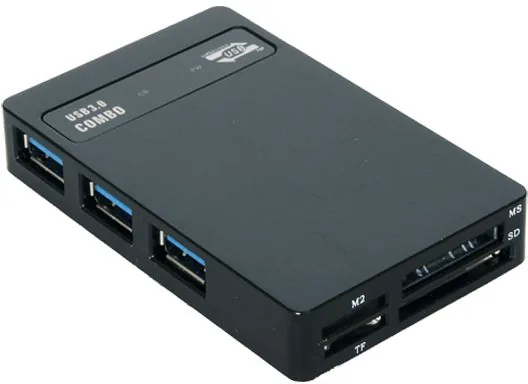
3x USB-A 3.0 (Port), 1x microSD, 1x SD Card, 2x Memory Stick
Transfer
3x USB-A 3.0 (Port, 5Gb/s), 1x microSD (microSD), 1x SD Card (SD Card, MMC), 1x Memory Stick (Memory Stick), 1x Memory Stick (Memory Stick Micro)
Power Supply
Power also via Connection (max. 900mA), Power input (1x Barrel Plug 5V), external power supply possible and included (1x Barrel Plug 5V)
Dimensions
3.94x1.18x2.48 in (WxHxD)
Weight
0.66 lbs
Housing Color
Black
Compatibility
Universal
USB Notation
Link
Product Description
Enhance Your Connectivity with The Product
In the modern digital landscape, efficient data transfer is crucial for professionals managing large volumes of data daily. The Exsys EX-1635 Multi-Slot-Cardreader, USB 3.0 Micro-B [Socket] Manual represents a versatile solution designed to streamline your workflow without cluttering your desk with multiple adapters. This device combines the functionality of a high-speed card reader with a robust USB hub, offering multiple connectivity options in a compact form factor.
Key Features and Performance
The unit is engineered to support the latest USB standards while maintaining compatibility with older devices. It works seamlessly with USB 3.0 serial bus technology, ensuring secure data transfer rates of up to 5 Gbit per second. This speed is essential when moving large multimedia files. The device includes four dedicated slots compatible with various memory card formats, including SD, SDHC, TF, M2, MMC, and Memory Stick. Additionally, three external USB 3.0 A-ports allow you to connect peripherals such as keyboards, mice, and hard drives simultaneously.
Power Management and Compatibility
One of the standout aspects of this unit is the self-powered mode capability. An external 5V DC power supply ensures that each USB port can deliver a maximum of 900mA, preventing power shortages often encountered with bus-powered hubs. It supports all major operating systems and automatically installs drivers upon connection, making it a true plug-and-play experience. You do not need to manually configure addresses or interrupts, as the system handles these tasks via BIOS.
Installation and Maintenance Guidelines
Setting up the hardware is intuitive. Connect the USB micro-B port to the hub first, attach the included power supply, and link the USB A-plug to your computer. For maintenance, use only a dry, non-flocculent cloth to clean connectors gently. Avoid moisture to prevent damage. Certifications such as CE, FCC, and RoHS confirm adherence to international standards. Whether expanding your workstation or managing archives, this card reader delivers reliable performance and speed.
Technical Specifications
Understanding the physical layout helps maximize utility. The USB 3.0 micro-B port uses a specific pin configuration where Pin 1 supplies VBUS power. The device features operational LEDs to indicate power and activity on the external ports. The build quality reflects a design intended for continuous operation. Ultimately, the Exsys EX-1635 provides a balance of speed and versatility. Reference the Exsys EX-1635 Multi-Slot-Cardreader, USB 3.0 Micro-B [Socket] Manual for technical details.
Notes
Ensure power adapter connection before data transfer. Clean connectors with dry cloth only. Avoid force insertion.
Search for 67,706 Manuals online


Type-in Brand or Model