
Exsys EX-1318 Manual
PDF manual · 2 Pages
English



Quick check
Incorrect answer, please try again.
Chat with your Exsys EX-1318 manual using AI
Get instant AI answers from your Exsys EX-1318 manual
Ask anything about the Exsys EX-1318. Answers come from this manual, with the pages they are based on.
Ask a Question
Do you recommend EX-1318?
Yes NoFrequently Asked Questions
The EX-1318 is compatible with Windows XP, Vista, 7, 8.x, 10 and various Windows Server editions (2003, 2008 R2, 2012). Newer Windows versions often auto-install drivers; older systems may require the Realtek NIC driver installer included with the device.
Is this answer helpful?
No. The EX-1318 is bus-powered via the USB-C connection and does not require an external power supply. Note that very low-power USB ports or underpowered hubs could limit functionality.
Is this answer helpful?
Yes, when connected to a USB 3.1 Gen1 (USB-C) port and a Gigabit network, the adapter supports 10/100/1000 Mbps Ethernet. On USB 2.0 hosts, throughput will be limited by the USB interface and may not reach full Gigabit performance.
Is this answer helpful?
Open Device Manager and look under "Network adapters" for an entry such as "USB 10/100/1000 LAN" or Realtek network adapter. If present, the device is installed and ready to use; otherwise install the RTK NIC driver provided.
Is this answer helpful?
No. The adapter relies on the system BIOS and operating system to automatically assign I/O addresses and interrupt resources. Manual configuration of these settings is not supported.
Is this answer helpful?
The EX-1318 carries CE, FCC, RoHS and WEEE certifications, indicating compliance with common safety, electromagnetic compatibility and environmental standards.
Is this answer helpful?
Use only a dry, lint-free cloth and apply gentle pressure to remove dirt. Avoid moist or wet cloths and ensure no fibers are left in connector openings to prevent connectivity issues.
Is this answer helpful?
Advantages and Disadvantages
Advantages

- Plug-and-play on Windows 10/Server 2012 R2 with automatic driver installation
- Gigabit Ethernet support (10/100/1000 Mbps) via a compact USB-C dongle
- Backward compatibility with USB 1.1, 2.0, 3.0 and 3.1 hosts
- Bus-powered design — no external power adapter required
- Realtek chipset ensures broad driver support and stable performance
Disadvantages

- May require manual driver installation on older Windows versions (XP/Vista/7/8.x)
- Cannot manually configure I/O addresses or IRQs — relies on system assignment
- Performance on USB 2.0 hosts is limited compared to USB 3.1
- Relies on host power — some low-power USB ports or hubs may not supply enough current
- Single RJ45 port limits use to one wired connection at a time
Product Specification
Type
LAN adapter
Design
1x external wired (connection cable not detachable)
Interface
1x USB-C 3.0 (plug via cable, 5Gb/s, 6.69in cable length)
Connection
1x RJ-45
Transfer rate
1x RJ-45 (10/100/1000Base-T)
Power supply
Power supply only via interface
Chipset
Realtek RTL8153 (LAN adapter, RJ-45)
Dimensions
1.18x0.59x2.56in (WxHxD)
Compatibility
universal
Special features
Wake on LAN
USB designation
Link
Product Description
Exsys LAN Adapter, RJ-45, USB-C 3.0 (Plug) Manual
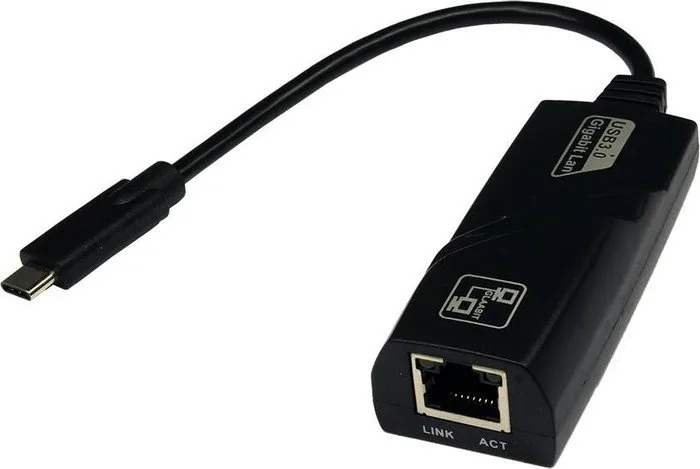
The Exsys LAN Adapter (EX-1318) is a compact USB-C to Gigabit Ethernet solution designed to add or restore wired network connectivity to laptops, desktops, and other devices. Equipped with a USB 3.1 Gen1 (USB-C) plug and a single RJ45 Gigabit port, the adapter supports 10/100/1000 Mbps networks and is backward compatible with USB 1.1, 2.0 and 3.0 ports. Powered via the USB bus, the EX-1318 uses a Realtek chipset to manage the Ethernet interface and delivers high-speed data transfer up to 5 Gbit/s on the USB link for reliable performance.
Key features and usage
The EX-1318 offers a plug-and-play experience on many modern Windows systems. After connection, Windows 10 and Windows Server 2012 R2 typically detect the device automatically and install drivers. For older systems (Windows XP, Vista, 7, 8.x and several Server editions), the Realtek NIC driver installer may be required; once installed the device appears in Device Manager as "USB 10/100/1000 LAN" or similar. The adapter’s bus-powered design removes the need for external power, and its simplicity makes it ideal for travel, remote work, or replacing a failing onboard Ethernet port.
Physical build and compatibility notes
The adapter includes status LEDs for link/activity monitoring and a robust RJ45 connector wired to standard Ethernet pinouts. It is certified to CE, FCC, RoHS and WEEE standards. Manual and basic installation guidance are included. Because system BIOS and operating systems automatically assign I/O resources and interrupts, manual configuration of addresses or IRQs is not supported.
Cleaning and care
To maintain the adapter, use a dry, lint-free cloth and apply gentle pressure. Avoid wet or abrasive cleaning agents and ensure no fibers remain inside connectors.
Notes
- Compatible with mainstream Windows versions; verify driver availability for legacy systems.
- Bus-powered — no external power required, though extremely power-hungry USB hubs or faulty ports may limit operation.
- Ideal for adding Gigabit Ethernet to ultraportable devices with only USB-C ports.
Search for 67,706 Manuals online


Type-in Brand or Model