

Exsys EX-1250V Manual
PDF manual · 16 Pages
English



Quick check
Incorrect answer, please try again.
Chat with your Exsys EX-1250V manual using AI
Get instant AI answers from your Exsys EX-1250V manual
Ask anything about the Exsys EX-1250V. Answers come from this manual, with the pages they are based on.
Ask a Question
Do you recommend EX-1250V?
Yes NoFrequently Asked Questions
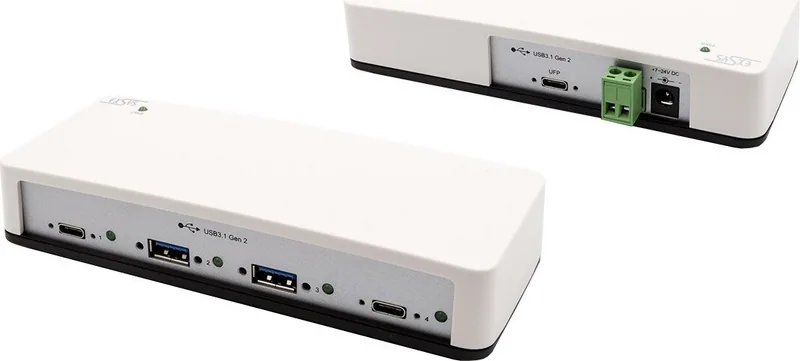
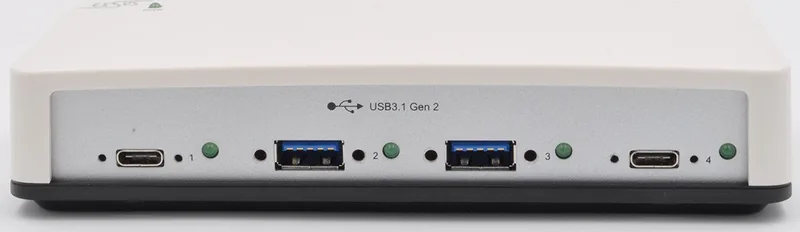
It provides up to four downstream ports: 2x USB 3.1 (Gen2) A-ports and 2x USB 3.1 (Gen2) C-ports. One additional upstream USB-C (Gen2) port connects the hub to your PC.
Is this answer helpful?
With external power connected via the DC connector or terminal block, each port can be supplied with up to 2.1A. This is intended to allow trouble-free charging for devices like iPhones, iPads, smartphones, and tablets.
Is this answer helpful?
The hub is designed for data transfer rates up to 10Gbit/s. This performance is supported by its VIA chipset and SuperSpeed+ USB 3.1 (Gen2) behavior.
Is this answer helpful?
Yes. It supports USB 1.1, 2.0, 3.0, and 3.1, so older peripherals can still work. The hub also supports both self-powered and bus-powered operation modes.
Is this answer helpful?
For all operating systems mentioned, the device is intended to be recognized automatically after hardware installation. You can verify the installation in the Device Manager under USB-Controller.
Is this answer helpful?
You can install it on a wall or on a DIN-rail. The delivery includes a wall mounting bracket and a DIN-RAIL kit. For rack-oriented setups, the DIN-RAIL kit is intended to support 19-inch rack installation.
Is this answer helpful?
Advantages and Disadvantages
Advantages

- Supports USB 1.1 to 3.1 devices for broad compatibility
- Up to 10Gbit/s data transfer with a VIA chipset optimized for SuperSpeed+
- Powered operation can provide up to 2.1A per port for convenient device charging
- Up to 4 downstream ports (2x A and 2x C) plus one upstream USB-C connection to the PC
- Includes wall mounting and DIN-RAIL kit, with screw-lock port fastening and per-port status LEDs
Disadvantages

- Only supports up to four connected USB devices at a time
- For maximum charging performance, external power is required within the 7-24V range
- Installation requires attention to wiring safety (never connect power to GND)
- Uses a plastic housing, so it may be less durable than metal for rough environments
- Cleaning must be dry and connector-safe, with no wet/moist cloth allowed
Product Specification
Type
USB-Hub
Form Factor
1x external wired (Wall mounting via mounting bracket, TS 35 DIN rail via mounting bracket)
Interface
1x USB-C 3.1 (Port, screwable, 10Gb/s), 1x USB-C 3.0 (Plug via Cable, 10Gb/s)
Connectivity
2x USB-C 3.1 (Port, screwable), 2x USB-A 3.1 (Port, screwable)
Output
2x USB-C 3.1 (Port, 10Gb/s, 2x 5V/2.1A/10.5W), 2x USB-A 3.1 (Port, 10Gb/s, USB BC, 2x 5V/2.1A/10.5W)
Power Supply
Power supply also via interface, Power input (1x Barrel connector 12V/3A), external power supply possible and included (1x Barrel connector, 12V/3A), Screw terminals (7-24V DC), Remote powering
Chipset
VIA/VLI VL820-Q2 (USB-Hub)
Dimensions
5.94x1.34x2.44 in (WxHxD)
Weight
0.93 lb
Housing Color
white
Compatibility
universal
Special Features
extended operating range (Temperature: 32F to 131F, Humidity: 5% to 95%)
USB Naming Convention
Link
Product Description
Exsys USB Hub, 2x USB-C 3.0, 2x USB-A 3.0, USB-C 3.1 [Socket] Manual
Add four USB 3.1 (Gen2) ports without sacrificing speed
The Exsys USB Hub (EX-1250V) is a compact plastic solution for expanding a single computer connection into up to four USB devices. It combines two A-ports and two C-ports for downstream use, plus one upstream USB-C (Gen2) connection to your PC. That setup is ideal when you need more room for peripherals while keeping performance high.
Charging and data transfer, in one hub
A standout feature is the powered operation. With external power (DC connection or optional terminal block), the hub can supply up to 2.1A per port, making it convenient for charging iPhones, iPads, smartphones, and tablets. For data, the hub is built to take advantage of a VIA chipset designed for SuperSpeed+ USB behavior, supporting transfer rates up to 10Gbit/s. This helps devices communicate reliably while taking advantage of modern USB bandwidth.
Flexible compatibility and simple operation
The Exsys USB Hub supports USB 1.1 through 3.1, so it can work with a wide range of existing devices. It also supports both self-powered and bus-powered modes, depending on how you connect power. Installation is straightforward: after connecting the included USB cable and powering the hub, most operating systems detect it automatically. Status LEDs provide clear feedback per port, indicating whether devices are connected and which USB mode is active.
Installation that fits different setups
For mounting, the hub supports wall installation and DIN-rail workflows. The delivery includes a wall mounting bracket and a DIN-RAIL kit for securing the unit in industrial or rack-oriented environments. Ports are also designed with screw-lock fastening, improving stability for frequent cable connections.
Key takeaways
- Up to 4 downstream USB ports (2x A, 2x C) using a single upstream USB-C connection to your PC.
- Up to 10Gbit/s data transfer, optimized with a VIA chipset for SuperSpeed+ performance.
- Up to 2.1A per port charging support when using external power.
- Works with USB 1.1, 2.0, 3.0, and 3.1 devices for broad compatibility.
- Includes mounting accessories (wall bracket and DIN-RAIL kit) plus per-port status LEDs.
Notes for setup and safe use
- Always connect power correctly: never connect power to GND, and observe the connector direction.
- Use the included power supply (or the specified optional power approach) and remain within the 7-24V operating range.
- For cleaning, use only a dry, lint-free cloth, and avoid moisture around connectors.
Search for 67,706 Manuals online


Type-in Brand or Model