
Exsys EX-1163HM Manual
PDF manual · 12 Pages
English



Quick check
Incorrect answer, please try again.
Chat with your Exsys EX-1163HM manual using AI
Get instant AI answers from your Exsys EX-1163HM manual
Ask anything about the Exsys EX-1163HM. Answers come from this manual, with the pages they are based on.
Ask a Question
Do you recommend EX-1163HM?
Yes NoFrequently Asked Questions
Yes, the EX-1163HM supports all operating systems. The drivers are installed automatically by the OS upon connection via plug-and-play functionality.
Is this answer helpful?
The device supports both self-powered and bus-powered modes. It can also be supplied via an external 7-24V DC signal through the terminal block.
Is this answer helpful?
To switch from self-power to bus-power, open the case using the side screws and move jumper JP1 from T to U.
Is this answer helpful?
Yes, the metal housing provides durability and effective heat dissipation, making it suitable for continuous operation in enclosed spaces.
Is this answer helpful?
Yes, the hub is designed for peripherals like sensors, barcode printers, or storage drives, delivering consistent performance under pressure.
Is this answer helpful?
The internal NEC chipset ensures data transfer rates reach up to 480Mbit/s, facilitating quick file exchanges.
Is this answer helpful?
No, use a dry non-fibrous cloth. Ensure no moisture enters the connectors to prevent damage.
Is this answer helpful?
Advantages and Disadvantages
Advantages

- Supports high speed data transfer up to 480Mbit/s using NEC chipset
- DIN-rail mounting allows for easy installation on standard racks
- External power supply option prevents host computer drain
- Compatible with all major operating systems and USB versions
Disadvantages

- Requires opening case to switch from self to bus power
- Terminal block power connection needs careful wiring
- IP30 rating does not offer water protection
- Limited to USB 2.0 speed despite higher version support
Product Specification
Type
USB Hub
Form Factor
1x external wired (wall mount, DIN rail via mounting bracket)
Input
1x USB-B 2.0 (socket, 480Mb/s), 1x USB-A 2.0 (plug via cable, 78.74in cable length)
Ports
4x USB-A 2.0 (socket)
Transfer
4x USB-A 2.0 (socket, 480Mb/s, 5x 5V/500mA)
Power Supply
Power supply also via connection, screw terminals (7-24V DC), remote power
Chipset
NEC Renesas uPD720112
Dimensions
1.02x4.51x2.61in (WxHxD)
Weight
0.93lbs
Housing Color
Black
Compatibility
Universal
Features
Metal housing, extended operating range (Temperature: 32F to 131F, Humidity: 5% to 95%)
USB Labeling
Left
Product Description
Industrial USB Connectivity Solutions
Product Overview
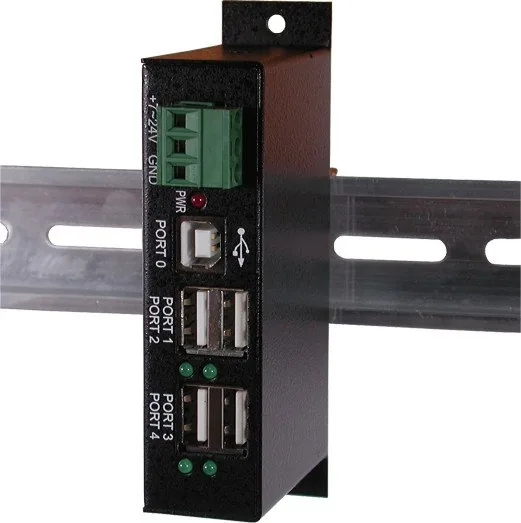
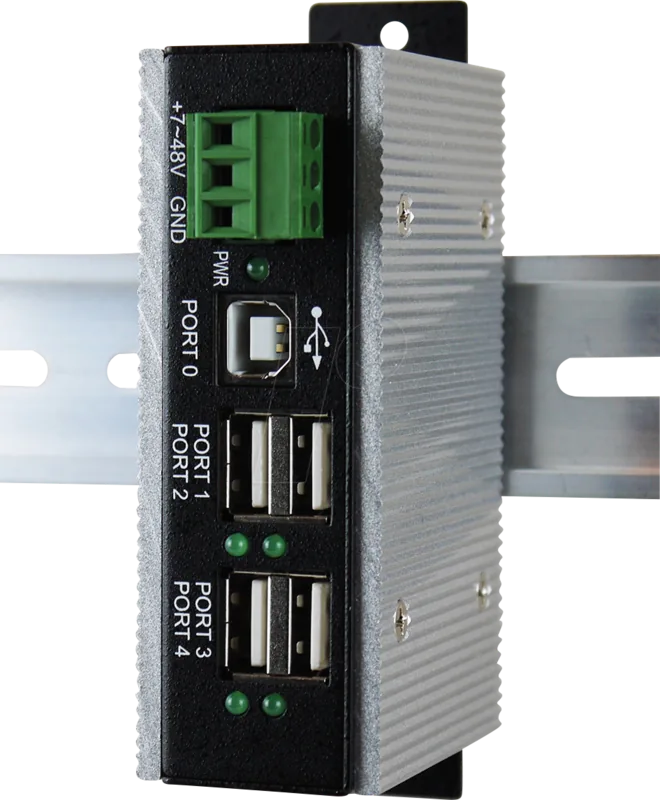
In modern industrial environments, reliable connectivity is paramount for maintaining operational efficiency and ensuring seamless integration of peripheral devices. The Exsys Industrial Railmount USB-Hub stands out as a robust solution specifically designed for demanding automation tasks where stability cannot be compromised. This device integrates seamlessly into standard DIN-rail setups, providing a dedicated expansion point for USB peripherals within machinery control rooms, server cabinets, or harsh manufacturing environments.
Performance and Compatibility
The core of this hardware solution revolves around high-speed data transmission capabilities. Equipped with four downstream USB 2.0 Type-A ports and a single upstream Type-B connection, users can connect multiple devices without compromising performance or stability. The internal NEC chipset ensures data transfer rates reach up to 480Mbit/s, facilitating quick file exchanges and stable peripheral communication even under load. Compatibility spans across USB standards ranging from 1.1 to 3.1, ensuring broad interoperability with existing systems regardless of age.
Power and Durability
Power management is a critical feature highlighted by the terminal block design. Users can supply power externally using a 7-24V DC signal through the block, preventing USB ports from draining the host computer resources unnecessarily. This dual-mode capability allows the system to operate in either self-powered or bus-powered modes, offering flexibility for different deployment scenarios based on site infrastructure. The metal housing provides significant durability and effective heat dissipation, which is critical for continuous operation in enclosed rack spaces.
Installation and Usage
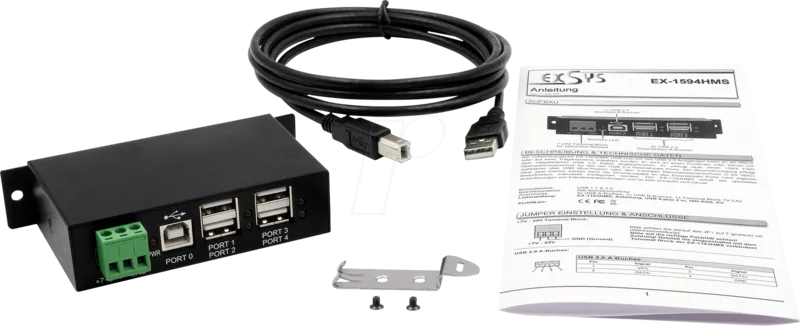
Installation is straightforward, supporting plug-and-play functionality across various operating systems without requiring complex manual configuration. Once connected via the provided USB 2.0 cable, the driver installation occurs automatically within the OS environment. A status LED on each port offers visual confirmation of active connections, aiding in quick troubleshooting. The IP30 rating guarantees protection against solid objects and dust, suitable for clean industrial settings.
Maintenance and Specs
Whether managing sensors, barcode printers, or storage drives, this product delivers consistent performance under pressure. Its compact form factor saves valuable cabinet space while maximizing port availability for critical data flow. The included DIN-rail kit simplifies mounting, reducing the time spent on mechanical setup and allowing for professional rack integration. Maintenance involves using a dry non-fibrous cloth to clean the exterior for longevity.
The operating temperature range spans from 0 to 55 degrees Celsius, allowing deployment in diverse climates. Storage tolerances extend well beyond normal operating limits, ensuring the device survives shipping without damage. Dimensions are approximately 114mm by 66mm, fitting easily into standard enclosures.
Search for 67,706 Manuals online


Type-in Brand or Model