
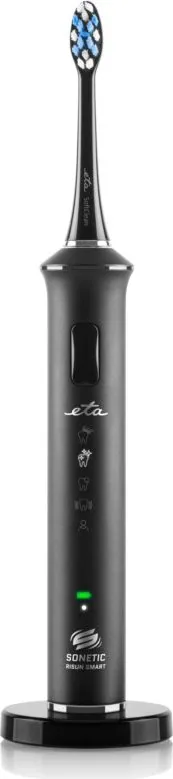
eta Sonetic Smart 7707 Manual
PDF manual · 76 Pages
English



Quick check
Incorrect answer, please try again.
Chat with your eta Sonetic Smart 7707 manual using AI
Get instant AI answers from your eta Sonetic Smart 7707 manual
Ask anything about the eta Sonetic Smart 7707. Answers come from this manual, with the pages they are based on.
Sonetic Smart 7707 Maintenance Schedule
Replace the brush head with a new one after 3 months of use, or sooner if significant wear or damage is observed.
Rinse the brush head and body under running water. Wipe the body with a damp cloth. Do not immerse in water or use a dishwasher.
Regularly inspect the charging base power cord for damage from sharp objects, heat, or bending. Ensure it is safe to use.
Charge the toothbrush at regular intervals (e.g., every 2-3 weeks) to maintain optimal battery life, even if not fully discharged.
Free maintenance reminders
Timed to your purchase date. Always free, unsubscribe anytime.
Ask a Question
Do you recommend Sonetic Smart 7707?
Yes NoDo you recommend Sonetic Smart 7707?
Yes NoFrequently Asked Questions
Download the RISUN app from the App Store or Google Play. Turn on Bluetooth on your phone, then press the power button on the toothbrush to activate pairing mode. Select the device in the app and follow the on-screen instructions to complete the connection.
Is this answer helpful?
Yes, you can use the toothbrush independently. However, data such as cleaning time and frequency will not be recorded until you connect the device to the app later for synchronization.
Is this answer helpful?
It is recommended to replace the brush heads every three months or sooner if the bristles appear worn or frayed to ensure effective cleaning and hygiene.
Is this answer helpful?
Generally, yes. However, if you have recent dental work, implants, or specific concerns, consult your dentist before using the device to ensure it is safe for your individual case.
Is this answer helpful?
For the first charge or if the battery has been unused for over three months, charge for 12 hours. For regular maintenance, approximately 10 hours is sufficient to reach a full charge.
Is this answer helpful?
The toothbrush body is waterproof (IPX7) and can be rinsed under running water, but the charging base must never be submerged or used while wet.
Is this answer helpful?
Advantages and Disadvantages
Advantages

- Connects to smartphone app for real-time tracking and personalized hygiene plans
- Features four specialized cleaning modes including whitening and gum massage
- Induction charging system offers high safety with IPX7 waterproof rating
- Long battery life provides up to 5 hours of continuous use per charge
- Includes three replacement brush heads and a convenient travel case
Disadvantages

- Requires a separate smartphone and app installation to access full smart features
- Initial pairing process may occasionally fail due to Bluetooth interference
- First charge requires a long duration of approximately 12 hours
- Replacement heads must be purchased separately after the initial set runs out
- Vibrations may feel unusual to first-time users of sonic technology
Product Specification
Type
Electric toothbrush
Operating mode
Battery operated (Li-Ion)
Brush head shape
Oval
Cleaning programs
5
Timer
2 minutes
Features
App control, charging indicator light
Package contents
Charging station, case, 3x replacement brush heads
Product Description
Discover the eta Sonetic Smart Sonic Toothbrush
The eta Sonetic Smart is not just a toothbrush; it is a sophisticated oral care companion designed to elevate your daily hygiene routine. By integrating advanced sonic technology with smart connectivity, this device transforms a simple task into a personalized health experience. The sleek design houses powerful vibrations that effectively remove plaque while being gentle on gums, making it suitable for users with braces, crowns, or sensitive teeth.
What sets the eta Sonetic Smart apart is its seamless integration with the RISUN application. Once paired via Bluetooth with your Android or iOS device, the toothbrush becomes a multifunctional assistant. It tracks your cleaning habits, offering detailed statistics and personalized hygiene plans based on the condition of your teeth. Whether you need a standard clean, an intensive polish, or a whitening boost, the app guides you through the optimal technique and timing.
The device features four distinct cleaning modes: Normal for daily use, Whitening for brighter smiles, Intensive for deep cleaning, and Massage for gum health. An individual mode allows for custom settings directly within the app. The induction charging system ensures safety with IPX7 waterproofing, allowing you to rinse the brush head easily without worrying about water damage to the body. A fully charged battery provides up to five hours of operation, perfect for travel or extended trips.
Safety is paramount in the design of the eta Sonetic Smart. It includes clear indicators for battery life and connection status, ensuring you always know the device's readiness. The package includes three replacement brush heads and a protective travel case, making it ideal for maintaining hygiene on the go. By combining ergonomic comfort with intelligent monitoring, the eta Sonetic Smart helps you achieve and maintain a healthier smile effortlessly.
Search for 67,732 Manuals online


Type-in Brand or Model