Manual.ly Logo

ESYLUX RC 230i UC Manual

0.0 · 0 Ratings

PDF manual · 66 Pages

English

M: OA-GPT-54-NAN
page

/ 66

Loading...
9396502463788b833a92a89d475cd54bfab7 page 9
9
GB
penetratesolidobjects.
•Toavoidinfluencingthelightsensor,maintainaminimumdistanceof1minrelation
totheconnectedlightinganddonotpointlightsourcesdirectlyatthedetector.
•Wheninstallingthedevice,bearinmindthesurroundingareae.g.neighbouring
propertiesorthedistancetotheroad.
•Themotiondetectorshouldonlybeinstalledonastable,flatsurface(wall/ceiling).
Thewallbaseunitandsensorareconnected.Forinstallationpurposes,separatethe
twoparts.Fitthescrewdriverintothesideopeningandleverinthedirectionofthe
sensor,pullingthedetectorawayfromthewallbase(Fig. 2.1).Ifmountingonawall,the
cableinletsmustfacedownwards.Ifmountingonaceiling,thecableinletsmustface
forwards.Feedthecableintothedetectorandmountthewallbaseunitintherequired
position(Fig. 3).Connectthemotiondetectoraccordingtothecircuitdiagram(Fig. 4).
CAUTION: The maximum in-rush current must not be exceeded when connecting to capacitive
loads such as electronic ballasts or fluorescent lamps with parallel compensation.
(4.1) Standardoperation(RC130i–RC280i).
(4.2) Parallelconnectionofmax.8devices.
(4.3) Whenconnectinginductors(e.g.relays,contactors,ballasts)theuseofafilter(A)
maybenecessary.
(4.4) Standardoperationwithadditionalpermanentlightingfunctionthroughexternalswitch.
(4.5) Parallelconnectionandautomaticstairwelllight.
(4.6) Standardoperationwiththeadditionalpossibilityofswitchingonbyhand.Iffitting
toaceiling,thetwosensorpartsareturnedawayfromeachotherby180°(Fig. 5).
Pressthesensorintothewallbaseuntilitclicksintoplace(Fig. 2.2).
(4.7) Standardoperation(RC230iUC).
NB: The motion detector’s sensor must be facing downwards.
4 • START-UP AND SETTING
Afterthedevicehasbeensuccessfullyinstalledandthepowersupplyswitchedon,the
devicewillperformaself-test(lastingabout60seconds),theredfocusLEDandtheblue
modeLEDwillflashalternately.Duringtheself-test,certainfunctionscanbeenabled
bytheoptionalremotecontrolMobil-RCi.Theconnectedsystemisactivated.Afterthe
automatictesthasbeenperformed,thedevicewillbeoperational.Thesettingelements
areconcealedinthehousing.Bypressingupandlettinggoofthelens,thesensorhead
isunlockedandprotrudesfromthehousingbyapprox.1cm.Repeatthisprocedureto
allowthesensortoreturntoitsoriginal,lockedposition(Fig. 6,workslikearetractable
ballpointpen).Arangeoffurthersettingoptions/specialfunctionsareavailablewiththe
optionalMobil-RCiremotecontrol.
Test mode
Turntheoperationselectorswitch(Fig. 7.1) to “Test”.
Duringthetestmode,thefocusLEDremainspermanentlyon.
GB
INSTALLATION AND OPERATING INSTRUCTIONS
Congratulations on your purchase of this high-quality ESYLUX product. To ensure proper operation,
please read these user instructions carefully and keep them for future reference.
1 • SAFETY INSTRUCTIONS
CAUTION: work on the 230 V power system must be carried out by authorised personnel only
with due regard to the applicable installation regulations. Switch off the power supply before
installing the system.
μ = Contact gap < 1.2 mm
Usethisproductonlyasintended(asdescribedintheuserinstructions).Changesor
modificationstotheproductorpaintingitwillresultinlossofwarranty.Youshould
checkthedevicefordamageimmediatelyafterunpackingit.Ifthereisanydamage,you
shouldnotinstallthedeviceunderanycircumstances.
Ifyoususpectthatsafeoperationofthedevicecannotbeguaranteed,youshouldturn
thedeviceoffimmediatelyandmakesurethatitcannotbeoperatedunintentionally.
2 • DESCRIPTION
ESYLUXRCiseriesmotiondetectorshavea130°/230°/280°fieldofdetectionand
360°anti-creepprotection.ESYLUXmotiondetectorsarepassiveinfrareddetectorswhich
reacttomovingheatsources(e.g.peopleorvehicles)(Fig. 1 (1) 360° anti-creep protection
(2) head-on to detector (3) diagonally to detector).Ifthemotiondetectorsensesachangein
thermalradiationinsideitsfieldofdetection,dependingonthesetlightvalue,itwill
activatetheconnectedsystem(e.g.lighting)forapresetlengthoftime.TheESYLUX
RCimotiondetectorseriescanbemountedontoawallorceilingwithouttheneedfor
furtheraccessories.Thedevicecanbemountedoninnerandoutercornerwallsusing
accessories.TheESYLUXRCimotiondetectorfeaturesfactorysettingsandthedetector
operatesaccordingtopresetvalues(10lux,2min,max.electronicrange).Thevalues
canbeindividuallymodified.Thedevicecanbepresetusingeithertheadjusting
controllersonthedeviceor,moreconveniently,usingtheESYLUXMobil-RCiandMobil-
RCi-Mremotecontrols(availableasanoption).
NB: To activate the detector’s complete range of functions, the Mobil-RCi remote
control is required.
3 • INSTALLATION/ASSEMBLY/CONNECTION
Beforeinstallingthedevice,observethefollowing:
•Turnoffthepowersupply.
•Informationconcerningrangeisbasedonaninstallationheightof2.50m.(Thefield
ofdetectionwillvaryaccordingtotheheight)
•Foroptimumperformance(i.e.maximumrange),positionthedevicesothatpeople
vehiclesaremovingparalleltothedetector(Fig.1).
•Makesurethatthedetectorhasaclearlineofsight,asinfraredbeamscannot

Chat with your ESYLUX RC 230i UC manual using AI

Get instant AI answers from your ESYLUX RC 230i UC manual

Ask anything about the ESYLUX RC 230i UC. Answers come from this manual, with the pages they are based on.

Ask a Question

0/1000

Do you recommend RC 230i UC?

Yes No

Frequently Asked Questions

A

It is a passive infrared motion detector that reacts to moving heat sources like people or vehicles. It switches connected lighting or devices based on motion and ambient light conditions.

Is this answer helpful?

A

The RC 230i UC offers a 230° detection field with 360° anti-creep protection, helping it cover wide areas and detect movement below the sensor as well.

Is this answer helpful?

A

Yes. The detector is designed for wall or ceiling installation. The sensor head can be adjusted, which helps align the coverage area to the room or outdoor space.

Is this answer helpful?

A

No. It can work with the built-in controls and factory settings. However, the optional Mobil-RCi remote control unlocks more advanced settings and special functions.

Is this answer helpful?

A

The factory preset is 10 lux, 2 minutes, and maximum electronic range. These settings can be changed manually or through the optional remote control.

Is this answer helpful?

A

Yes. It only activates connected lighting when motion is detected and the set light threshold is reached, which helps reduce unnecessary power use and improves convenience.

Is this answer helpful?

M: OA-GPT-54-NAN

Advantages and Disadvantages

Advantages

  • 230° detection with 360° anti-creep protection for broad coverage.
  • Universal-voltage RC 230i UC version suits more installation types.
  • Adjustable time, light level, and range for tailored operation.
  • Wall or ceiling mounting keeps the installation flexible.
VS

Disadvantages

  • Full feature access requires the optional Mobil-RCi remote.
  • Direct sunlight can reduce sensing range and reliability.
  • Nearby animals or moving branches may cause unwanted triggers.
M: OA-GPT-54-NAN

Product Specification

Type

Motion sensor

Alarm zones

1

Standard

N/A

Detection range

131.23 ft

Detection angle

230°

Power supply

Mains (12-24V)

Operating temperature

-13°F to +131°F

Dimensions

5.32x4.13x3.07in

Weight

0.68 lb

Protection class

IP54

Manufacturer's warranty

five years

M: OA-GPT-54-NAN

Product Description

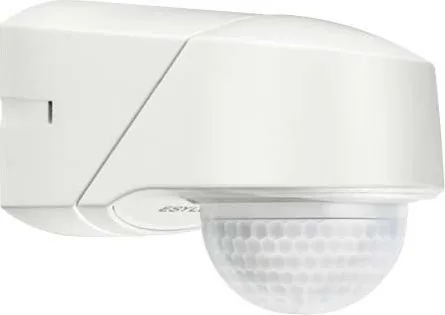
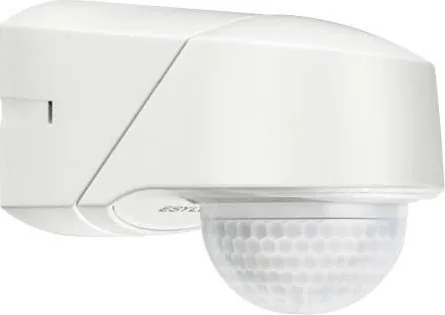
ESYLUX RC 230i UC White Motion Detector

The ESYLUX RC 230i UC white motion detector is a practical choice for anyone who wants reliable lighting control with a clean, discreet design. Built on passive infrared technology, it reacts to moving heat sources such as people or vehicles and helps automate lighting only when it is actually needed. For readers searching for the ESYLUX RC 230i UC white motion detector Manual, the main idea is simple: this model is designed to combine flexibility, efficiency, and straightforward setup in one compact unit.

Designed for flexible installation

One of the strongest points of the RC 230i UC is its adaptable detection concept. It offers a 230° field of detection plus 360° anti-creep protection, which makes it well suited for entrances, walkways, corridors, and other areas where motion can approach from multiple directions. The unit can be mounted on a wall or ceiling, and the sensor head can be adjusted to match the installation site. That makes it easier to fine-tune coverage without overcomplicating the setup.

Practical control and everyday convenience

The detector supports both manual adjustment and optional infrared remote control, so users can choose a simple setup or a more advanced configuration. Factory settings are already sensible, with a default 10 lux / 2 min / maximum electronic range profile, but the values can be changed to suit different routines. Time, brightness threshold, and range can all be tailored, which is especially useful in shared spaces or areas with changing daylight conditions.

Built for more than basic motion switching

This model is not limited to a basic on/off response. It includes test mode, impulse mode, continuous lighting control, holiday mode, and alarm mode, giving it a broader role in lighting management. The RC 230i UC version is especially interesting because it supports universal voltage input, making it suitable for a wider range of installations. With a detection range of around 20 m at 2.5 m mounting height, it balances coverage with precision.

Why it stands out

The white housing blends well into modern interiors and exteriors, while the UV-stabilized polycarbonate enclosure and IP54 protection add durability. In daily use, the detector helps reduce unnecessary energy consumption, improves convenience, and supports a more automatic lighting experience. It is a smart fit for users who want a dependable motion sensor that feels robust without looking bulky.

Notes

  • Best performance is achieved when movement passes across the detector, not directly toward it.
  • Keep light sources at least 1 m away to avoid affecting the sensor.
  • Optional remote control unlocks the full feature set.
  • Small animals, wind, or nearby moving objects may trigger detection in some environments.
M: OA-GPT-54-NAN

© Copyright 2026 Manual.ly
