
ESI U22 XT Manual
PDF manual · 14 Pages
English



Quick check
Incorrect answer, please try again.
Chat with your ESI U22 XT manual using AI
Get instant AI answers from your ESI U22 XT manual
Ask anything about the ESI U22 XT. Answers come from this manual, with the pages they are based on.
Ask a Question
Do you recommend U22 XT?
Yes NoFrequently Asked Questions
Yes, the interface fully supports Windows 10 along with Vista, 7, and 8 to ensure stable performance across modern operating systems.
Is this answer helpful?
No, the device is bus-powered and draws energy directly from the USB connection eliminating the need for a wall adapter.
Is this answer helpful?
Yes, the dedicated Hi-Z input on the front panel is specifically designed for high impedance instruments like guitars and bass.
Is this answer helpful?
No, DirectWIRE technology is exclusive to the Windows driver suite on ESI products so Mac relies on native CoreAudio.
Is this answer helpful?
The interface supports up to 96kHz sampling rate with 24-bit resolution for high fidelity audio processing and playback.
Is this answer helpful?
You must toggle the +48V switch on the front panel when connecting condenser microphones to provide necessary power.
Is this answer helpful?
Mac OS X recognizes it natively while Windows requires manual driver installation for advanced features like low latency routing.
Is this answer helpful?
Advantages and Disadvantages
Advantages

- Bus powered for easy portability and simplified setup
- Supports 24-bit 96kHz audio resolution for high fidelity
- Includes DirectWIRE for internal routing on Windows
- High dynamic range exceeds 100dB for clarity
- Feature rich front panel controls for monitoring
Disadvantages

- DirectWIRE functionality unavailable on Mac OS X
- Windows system requires specific driver installation
- No external power supply option provided
- Basic driver mode on Mac lacks advanced features
Product Specification
Interface
USB 2.0
Input Channels
2
Output Channels
2
Mic Preamps
1
Analog Inputs
1x Mic In (XLR), 1x Stereo Line In (RCA), 1x Instrument In (0.25 inch Jack)
Analog Outputs
2x Line Out (0.25 inch Jack), 1x Headphone Out (0.25 inch Jack)
Digital Inputs
no
Digital Outputs
no
AD/DA Converter
24-bit/96kHz
Product Description
Discover the ESI U22 XT Experience
Starting with the ESI U22 XT, this device redefines accessibility in home studios and professional setups alike. Whether you follow the setup guide found in the ESI U22 XT Manual or dive directly into recording, the flexibility here is unmatched for its class. It serves as a robust professional 24-bit USB Audio Interface tailored for versatile audio needs ranging from podcasting to music production.
Power and Connectivity
The unit is bus-powered, eliminating the need for external power adapters by saving space significantly. You connect directly via USB 2.0 to your PC or Mac to begin operation immediately. This portable design ensures you have audio quality available wherever you work without power cords or batteries.
Input Versatility
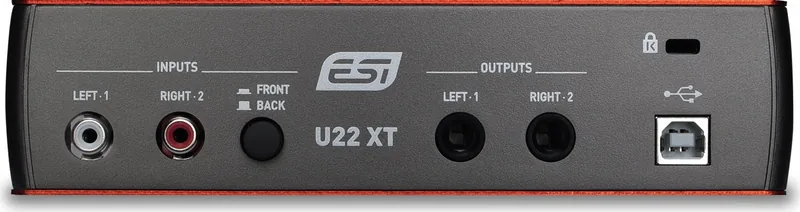
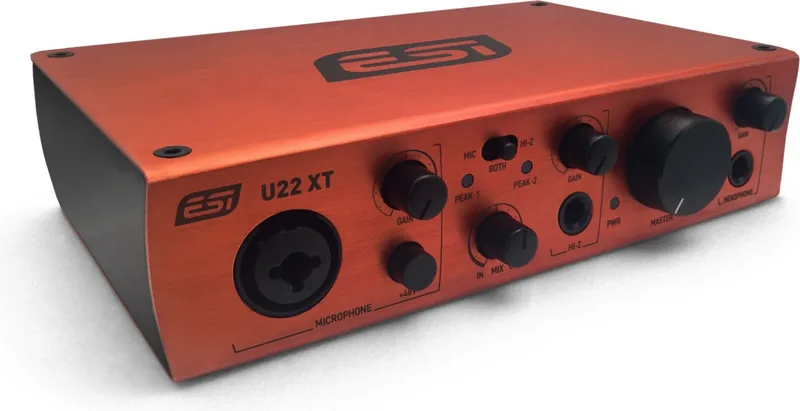
Capture sound with high precision using the combination XLR input jack. This supports dynamic or condenser microphones with switchable +48V phantom power for studio-quality vocals. There is also a dedicated Hi-Z input for electric guitars. Line level inputs via RCA allow connecting synthesizers or mixers effortlessly.
Output Options
Monitor your audio through the balanced TRS outputs connected to studio monitors or through the dedicated headphone jack for personal listening. The front panel offers immediate control over levels and the monitoring mix. You can blend inputs and playback signals directly at the device to ensure accurate performance tracking.
Software and Drivers
Windows users enjoy low latency support via ASIO 2.0 and DirectWIRE technology which allows routing audio internally between applications without physical cabling required. Mac users benefit from native CoreAudio support for seamless integration with zero latency issues. The included control panels ensure easy management of inputs, outputs, and routing on both operating systems efficiently for producers.
Technical Specifications
The audio engine processes up to 24-bit resolution at 96kHz sampling rates. Dynamic range exceeds 100dB for high fidelity. Windows Vista and newer including Windows 10 are supported. Mac OS X 10.7 or higher is required for the native interface mode.
Physical Controls
The interface features peak LEDs for visual signal verification. A master volume knob adjusts the main output level while individual channel faders allow precise gain staging. Front and back switching enables you to choose between microphone inputs on the front or line inputs on the rear for varied workflow scenarios. A security slot on the side allows laptop lock attachment to deter theft during transport.
Installation Notes
Installation is straightforward on modern systems. Windows requires a manual driver setup for full features like DirectWIRE while Mac OS X often requires no driver installation for basic operation making it highly user friendly.
Conclusion
In conclusion, the ESI U22 XT stands out as a reliable solution for expanding your audio capabilities significantly. It balances cost with features that satisfy beginners and pros alike. The build quality supports frequent use while the software suite offers deep functionality for complex audio routing tasks. It remains a top choice for USB audio interfaces.
Search for 67,732 Manuals online


Type-in Brand or Model