


ESI Gigaport eX Manual
PDF manual · 19 Pages
English



Quick check
Incorrect answer, please try again.
Chat with your ESI Gigaport eX manual using AI
Get instant AI answers from your ESI Gigaport eX manual
Ask anything about the ESI Gigaport eX. Answers come from this manual, with the pages they are based on.
Ask a Question
Do you recommend Gigaport eX?
Yes NoFrequently Asked Questions
The ESI Gigaport eX supports professional-grade audio resolution up to 24-bit at 192 kHz sampling rate, ensuring high-fidelity reproduction for demanding audio tasks.
Is this answer helpful?
Yes, it is perfectly suited for DJs. It offers eight outputs that can be used as four separate stereo pairs for Mix, Cue, and Effects, along with dedicated headphone jacks for monitoring.
Is this answer helpful?
No, it works natively with CoreAudio on OS X and macOS 10.9 and higher without installing drivers, though a Control Panel is available for advanced settings.
Is this answer helpful?
There are two stereo headphone outputs. One monitors channels 1 and 2 specifically, while the other provides a sum of all active channels.
Is this answer helpful?
DirectWIRE Loopback allows you to internally record digital audio signals being played back through the interface, useful for capturing streams or software synth output.
Is this answer helpful?
Yes, despite being optimized for USB 3.1 with a USB-C connector, it is fully backward compatible with standard USB 2.0 ports using the included adapter cable.
Is this answer helpful?
Advantages and Disadvantages
Advantages

- Eight independent high-quality analog output channels supporting up to 7.1 surround sound configurations
- Supports ultra-high resolution audio up to 24-bit / 192 kHz with 114dB dynamic range
- Includes two dedicated headphone outputs for independent monitoring of specific channels or master mix
- Features DirectWIRE technology for flexible real-time signal routing between software and hardware
- Native CoreAudio support on macOS eliminates the need for drivers for basic operation
Disadvantages

- Internal loopback recording is restricted to only physical outputs 1 and 2
- Windows users must install specific drivers to unlock all advanced features like DirectWIRE
- Lateny configuration requires adjustment before starting audio applications for best results
- Output connectors use unbalanced RCA (Cinch) format rather than balanced XLR
- USB-C cable provided is Type C to Type C, requiring adapters for older USB Type A ports if not included separately
Product Specification
Interface
USB-C 3.1
Output Channels
8
Mic Preamps
No
Analog Outputs
8x Line Out (RCA), 2x Headphone (0.25in Jack)
Digital Inputs
No
Digital Outputs
No
AD/DA Converter
24bit/192kHz
Features
Bus powered
Dimensions
4.72x0.79x2.76in (WxHxD)
Product Description
ESI Gigaport eX: The Ultimate Multi-Channel Audio Solution
The ESI Gigaport eX stands as a pinnacle of professional audio engineering, designed specifically for users who demand high-fidelity multi-channel playback without compromising on performance. This device transcends the limitations of standard sound cards by offering eight independent analog output channels, making it an ideal choice for complex setups requiring surround sound or specialized DJ applications.
At its core, the interface delivers pristine audio quality through top-tier 24-bit / 192 kHz Digital-to-Analog converters. With a dynamic range of 114dB, every nuance of your music is reproduced with exceptional clarity. Whether you are running a full 7.1 surround system or managing four separate stereo pairs for cueing and effects in a live DJ environment, the Gigaport eX handles the load with ease.
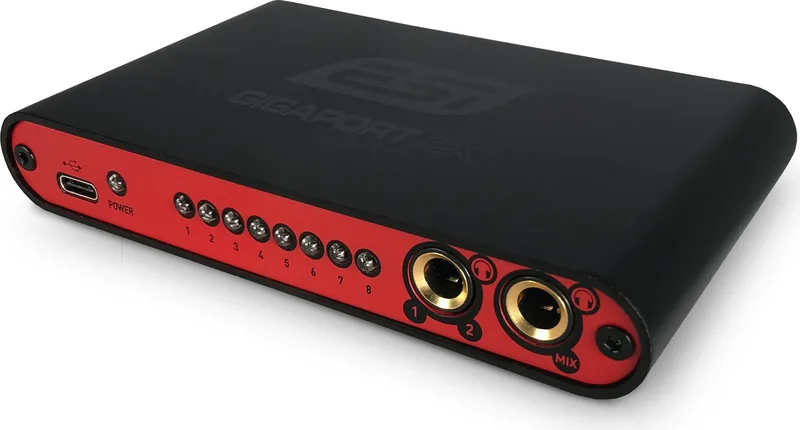
Connectivity is seamless thanks to the modern USB-C port, optimized for USB 3.1 but fully compatible with traditional USB 2.0 ports. On the front panel, you will find two distinct headphone outputs. One provides a direct monitor of channels 1 and 2, while the other offers a master mix of all active channels. This dual-monitoring capability allows professionals to check specific tracks or the overall mix independently, a feature that proves invaluable during mixing sessions or live performances.
The rear panel features eight unbalanced RCA line outputs, each clearly labeled for easy identification. Under Windows, the dedicated Control Panel grants granular control over latency, buffer sizes, and sample rates. A standout feature is the DirectWIRE technology, which enables flexible routing of audio signals between software applications and physical outputs. This means you can route any combination of channels to any physical output dynamically, even while audio is playing. Additionally, the DirectWIRE Loopback function allows for internal recording of system audio, perfect for capturing streams or software synthesizer outputs directly onto your hard drive.
On macOS, the device operates natively via CoreAudio, requiring no additional driver installation for basic functionality, though the included Control Panel unlocks advanced features. Its Class 1 compliance ensures broad compatibility across various operating systems, including Linux and mobile devices, making it a versatile tool for any audio enthusiast or professional.
Notes:
- Ensure drivers are installed from the official website for full feature access on Windows.
- Latency settings must be configured before launching audio applications for optimal performance.
- Internal loopback recording is limited to signals routed through physical outputs 1 and 2.
Search for 67,732 Manuals online


Type-in Brand or Model