
ESI cosMik uCast Manual
PDF manual · 2 Pages
English



Quick check
Incorrect answer, please try again.
Chat with your ESI cosMik uCast manual using AI
Get instant AI answers from your ESI cosMik uCast manual
Ask anything about the ESI cosMik uCast. Answers come from this manual, with the pages they are based on.
Ask a Question
Do you recommend cosMik uCast?
Yes NoFrequently Asked Questions
Connect the microphone to your iPhone or iPad using the supplied USB-C cable along with an Apple Camera Connection Kit adapter if your device has a Lightning port. Most audio apps will automatically detect and utilize the microphone once connected.
Is this answer helpful?
No, the microphone works immediately as a plug-and-play device on Mac and Windows systems. However, Windows users can download an optional EWDM driver to access professional features like ASIO, lower latency, and virtual audio channels.
Is this answer helpful?
The Power/Mute LED displays the operational status. A green light means the microphone is ready and active. A red light indicates that the mute switch has been engaged, silencing the microphone input.
Is this answer helpful?
Yes, you can connect stereo headphones to the 1/8-inch headphone connector on the bottom of the unit. Use the Headphone Level knob to adjust the volume so you can hear both your input and computer playback clearly.
Is this answer helpful?
The kit includes a USB-C to USB-C cable for computers with USB-C ports and a USB-C to USB-A cable for computers with standard USB 2.0 or 3.0 ports. Both allow direct connection to the microphone for power and audio transmission.
Is this answer helpful?
Start with the gain knob turned down. After enabling the mute switch, slowly turn it clockwise while watching your software's input meters. Stop when the signal peaks just below 0dB, usually in the yellow area, to avoid clipping.
Is this answer helpful?
Advantages and Disadvantages
Advantages

- Universal compatibility with Mac, PC, iPhone, and iPad via USB-C
- Cardioid polar pattern effectively rejects rear background noise
- Plug-and-play functionality requires no drivers for basic use
- Includes optional EWDM driver for low-latency ASIO performance
- Clear LED status indicators show power and mute states instantly
Disadvantages

- Requires specific adapters for non-USB-C iOS devices
- Advanced features like DirectWIRE require external driver installation
- No built-in phantom power for other XLR microphones
- Gain knob lacks tactile click stops for precise incremental changes
- Headphone output volume may vary depending on host device settings
Product Specification
Type
Streaming Microphone
Design
Digital
Transducer Principle
Condenser
Polar Pattern
Cardioid
Connection
USB-C
Frequency Range
30Hz-18kHz
Nominal Impedance
350 Ohms
SPL max.
130dB
Signal-to-Noise Ratio (SNR)
89dB
Power Supply
USB
Package Contents
Desk Stand
Features
Headphone Jack (3.5mm)
Dimensions
6.93x1.97x1.97 in
Weight
8.82 oz
Product Description
Unlock Professional Audio Quality with ESI cosMik uCast
The ESI cosMik uCast is a versatile professional USB condenser microphone designed for musicians, podcasters, and content creators who demand high fidelity without complexity. This device excels in capturing voice, vocals, and acoustic instruments like guitars or piano with exceptional clarity. Its cardioid polar pattern ensures that it focuses on sound sources directly in front of the capsule while effectively rejecting background noise from the rear. This feature allows you to position the microphone precisely to isolate your desired audio source, making it ideal for home studios or live recording environments where ambient noise control is crucial.
Seamless Connectivity and Setup
One of the standout features of the cosMik uCast is its plug-and-play capability across multiple platforms. Whether you are using a Mac, Windows PC, iPhone, or iPad, the microphone connects effortlessly via the USB-C port. The package includes two cables: a USB-C to USB-C cable for modern devices and a USB-C to USB-A cable for older computers. For iOS users with Lightning ports, a standard adapter enables instant connection. On Windows systems, an optional EWDM driver can be downloaded to unlock advanced features like ASIO support, DirectWIRE virtual channels, and reduced latency for professional audio applications.
Intuitive Control Interface
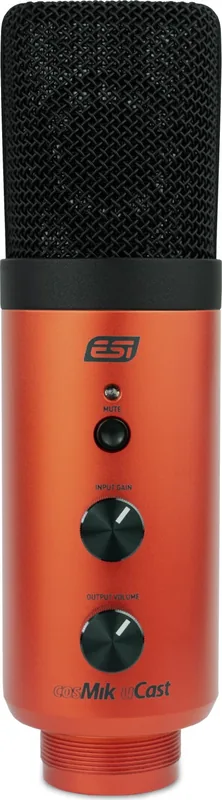
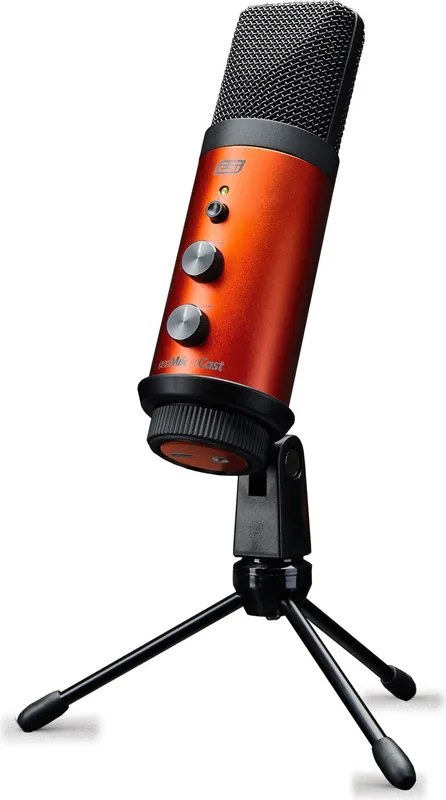
The unit features a straightforward interface with essential controls located within easy reach. A dedicated gain knob adjusts input sensitivity to match your sound source, ensuring optimal signal levels without distortion. The headphone output jack supports stereo monitoring, allowing you to listen to playback or your own performance in real-time with adjustable volume via the level knob. A mute switch provides immediate silence when needed, indicated by a clear LED status light. When operational, the light glows green; when muted, it turns red, offering visual confirmation at a glance.
Key Notes
- The mute function silences only the microphone input, not computer playback through headphones.
- Recommended recording levels sit just under 0dB, typically in the yellow zone of software meters.
- Regularly check the manufacturer website for manual updates and driver enhancements.
Search for 67,732 Manuals online


Type-in Brand or Model