
ESI Amber i1 Manual
PDF manual · 16 Pages
English



Quick check
Incorrect answer, please try again.
Chat with your ESI Amber i1 manual using AI
Get instant AI answers from your ESI Amber i1 manual
Ask anything about the ESI Amber i1. Answers come from this manual, with the pages they are based on.
Ask a Question
Do you recommend Amber i1?
Yes NoVideo Manual
ESI Amber i4 - Easy Recording
Frequently Asked Questions
Windows 10 or 11 and Mac OS X 10.9 or higher are required. An Intel CPU or Apple Silicon M1/M2 is recommended along with an available USB port for connection to the interface. Higher specs yield better performance.
Is this answer helpful?
Yes, it features a dedicated +48V switch enabling phantom power for condenser microphones connected via the XLR combo input channel on the front panel for studio recording needs.
Is this answer helpful?
Yes, using the DirectWIRE Loopback feature available in the control panel. This allows you to record internal playback signals or stream content without external hardware.
Is this answer helpful?
Yes, it is class compliant and works with tablets like iPads and iPhones using an adapter. This enables portable recording capabilities using the onboard inputs and outputs.
Is this answer helpful?
A USB Type A to Type C cable is included for connections. An optional USB-C cable is required for direct type C ports and is not included in the standard box.
Is this answer helpful?
Latency is usually set within the audio application itself rather than the control panel. Check the software settings for buffer size to manage latency on Mac OS.
Is this answer helpful?
Yes, the Amber i1 draws power directly from the USB connection. No external power adapter is necessary for operation when connected to a computer.
Is this answer helpful?
Advantages and Disadvantages
Advantages

- High resolution 24-bit/192 kHz audio quality for recordings
- Class compliant operation allows easy use with mobile tablets and adapters
- DirectWIRE Loopback support for internal audio routing and streaming
- Phantom power +48V switch available for condenser microphones
- USB bus powered design eliminates need for external power supply
Disadvantages

- Full functionality requires driver installation not included on all systems
- USB-C to USB-C cable not included for direct connection
- Latency settings depend heavily on host computer performance
- No dedicated batteries or power bank support for portability
- Interface requires specific software for advanced routing features
Product Specification
Interface
USB-C 3.1
Input Channels
2
Output Channels
2
Mic Preamps
1
Analog Inputs
1 x Mic/Line In (XLR/0.25 inch Combo), 1 x Stereo Line In (RCA), 1 x Instrument In (0.25 inch Jack)
Analog Outputs
2 x Line Out (0.25 inch Jack), 1 x Headphones (0.25 inch Jack)
Digital Inputs
No
Digital Outputs
No
AD/DA Converter
24-bit / 192 kHz
Features
Bus powered, Level Meter
Product Description
Unlocking Studio Quality
The ESI Amber i1 Manual informs users about a compact interface capable of high definition recording. It delivers 24-bit 192 kHz fidelity for professional results in every session. Musicians can connect a synthesizer or guitar directly to their computer system. Listen via headphones or studio monitors with exceptional clarity and depth. The device operates on USB bus power drawing energy from the connection port efficiently. It supports both Mac and PC systems seamlessly without complex configurations. Class compliant functionality allows immediate use with tablets via adapters. This portability makes it an ideal companion for mobile sessions on the go.
Connectivity and Hardware
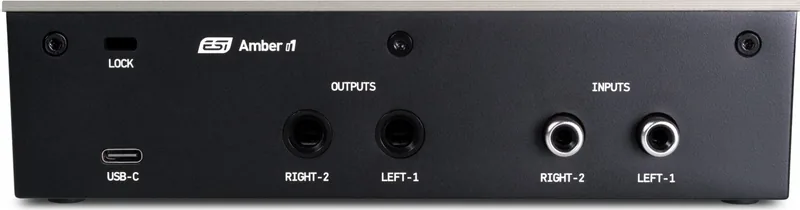
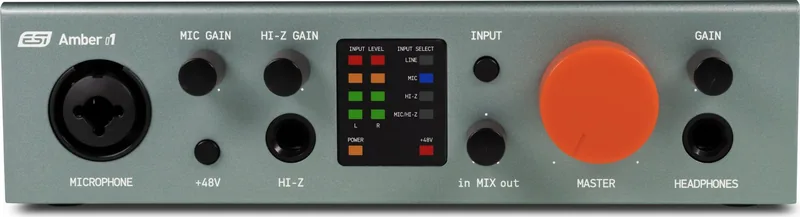
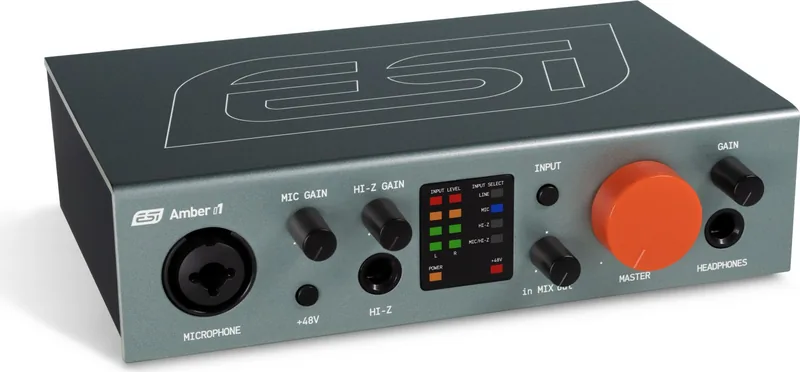
Inputs include an XLR combo for microphones to ensure versatile usage. Enable phantom power for condenser types with a dedicated +48V switch. Hi-Z input accommodates electric guitars and high impedance signals. Line input via RCA accepts line level signals from gear. Output options feature balanced TRS connectors for studio monitors. Master volume controls playback level. Input monitoring knob adjusts levels between input and playback signals. LEDs indicate signal presence and power status clearly. A security lock prevents theft during transport.
Software Integration
Drivers enhance functionality significantly on Windows and macOS. Installation involves extracting data and rebooting afterward to apply changes. The Control Panel offers latency adjustments for streaming. Virtual channels enable loopback recording for audio processing. Users should check the ESI Amber i1 Manual for specific setup steps. DirectWIRE routing allows internal streams between applications. Mixing audio before playback is possible through routing options. Virtual channels appear in software for flexible configuration.
Performance and Stability
Buffer settings optimize latency for real-time application usage during recording. Lower values reduce delay significantly during live performances or monitoring. System load impacts performance depending on active channels and plugins used. Advanced components are recommended for optimal stability and speed during heavy tasks. Compatibility covers USB 2.0 and 3.1 ports for various hardware configurations. Class compliance ensures broad support across modern devices like smartphones. Real time monitoring mixes input and playback to hear input clearly without delay. Hardware ensures consistent quality throughout the audio chain without dropouts.
Notes
Always update drivers for best results and security patches from the provider. Contact support for issues during setup or troubleshooting via the website. Check specifications before purchasing to ensure compatibility with your operating system. This interface transforms your digital audio workflow efficiently for everyone.
Search for 67,732 Manuals online


Type-in Brand or Model