
Ersa Analog 60 Manual
PDF manual · 40 Pages
English



Quick check
Incorrect answer, please try again.
Chat with your Ersa Analog 60 manual using AI
Get instant AI answers from your Ersa Analog 60 manual
Ask anything about the Ersa Analog 60. Answers come from this manual, with the pages they are based on.
Ask a Question
Do you recommend Analog 60?
Yes NoFrequently Asked Questions
It is well suited for electronics repair, assembly, and general workshop soldering. The fast heat-up and stable analog control make it practical for everyday tasks where reliable temperature management matters.
Is this answer helpful?
Yes. The ESD-safe version with an “A” designation is designed for antistatic use and can be integrated into protected workstations. It helps reduce the risk of electrostatic damage to delicate parts.
Is this answer helpful?
The station reaches working temperature quickly, with an approximate heat-up time of about 60 seconds to 350°C. Actual results may vary depending on the tip and working conditions.
Is this answer helpful?
Yes. The temperature can be locked using the fixed-temperature method described in the instructions. This is useful when you want to prevent changes by unauthorized users.
Is this answer helpful?
The tip can be changed even while hot, but the station should be switched off first. The spring hook is released, the old tip is removed with pliers, and the new tip is fitted in the correct position.
Is this answer helpful?
First check power connection, fuse condition, and whether the iron is properly connected to the power unit. If those are fine, the heating element and temperature sensor may need continuity testing.
Is this answer helpful?
Advantages and Disadvantages
Advantages

- 60 W output and quick heat-up make it efficient for routine soldering tasks.
- Simple analog temperature control is easy to adjust and understand.
- ESD-safe version supports work on sensitive electronic components.
- Tips and heating elements are replaceable, which helps extend service life.
Disadvantages

- No digital display, so temperature feedback is limited to the analog scale.
- Calibration may be needed for special tips or precise temperature work.
- Repairs to the power unit should be handled only by authorized specialists.
- Wear parts like tips and heaters are not covered by warranty.
Product Specification
Power
60W (24V)
Temperature
302-842°F
Heat-up time
60s
Weight
4.19lb
Package contents
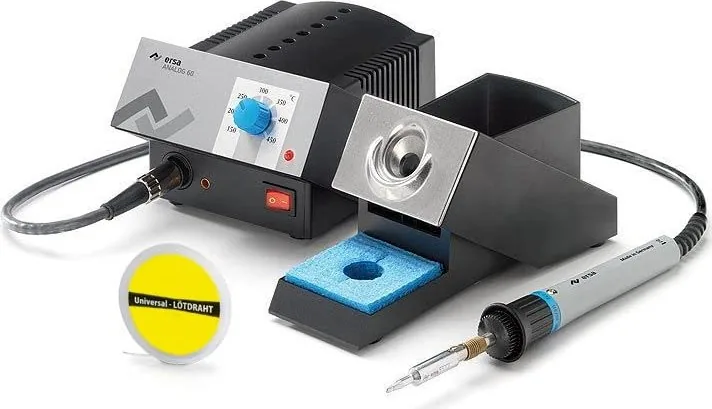
Soldering iron, Soldering iron stand
Product Description
Ersa Analog 60 Soldering Station: Practical Control for Everyday Soldering
The Ersa Analog 60 Soldering Station is designed for users who want dependable soldering performance in a compact, easy-to-use setup. Built around a 60 W power unit and a 24 V soldering iron, it offers fast heat-up, stable temperature control, and the kind of straightforward operation that makes it suitable for both workshop routines and precision electronics work. The Ersa Analog 60 Soldering Station Manual emphasizes clear setup steps, safe handling, and simple maintenance, which reflects the station’s practical design philosophy.
One of its strongest qualities is the analog temperature adjustment. Instead of relying on complex menus, the station uses a simple knob and graduated scale, allowing users to set the working temperature quickly. The manual also explains how to define fixed temperatures when repeatability is important, making the unit useful in environments where consistent results matter.
Safety and component protection are major themes throughout the product guidance. The soldering tip can reach temperatures up to 450°C, so careful handling is essential. The station is also suitable for sensitive electronic work, especially in the ESD-safe version marked with an “A,” which supports antistatic requirements and helps protect delicate components from discharge damage. That makes the Analog 60 a solid match for electronics repair, assembly, and fine soldering tasks.
Maintenance is refreshingly simple. Users can replace soldering tips, calibrate the temperature when needed, and inspect the heating element if performance drops. The sponge holder, holder stand, and potential equalization jack all support everyday workflow and workstation organization. With the right care, the station remains a reliable tool rather than a complicated piece of equipment.
For hobbyists, technicians, and repair professionals, the Ersa Analog 60 stands out because it focuses on the essentials: heat, control, and durability. It is not trying to be flashy; it is built to perform, and that is exactly why it remains appealing.
Notes
- Keep the tip clean for better heat transfer.
- Use the holder whenever the iron is idle.
- Check voltage compatibility before first use.
- Fixed temperature settings can help prevent unauthorized changes.
Search for 67,706 Manuals online


Type-in Brand or Model
Lena Schmidt
10 months ago
I am considering the Ersa ANALOG 60. How fast does it heat up, and are the soldering tips easy to replace? Is it suitable for frequent use (like school or ongoing projects)?
Manual.ly
10 months ago
The ANALOG 60 is reported to heat up very quickly, typically within about 10-15 seconds to reach around 300 C, and it holds temperature well during work. Users also praise the soldering tips for long service life and note that they are quick and straightforward to swap, even when the station is hot (with the help of a tool like a phone clamp). For frequent use, reviews describe it as reliable and an excellent all-rounder for many tasks, from fine wires to larger solder joints, and even mention it being well-suited for regular school use. The flexible, easy-to-handle cable is also commonly highlighted.