
Ergotron TeachWell Manual
PDF manual · 10 Pages
English



Quick check
Incorrect answer, please try again.
Chat with your Ergotron TeachWell manual using AI
Get instant AI answers from your Ergotron TeachWell manual
Ask anything about the Ergotron TeachWell. Answers come from this manual, with the pages they are based on.
Ask a Question
Do you recommend TeachWell?
Yes NoFrequently Asked Questions
The guidance states that once installation is complete, the lift tension must be set so the riser moves smoothly through the full range of motion and stays where you set it. If tension is off, the workstation may be difficult to move or may not hold its position safely. Proper adjustment also supports safe and optimum operation.
Is this answer helpful?
Follow the adjustment instructions to loosen or tighten the tension until motion becomes smooth and easy. The text notes you may need several turns depending on your product and the adjustment. After changes, re-check that the workstation can move through the full range without sticking and that it holds its selected height.
Is this answer helpful?
Yes. The text says any time equipment is added or changed and the mounted weight differs, you should repeat the adjustment steps. This ensures safe, consistent operation because the new load affects how the riser balances.
Is this answer helpful?
Keep the cart upright at all times and do not remove the zip tie and cardboard spacer that prevents the hand brake from disengaging until the manual instructs you to. The text warns that removing these early or tipping the cart sideways can cause unintended riser motion, leading to injury or equipment damage.
Is this answer helpful?
The guidance instructs lowering the worksurface to the lowest position, then turning the adjustment nut at the bottom of the riser counterclockwise until it stops. It also mentions the adjustment may require 40-60 revolutions. Minimizing lift tension helps reduce impact hazard risks before transport or storage.
Is this answer helpful?
The text includes a step stating to release the brake to move the riser. Use this during height adjustment once the workstation is set up safely. Always ensure the cart is upright and follows the listed safety precautions to avoid unintended motion.
Is this answer helpful?
Yes. The text includes values indicating the total weight added to mounted accessories, worksurface, keyboard tray, and cable box should not exceed configuration-based limits. Confirm your assembled accessories and total added weight match the stated bounds to maintain safe, smooth operation.
Is this answer helpful?
Advantages and Disadvantages
Advantages

- Smooth, controlled movement across the full range of motion when tension is correctly adjusted.
- Holds the workstation where it is set, improving positioning stability for daily tasks.
- Clear safety guidance to reduce impact, crushing, and cutting risks during setup.
- Configurable setup notes emphasize repeating tension adjustments when mounted weight changes.
- Practical instructions for minimizing lift tension before removing, shipping, or storing.
Disadvantages

- Requires tension adjustment after installation for safe and optimal operation.
- If you add or change mounted equipment, you must repeat the adjustment steps.
- Fine-tuning may take many turns before the difference is noticeable.
- Safety steps are strict (cart must remain upright; do not remove specific packaging aids until instructed).
- Incorrect handling (tipping or removing the spacer early) can lead to unintended riser motion and damage.
Product Specification
Type
mobile workstation
Shape
rectangular
Material
Tabletop: plastic, Frame: steel/aluminum
Color
Tabletop: gray, Frame: gray
Tabletop Dimensions (WxD)
22.36x19.76in
Tabletop Height
31.89-51.97in
Tabletop height adjustable
electric
Tabletop Ergonomics
N/A
Table legs
4-leg (4 casters)
Storage
N/A
Load capacity
38.58 lbs
Special features
Cable management, Notebook holder, Keyboard holder
Manufacturer warranty
5 years
Product Description
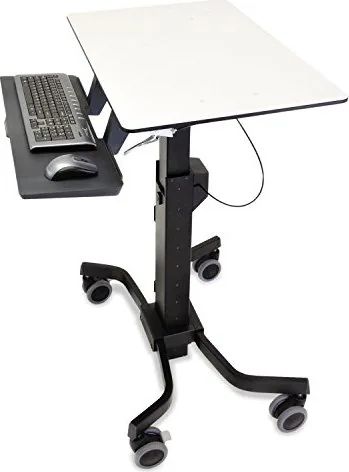
Ergotron Teachwell Electrically height-adjustable mobile workstation 57x50cm grey/grey Manual
Move from one posture to the next with confidence. The Ergotron Teachwell Electrically height-adjustable mobile workstation (57x50cm, grey/grey) is designed for a clean, mobile digital workspace where screen height and viewing comfort can be dialed in. It supports smooth operation when properly set up and balanced, helping you keep your workstation where you want it during everyday work.
This system is built around controlled height positioning and stability. After installation, it requires tension adjustment so the riser moves easily through its full range of motion and stays at the selected height. If the workstation feels stiff, resists movement, or does not hold its position, you should loosen or tighten the tension until motion becomes smooth and effortless.
Safety matters. Moving parts can create impact hazards, including crushing or cutting. During unpacking and setup, keep the cart upright at all times and do not remove the zip tie or cardboard spacer that prevents the hand brake from disengaging until the instructions tell you to. Also avoid tipping the cart sideways, since that can cause unintended riser motion.
When equipment configuration changes, repeat the tension adjustment steps. Adding or replacing mounted gear can change the effective load, which affects how the riser balances. Depending on your setup, the adjustment may take multiple turns before you notice a difference, so proceed gradually.
For safer handling during removal, shipping, or storage, minimize lift tension first. The included guidance explains lowering the worksurface to its lowest position and turning the adjustment nut at the bottom of the riser counterclockwise until it stops. This helps reduce stored lift energy before the cart is moved or kept away.
Key takeaways
- After installation and after any equipment change, adjust the lift tension so movement is smooth and the workstation holds position.
- Keep the cart upright and do not remove the zip tie or cardboard spacer until instructed to prevent unintended brake disengagement.
- Expect tension fine-tuning to take several turns; adjust gradually until motion is easy through the full range.
- Reduce lift tension to the minimum before removing, shipping, or storing the workstation.
Notes
- Load limits depend on your configuration, so confirm total added weight stays within the values listed for the mounted accessories and worksurface.
- For day-to-day ergonomics, aim for screen height slightly below eye level, keyboard near elbow height, a 90-degree elbow angle, and short, regular breaks to reduce fatigue.
Search for 67,706 Manuals online


Type-in Brand or Model